
Edição de Fotos com IA para Espaços de Coworking: Divulgue Seu Espaço com Eficácia — Magic Eraser
Use a edição de fotos com IA para divulgar espaços de coworking e escritórios compartilhados. Remova a desordem das mesas, equilibre a iluminação mista, crie imagens prontas para tours virtuais e produza fotos profissionais dos membros para a marca do seu coworking.

Product Marketing
Revisado por Magic Eraser Editorial ·
Índice
- Por que a fotografia de espaços de coworking é um desafio único
- Organizando mesas e áreas comuns com o Magic Eraser
- Equilibrando a iluminação mista e realçando os acabamentos internos
- Fotos profissionais de membros e conteúdo da comunidade
- Tours virtuais, plataformas de anúncio e conversão de agendamentos
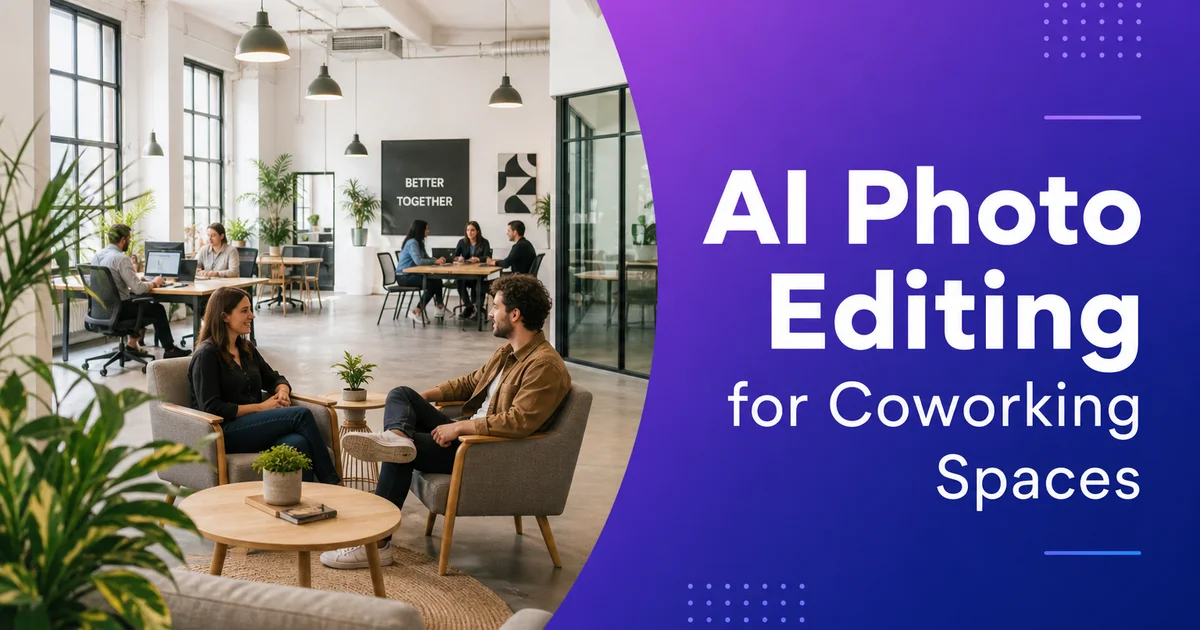
Espaços de coworking vendem uma experiência — um ambiente produtivo e bem projetado onde profissionais podem dar o seu melhor. O Coworking Resources relata que o mercado global de espaços de trabalho flexíveis continua a se expandir rapidamente, com novos espaços sendo inaugurados em todas as grandes áreas metropolitanas. Nesse cenário competitivo, a qualidade das suas fotos de marketing influencia diretamente se um membro em potencial agenda uma visita ou rola a página e passa para a próxima opção.
Mas espaços de coworking são inerentemente difíceis de fotografar bem. São ambientes compartilhados onde os membros deixam itens pessoais nas mesas, cabos se espalham pelas superfícies, e a iluminação mista de janelas e luminárias cria uma exposição irregular. O espaço muda de aparência a cada hora conforme a ocupação varia. O ambiente de trabalho claro e arejado que você quer divulgar raramente sai assim nas fotos sem uma edição significativa.
A edição de fotos com IA transforma fotos reais de coworking em materiais prontos para marketing. Remova a desordem das mesas e itens pessoais, equilibre a iluminação mista, realce o calor e a textura dos acabamentos internos e crie fotos profissionais dos membros. Tudo isso sem um fotógrafo profissional ou horas no Photoshop. O resultado é um acervo visual que representa fielmente seu espaço no seu melhor e converte visitantes em agendamentos de visitas.
- A remoção de objetos limpa as mesas de itens pessoais, cabos e desordem temporária para visuais prontos para uso.
- A correção de iluminação com IA equilibra janelas claras contra zonas internas mais escuras sem estourar as altas luzes.
- O aprimoramento de materiais internos revela o calor e a textura da madeira, concreto, plantas e acabamentos de design.
- O Background Eraser cria fotos profissionais dos membros a partir de imagens tiradas em qualquer lugar do espaço.
- Fotografias editadas de forma consistente em todos os canais de marketing constroem uma marca de coworking coesa.
Por que a fotografia de espaços de coworking é um desafio único
Diferentemente de um escritório tradicional que é projetado, mobiliado e fotografado uma vez antes dos inquilinos se mudarem, um espaço de coworking é um ambiente vivo que muda diariamente. As mesas acumulam garrafas d'água, monitores externos, luminárias de mesa pessoais, pilhas de cadernos e adesivos em laptops. As áreas comuns alternam entre arrumadas e usadas ao longo do dia. As salas de reunião retêm anotações de marcador de quadro branco, canetas espalhadas e copos de café esquecidos da reserva anterior.
A iluminação é o maior desafio técnico. A maioria dos espaços de coworking possui grandes janelas — um diferencial pela luz natural — combinadas com luminárias de LED ou fluorescentes no teto. Quando você fotografa em direção às janelas, o exterior fica superexposto em branco puro enquanto o interior escurece. Quando você fotografa na direção oposta às janelas, as luzes do teto projetam uma iluminação plana e fria que faz acabamentos de madeira quente e móveis coloridos parecerem apagados. Temperaturas de cor mistas da luz do dia e fontes artificiais criam dominantes de cor desagradáveis que variam ao longo do enquadramento.
A National Association of Realtors sempre constata que a fotografia de qualidade profissional aumenta consideravelmente o engajamento com anúncios de imóveis comerciais. Isso se aplica diretamente ao coworking: as fotos do seu site, as imagens do Google Meu Negócio e as galerias das plataformas de anúncio são a primeira impressão para membros em potencial. Fotos que mostram mesas desarrumadas e iluminação desequilibrada sugerem um espaço mal administrado, independentemente de quão excelente seja a experiência real.
- Mesas compartilhadas acumulam itens pessoais diariamente, fazendo o espaço parecer desarrumado em fotos espontâneas.
- A iluminação mista de grandes janelas e luminárias de teto cria exposição irregular e dominantes de cor.
- Salas de reunião e áreas comuns mostram sinais de uso que prejudicam a aparência polida que você deseja transmitir.
- A fotografia de qualidade profissional aumenta significativamente o engajamento com anúncios de espaços comerciais.
Organizando mesas e áreas comuns com o Magic Eraser
A maneira mais rápida de transformar uma foto de coworking de vivida para pronta para marketing é remover itens pessoais e desordem incidental. O Magic Eraser faz isso com precisão. Passe o pincel sobre a garrafa d'água de um membro em uma mesa compartilhada, e a IA reconstrói a superfície limpa da mesa. Remova um emaranhado de cabos de carregamento, e a mesa mostra seu acabamento de design real. Apague um copo de café esquecido de uma mesa de reunião, e a sala parece recém-preparada para a próxima reserva.
Preste atenção aos elementos que sinalizam 'espaço de trabalho de outra pessoa' em vez de 'seu futuro espaço de trabalho'. Adesivos no laptop, fotos pessoais, cadernos de marca, modelos específicos de fones de ouvido e bolsas identificáveis criam a impressão de que a mesa pertence a outra pessoa — o que é psicologicamente contraproducente quando você quer que o visitante se imagine no espaço. Remover esses itens cria um ambiente neutro e aspiracional que qualquer membro em potencial pode habitar mentalmente.
Para áreas comuns como cozinhas, lounges e espaços de eventos, concentre-se em remover itens temporários enquanto mantém os elementos permanentes de design. Um balcão de café deve mostrar superfícies limpas e equipamentos bem organizados, não canecas usadas e guardanapos amassados. Um lounge deve exibir o design dos seus móveis, não almofadas espalhadas e laptops esquecidos. O objetivo é mostrar cada área no padrão que ela mantém quando devidamente reorganizada — que é a experiência que um novo membro realmente encontraria durante uma visita.
- Remova itens pessoais como garrafas d'água, fones de ouvido, bolsas e adesivos de laptop para criar uma aparência neutra do espaço de trabalho.
- Superfícies de mesa limpas permitem que o visitante se imagine no espaço em vez de ver o local de trabalho de outra pessoa.
- As áreas comuns devem mostrar sua intenção de design — superfícies limpas, móveis organizados, amenidades em ordem.
- Concentre-se em remover a desordem temporária enquanto preserva os elementos permanentes de design e instalações da marca.
Equilibrando a iluminação mista e realçando os acabamentos internos
O AI Enhance resolve o maior problema fotográfico do coworking: a iluminação mista. A ferramenta corrige a exposição em todo o enquadramento para que tanto as zonas iluminadas pelas janelas quanto as áreas internas fiquem adequadamente visíveis. As áreas claras das janelas são suavizadas sem perder a vista externa. As zonas internas mais escuras são iluminadas para revelar móveis, acabamentos e profundidade espacial. O resultado é uma foto onde o espaço inteiro se lê claramente — exatamente o que um membro em potencial navegando pelo seu site precisa para avaliar se o ambiente é adequado para ele.
Além da correção de exposição, o AI Enhance revela a qualidade dos materiais que torna os espaços de coworking bem projetados atraentes. As superfícies quentes de madeira das mesas recuperam seus veios e riqueza. Pisos de concreto polido mostram seu brilho característico e variação sutil de cor. Plantas internas parecem vibrantes e saudáveis em vez de opacas e sombreadas. Tijolos aparentes exibem sua profundidade textural. Essas qualidades de material são precisamente o que diferencia um espaço de coworking premium de um escritório genérico. Elas merecem estar visíveis em cada foto de marketing.
A correção de cores também unifica o problema de temperatura mista. As janelas emitem luz do dia a aproximadamente 5500K; os LEDs do teto podem operar entre 3000K e 4500K dependendo da luminária. A mudança de cor resultante — quente em algumas áreas, fria em outras — faz o espaço parecer inconsistente. O AI Enhance normaliza a temperatura de cor em todo o enquadramento para que o espaço inteiro se leia como um ambiente unificado e coerente. Essa correção por si só pode transformar uma foto medíocre em uma foto forte.
- A correção de iluminação mista garante que tanto as zonas iluminadas pelas janelas quanto as áreas internas estejam adequadamente expostas em um único enquadramento.
- O aprimoramento de materiais revela os veios da madeira, o brilho do concreto, a textura dos tijolos e a vivacidade das plantas que definem espaços premium.
- A normalização da temperatura de cor elimina a divisão quente-frio da mistura de luz natural e iluminação artificial.
- A visibilidade completa do espaço permite que os visitantes do site avaliem com precisão o ambiente antes de agendar uma visita.
Fotos profissionais de membros e conteúdo da comunidade
Muitos espaços de coworking apresentam diretórios de membros, destaques da comunidade e recapitulativos de eventos em seus sites e redes sociais. Esses tipos de conteúdo requerem fotos de aparência profissional das pessoas, mas contratar um fotógrafo para cada novo membro ou evento é impraticável. O Background Eraser resolve isso isolando os sujeitos dos retratos dos fundos movimentados do coworking e colocando-os contra fundos limpos e consistentes.
Para fotos de membros, fotografe a pessoa na sua mesa ou em uma área comum bem iluminada, depois use o Background Eraser para substituir o fundo movimentado do escritório aberto por um tom neutro que combine com a paleta da sua marca. Cada membro recebe uma foto profissional independentemente de onde esteja sentado ou de como o espaço estava atrás dele naquele dia. Isso é especialmente valioso para clientes corporativos cujas equipes precisam de fotos uniformes para diretórios da empresa e perfis do LinkedIn.
A fotografia de eventos também se beneficia da edição seletiva. Eventos comunitários, almoços educativos e encontros de networking geram fotos que funcionam bem para redes sociais, mas frequentemente incluem mesas de buffet bagunçadas, cadeiras empilhadas ou sinalização temporária que você não colocaria no seu site. O Magic Eraser limpa esses enquadramentos para que o foco permaneça nas pessoas, na energia e na comunidade — que é, no final das contas, o que você está vendendo.
- O Background Eraser cria fotos consistentes de membros a partir de imagens tiradas em qualquer lugar do espaço.
- Clientes corporativos valorizam fotos uniformes para diretórios de equipe e perfis do LinkedIn.
- A limpeza de fotos de eventos remove a desordem temporária enquanto preserva a energia e a sensação de comunidade.
- Um acervo de fotos profissionais de pessoas sustenta o marketing comunitário contínuo sem custos recorrentes com fotógrafo.
Tours virtuais, plataformas de anúncio e conversão de agendamentos
O caminho de membro em potencial a contrato assinado frequentemente passa por múltiplos pontos de contato fotográficos: galerias de plataformas de anúncio (Deskpass, LiquidSpace, Coworker), imagens do Google Meu Negócio, seu próprio site e, cada vez mais, tours virtuais. Em cada ponto de contato, a qualidade das fotos ou constrói confiança ou introduz dúvidas. Dados do HubSpot mostram que a qualidade do conteúdo visual influencia diretamente as taxas de conversão em todos os setores, e o coworking não é exceção.
Para tours virtuais e visitas em 360 graus, as fotos editadas com IA servem como base. Espaços fotografados com iluminação consistente, superfícies limpas e exposição equilibrada se unem em tours que parecem polidos e convidativos. Fotos inconsistentes — algumas escuras, algumas claras, algumas desarrumadas, algumas limpas — criam uma experiência de tour desagradável que prejudica o posicionamento premium almejado pela maioria dos espaços.
As plataformas de anúncio merecem atenção especial porque apresentam seu espaço ao lado de concorrentes diretos. Quando um freelancer ou startup pesquisa coworking no Deskpass ou LiquidSpace, compara as fotos das galerias de cinco a dez espaços no mesmo bairro. O espaço com fotos claras, acolhedoras e sem desordem conquista mais agendamentos de visita do que o espaço com fotos escuras, desarrumadas e sem edição — mesmo que o segundo espaço seja objetivamente melhor projetado. A edição com IA garante que suas fotos se destaquem nessas comparações lado a lado.
- Membros em potencial encontram suas fotos em plataformas de anúncio, Google, seu site e tours virtuais.
- Fotos editadas de forma consistente produzem experiências de tour virtual mais fluidas e polidas.
- As plataformas de anúncio apresentam seu espaço ao lado de concorrentes, tornando a qualidade das fotos um fator competitivo direto.
- Fotos de galeria claras, acolhedoras e sem desordem conquistam mais agendamentos de visita do que fotos não editadas de espaços melhor projetados.
How to do it
- 1
Photograph spaces during off-peak hours with natural light
Shoot desks, meeting rooms, and common areas early in the morning or on weekends when the space is empty. Open blinds fully to maximize natural light, and supplement with overhead lighting if needed. Capture wide-angle shots of each zone plus detail shots of amenities like monitors, coffee bars, and phone booths.
- 2
Remove personal items and visual clutter with Magic Eraser
Brush over members' personal belongings left on desks — water bottles, laptop stickers, notebooks, headphones, bags. Remove cable tangles, stray power strips, and temporary signage. The AI reconstructs clean desk surfaces and neutral backgrounds so each workspace looks move-in ready.
- 3
Enhance lighting and interior warmth with AI Enhance
Run each photo through AI Enhance to correct mixed lighting from windows and overhead fixtures, boost warmth in wood and natural materials, and sharpen interior details. The tool balances bright window areas against darker interior zones so the full space is visible without blown-out highlights.
- 4
Create clean member headshots with Background Eraser
Use Background Eraser to isolate member headshots from busy coworking backgrounds. Replace cluttered open-plan backgrounds with clean, neutral tones for website member directories, team pages, and LinkedIn profiles. This gives every member a professional headshot regardless of where the photo was taken.
- 5
Export optimized versions for each marketing channel
Save full-resolution originals for your website gallery and virtual tour platform. Create landscape crops for Google Business Profile and Facebook, square crops for Instagram, and vertical crops for Stories and Pinterest. Maintain a consistent editing style across all channels for brand cohesion.
Fontes
- Global Coworking Growth Study 2025 — Coworking Resources
- The Role of Photography in Commercial Real Estate Marketing — National Association of Realtors
- Visual Content and Online Booking Conversion Rates — HubSpot