
Araç Envanteri Fotoğrafı
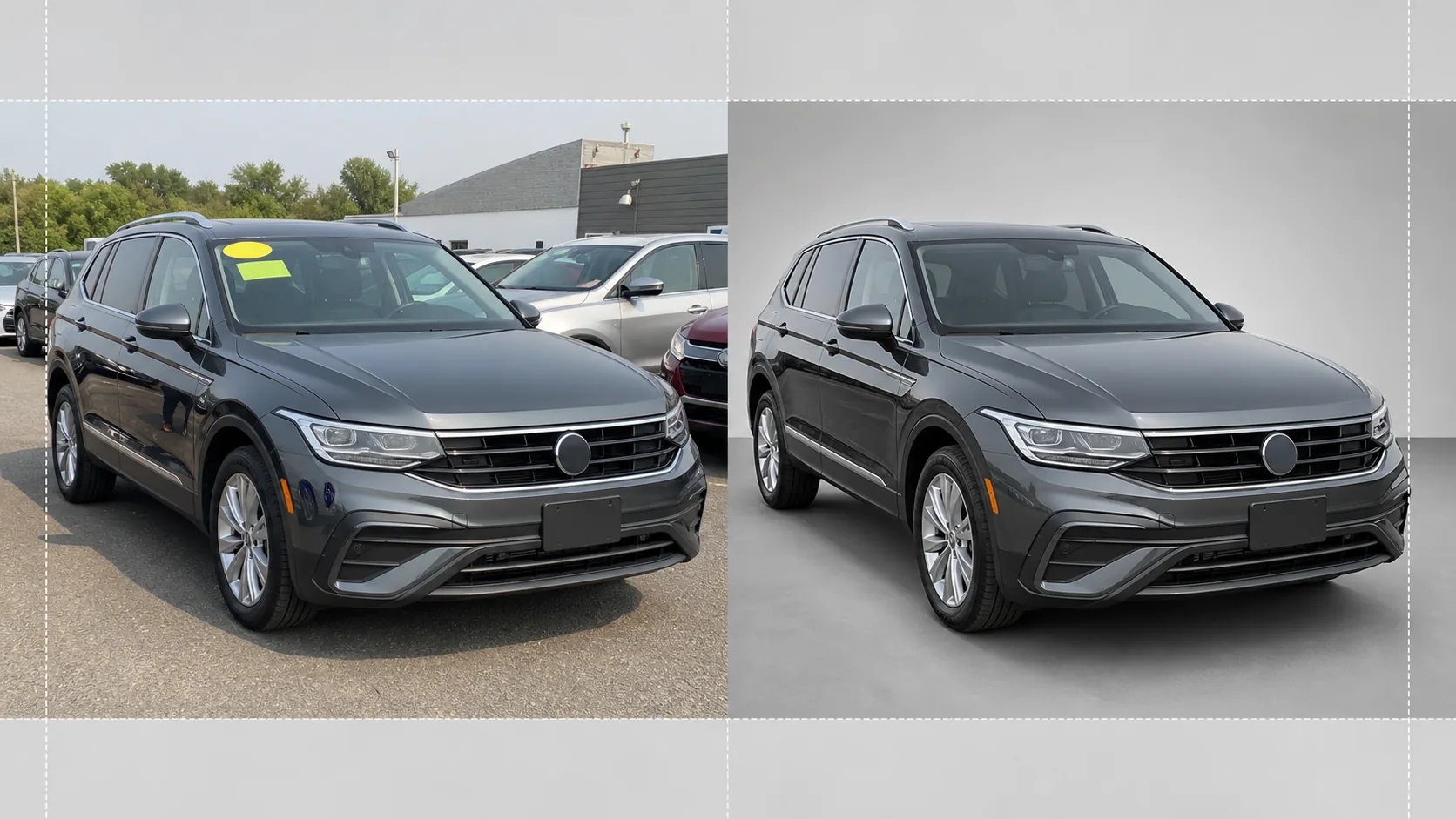
Otopark fotoğraflarını çevrimiçi envanter listeleri için showroom kalitesinde araç görüntülerine dönüştürün. Bu şablon, dağınık bayilik arka planlarını — diğer arabalar, tabelalar, binalar — kaldırır ve bunların yerine temiz beyaz, gri veya stüdyo tarzı bir arka plan koyar. Magic Eraser, ön cam yansımalarını, plaka ayrıntılarını ve otopark çıkartmalarını temizlerken, renk düzeltme her türlü ışıkta boyanın gerçeğe sadık görünmesini sağlar.
Bu şablonu ücretsiz deneyinE-commerce template preview
Bu şablon ne yapar
Bayilik envanter fotoğrafçılığının tüm iş akışını yönetir. Background Eraser, aracı otopark ortamından ayırır ve arka planı, tüm dikkati arabaya, kamyona veya SUV'a yönelten temiz stüdyo tarzı bir arka planla değiştirir. Magic Eraser, ön cam fiyat çıkartmalarını, otopark etiketlerini, plakaları (gizlilik için) ve parlak boya ve camdaki fotoğrafçının veya çevredeki araçların yansımalarını kaldırır. Renk düzeltme, boya rengini normalleştirir; böylece bulutlu gökyüzü altında, otopark sodyum ışıkları altında veya sert öğle güneşi altında çekilen fotoğrafların hepsi aynı doğru boya tonunu gösterir. Son görüntü kırpılır ve hizalanır; böylece araç, tüm envanteriniz boyunca ortalanmış ve yatay konumda durur.
Şablon ayarları
| Arka plan | Stüdyo beyazı, nötr gri veya gradyan showroom zemini |
| Yansıma temizleme | Boya ve cam yansımalarından fotoğrafçıyı, otopark dağınıklığını ve bitişik arabaları kaldırın |
| Boya rengi düzeltme | Nötr gün ışığı altında üreticinin boya kodu görünümüne normalleştirin |
| Gizlilik için karartma | Plakaları otomatik bulanıklaştırın veya kaldırın |
| Kırp ve hizala | Aracı otomatik ortala, ufuk hizası, 16:9 en boy oranı |
| Çıktı çözünürlüğü | 3000×1688px (AutoTrader, Cars.com ve bayi web siteleri için optimize edilmiştir) |
Bu şablon nasıl kullanılır
Otopark fotoğrafını yükleyin
Bayilik otoparkında çekilen aracın bir fotoğrafını yükleyin. Dörtte üç önden açı idealdir, ancak yandan profiller ve arkadan açılar da işe yarar. Şablon, akıllı telefonları, kompakt kameraları ve profesyonel kurulumları eşit ölçüde işler.
Arka planı ve dikkat dağıtıcıları kaldırın
Background Eraser, otopark ortamını keser ve temiz bir arka planla değiştirir. Magic Eraser, ön cam çıkartmalarını, otopark numarası etiketlerini, fiyat çıkartmalarını ve plaka metnini kaldırır. Boya ve camlardaki komşu araçların ve fotoğrafçının yansımaları otomatik olarak temizlenir.
Rengi ve pozlamayı düzeltin
Boya rengi, nötr gün ışığı altında üreticinin amaçladığı tonla eşleşecek şekilde normalleştirilir. Krom ve camdaki aşırı pozlanmış parlak alanlar kurtarılır, çamurluk kemerleri ve tamponların altındaki gölge ayrıntıları, eşit ve showroom kalitesinde bir görünüm için açılır.
Envanter listesi için dışa aktarın
Bitmiş görüntüyü 16:9 en boy oranında 3000×1688px olarak indirin. Format; AutoTrader, Cars.com, CarGurus, Facebook Marketplace ve bayi yönetim sisteminiz için optimize edilmiştir. Tüm otopark envanteri çekimleri için toplu işleme mevcuttur.
En iyi sonuçlar için profesyonel ipuçları
- ✓Aracı tampon yüksekliğinde dörtte üç önden açıyla fotoğraflayın. Bu, hem ön cepheyi hem de yandan profili tek bir karede yakalar ve çevrimiçi envanter listelerinde en çok tıklanan açıdır.
- ✓Doğrudan tepeden gelen güneş ışığında çekim yapmaktan kaçının — bu, aracın altında sert gölgeler ve tavanda ve kaputta yanmış parlak alanlar oluşturur. Bulutlu günler veya otoparkın gölgeli alanları, yapay zekânın çalışması için en eşit ışığı sağlar.
- ✓Mümkünse çekimden önce ön cam fiyat çıkartmasını çıkarın. Yapay zeka onu dijital olarak silebilse de, gösterge paneli ayrıntılarını kapatan büyük çıkartmalar bazen manuel rötuş gerektiren soluk bir hat bırakır.
- ✓Fotoğraflamadan önce aracı temiz tutun. Şablon, ışığı ve arka planı düzeltir, ancak boyadaki kir, su lekeleri ve kuş pislikleri, yapay zeka rötuşundan ziyade hızlı bir yıkamayla daha iyi ele alınır.
E-commerce workflow
Product photo hub
Use this template with the full ecommerce product photo workflow for marketplace backgrounds, cleanup, compression, resizing, and listing-ready exports.
View ecommerce product photo workflowSık sorulan sorular
Tüm bir envanteri tek seferde işleyebilir miyim?
+
Evet. Birden fazla araç fotoğrafı yükleyin; şablon her birine aynı arka plan, renk düzeltme ve temizleme ayarlarını uygular. Bu, tüm çevrimiçi envanteriniz boyunca görsel tutarlılık sağlar.
Boya rengi doğru olacak mı?
+
Renk düzeltme, boyayı nötr gün ışığında (5500K) nasıl göründüğüyle eşleşecek şekilde normalleştirir. Üreticinin boya kodunu biliyorsanız, yapay zeka ekrandaki rengin gerçek araca mümkün olduğunca yakın olmasını sağlamak için bunu referans olarak kullanır.
Motosikletler ve teknelerde işe yarar mı?
+
Evet. Arka plan kaldırma ve yansıma temizleme; motosikletler, tekneler, karavanlar ve ağır kamyonlar dahil her türlü araç için çalışır. Otomatik ortalama ve kırpma oranı, standart dışı araç oranları için manuel ayarlama gerektirebilir.
Otoparkınızdaki her aracı showroom'a hazır gösterin
Bayilik otopark fotoğraflarını yükleyin ve saniyeler içinde temiz, tutarlı, profesyonel envanter görüntüleri elde edin.
Ücretsiz deneyinRelated templates
More e-commerce templates for your workflow.
Ürün fotoğrafları için saf beyaz arka plan şablonu. Amazon, Shopify ve pazara hazır ayarlar, dönüştüren temiz, profesyonel ürün görselleri sağlar.
Etsy için optimize edilmiş listeleme fotoğraf şablonu. Yaşam tarzı çekimlerini 2000 piksel çözünürlükte temiz beyaz arka planlara dönüştürür, el yapımı ürün ayrıntılarını geliştirir ve Etsy'nin görsel kurallarına uygundur.
eBay için optimize edilmiş listeleme fotoğraf şablonu. Galeri görüntüleri için beyaz arka plan, durum belgeleme geliştirmesi ve eBay'in görüntü standartlarını karşılayan çok açılı düzenler.
Yüzükler, kolyeler ve saatler için profesyonel mücevher fotoğrafçılığı şablonu. Yansımaları kontrol eder, değerli taş ışıltısını artırır ve temiz arka planlar üzerinde pazara hazır görüntüler sunar.
Pazar yeri listeleri için profesyonel mobilya fotoğraf şablonu. Odadaki dağınıklığı ortadan kaldırın, gerçek boyutları gösterin ve parçaları temiz arka planlar üzerinde veya tarz sahibi oda bağlamlarında sunun.
Kırışıklık giderme, tiftik temizleme, saf beyaz arka planlar ve doğru kumaş rengiyle düz döşemeli giysi fotoğraflarını temizleyin. Shopify, Amazon ve butik mağazalar için hazır.