
Twitch Banner Fotoğrafı
Yayınınızın daha ilk ziyaretten itibaren oturmuş görünmesini sağlayan profesyonel bir Twitch kanal banner'ı tasarlayın. Bu şablon portrenizi her türlü arka plandan izole eder, onu oyun temalı veya marka renkli zeminlere yerleştirir ve profil fotoğrafı bindirmesi ile kanal gezinme öğeleri için güvenli bölgelerle birlikte Twitch'in tam banner boyutlarında çıktı verir.
Bu şablonu ücretsiz deneyinSocial Media template preview
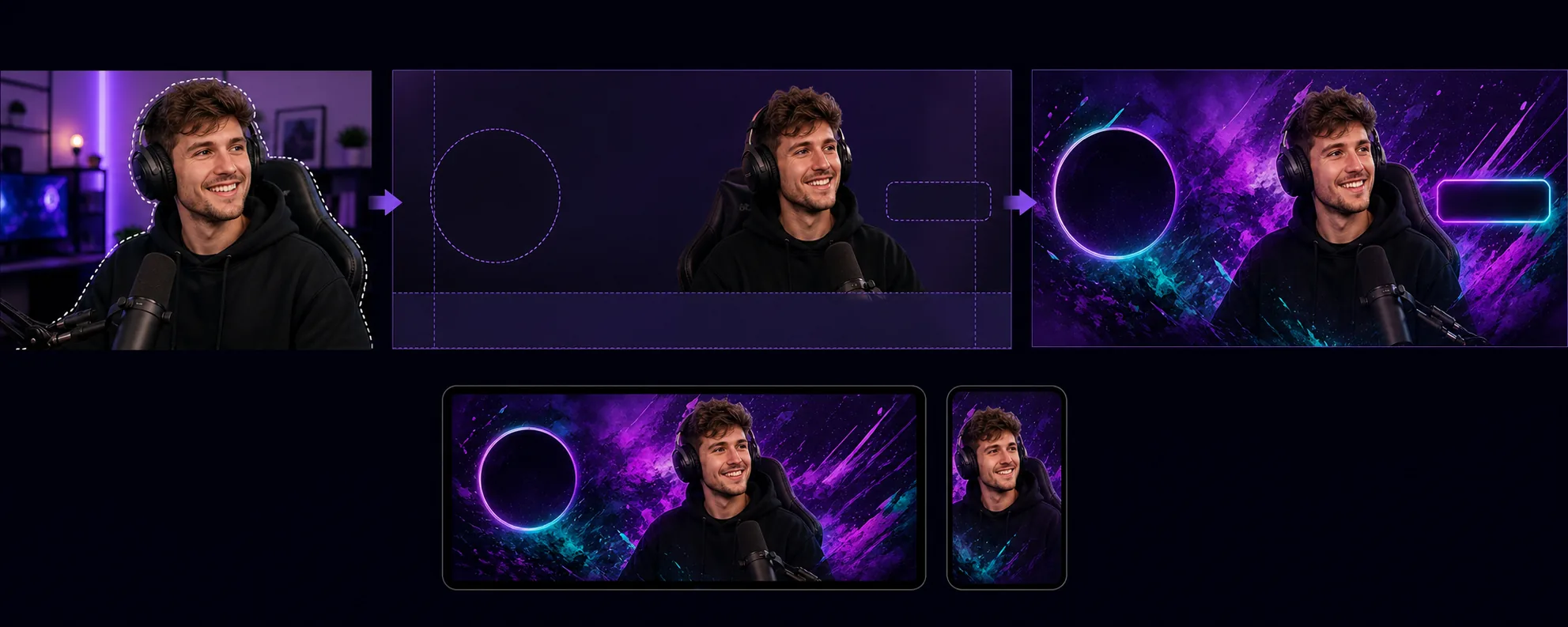
Bu şablon ne yapar
Profil fotoğrafı, takip et düğmesi ve kanal gezinmesinin banner'ın belirli alanlarına bindiği Twitch'in benzersiz düzen gereksinimleri için optimize edilmiş kanal banner'ları oluşturur. Background Eraser, yayıncı portrenizi veya ekip fotoğrafınızı her türlü ortamdan izole eder ve onu kanalınızın görsel kimliğine uyan bir arka plana yerleştirir — düz marka renkleri, geçiş tonlamaları, soyut oyun temaları veya ince desenler. Şablon, Twitch'in güvenli bölgelerine saygı gösterir; böylece önemli görsel içerik asla profil fotoğrafı dairesinin (sol taraf) ya da kanal puanı/abone düğmelerinin (sağ taraf) arkasında gizlenmez. Çıktı 1200×480px boyutundadır (önerilen banner boyutu) ve banner'ın farklı kırpıldığı hem masaüstü tarayıcı görünümlerinde hem de mobil uygulama başlıklarında görünürlük için ayarlanmıştır.
Şablon ayarları
| Banner boyutu | 1200×480px (Twitch'in önerdiği profil banner'ı) |
| Güvenli bölgeler | Sol 250px (profil bindirmesi), sağ 200px (düğmeler), alt 80px (gezinme çubuğu) |
| Arka plan | Düz renk, geçiş tonlaması, soyut oyun deseni veya özel görsel |
| Portre yerleşimi | Sağ-orta veya orta, profil fotoğrafı çakışma bölgesinden kaçınarak |
| Renk canlılığı | Twitch'in koyu mor arayüzünde görünürlük için güçlendirilmiş |
Bu şablon nasıl kullanılır
Yayıncı fotoğrafınızı yükleyin
Kendinizin, yayın düzeneğinizin veya ekibinizin bir fotoğrafını yükleyin. İfade dolu pozlarla çekilmiş üst beden kareleri banner'lar için en iyi sonucu verir. Şablon, web kamerası yakalamalarını, telefon özçekimlerini ve profesyonel fotoğrafları işler.
İzole edin ve konumlandırın
Background Eraser orijinal arka planı kaldırır ve portrenizi banner'ın güvenli bölgeleri içinde konumlandırır. Soldaki 250 piksel profil fotoğrafı daire bindirmesi için boş bırakılır ve alttaki 80 piksel gezinme çubuğundan kaçınır. Görseliniz hem masaüstünde hem de mobilde en yüksek görsel etkiyi yaratacağı yere yerleştirilir.
Arka planı ve marka kimliğini uygulayın
Kanalınızın kimliğine uyan bir arka plan seçin. Cesur geçiş tonlamaları ve oyun temalı desenler Twitch'in koyu mor arayüzünde iyi okunur. Kanalınızın yerleşmiş marka renkleri varsa, izleyiciler kanal sayfanıza geldiğinde tanınırlığı güçlendirmek için bunları kullanın.
Dışa aktarın ve yükleyin
Twitch için optimize edilmiş 1200×480px boyutunda indirin. Dosya 10MB'ın altındadır (Twitch'in sınırı) ve daha yavaş bağlantıya sahip izleyiciler için hızlı yüklenecek şekilde sıkıştırılmıştır. Kanalınıza yüklemeden önce banner'ın profil fotoğrafı ve gezinme bindirilmiş haliyle nasıl göründüğünü önizleyin.
En iyi sonuçlar için profesyonel ipuçları
- ✓İfade dolu veya enerjik bir poza sahip bir fotoğraf kullanın — kameraya işaret etmek, kutlamak veya öne eğilmek gibi. Durağan pozlar dar banner biçiminde kaybolur, dinamik pozlar ise izleyicilerin kalmak istemesini sağlayan görsel bir enerji yaratır.
- ✓Banner'ınızı hem masaüstünde hem de mobilde test edin. Twitch banner'ı mobilde farklı kırpar ve çoğunlukla orta kısmı gösterir. Cihazlar arası uyumluluk için en önemli görsel içeriğinizi ortadaki 700 piksele yerleştirin.
- ✓Banner renklerinizi Twitch vurgu rengi ayarınızla eşleştirin. Banner geçiş tonlaması, kanalınızın abone düğmesi ve vurgulanan metin için kullanılan aynı vurgu rengine dönüştüğünde, sayfanın tamamı uyumlu ve profesyonelce markalanmış hissi verir.
Araçlar
Sık sorulan sorular
Twitch banner'lar için hangi boyutları gerektirir?
+
Twitch, profil banner'ları için 1200×480 piksel önerir. Maksimum dosya boyutu 10MB'dır. Şablon, uygun sıkıştırmayla tam olarak bu boyutlarda çıktı verir.
Banner'a metin ekleyebilir miyim?
+
Şablon, metin bindirmesi olmadan görsel düzeni üretir. Kanal adınızı, yayın programınızı veya sosyal medya hesaplarınızı sonradan herhangi bir görsel düzenleyiciyle ekleyebilirsiniz. Güvenli bölge kılavuzları, metnin tam olarak nerede görünür kalacağını ve Twitch'in arayüz öğeleriyle kapatılmayacağını gösterir.
Bu, Twitch çevrimdışı ekranları için de işe yarar mı?
+
Şablon, profil banner'ı için boyutlandırılmıştır. Twitch çevrimdışı ekran görselleri 16:9 en boy oranı (1920×1080) kullanır. Benzer bir iş akışı kullanabilirsiniz — portreyi izole edin, arka planı uygulayın — ancak çevrimdışı ekran boyutlarını ayrı olarak seçmelisiniz.
Twitch kanalınızı ilk günden itibaren oturmuş gösterin
Bir fotoğraf yükleyin ve Twitch'in düzenine saygı gösteren, yayınınızı öne çıkaran profesyonel bir kanal banner'ı edinin.
Ücretsiz deneyinRelated templates
More social media templates for your workflow.
1080×1080 piksel çözünürlüğünde Instagram için optimize edilmiş kare kırpma şablonu. Temiz arka planlar, canlı renkler ve feed'de öne çıkan keskin ayrıntılar.
Güvenli bölge kılavuzlarıyla birlikte 2560×1440 piksel boyutunda YouTube banner şablonu. İçerik oluşturucu fotoğrafları, cihaza duyarlı düzen ve markayla tutarlı kanal resmi için arka planı temiz bir şekilde kaldırma.
Masaüstü için 820×312 piksel ve mobil kırpma için 640×360 piksel boyutunda Facebook kapak fotoğrafı şablonu. Profil resminin örtüşmesi ve CTA düğmesinin yerleştirilmesi için marka resimlerini uygun güvenli alanlarla temizleyin.
Tam 1500×500 piksel boyutunda profesyonel Twitter/X başlık görselleri oluşturun. Profil resmi çakışması hesapları, hem karanlık modda hem de aydınlık modda çalışır.
Doğal cilt yumuşatma, arka plan temizleme, aydınlatma düzeltme ve filtrelenmemiş, orijinal görünen ince renk derecelendirme ile flört profili fotoğraflarını geliştirin.
Temiz arka planlara, optimum 2:3 dikey boyutlara, canlı renk geliştirmelere ve pinlemeye hazır kompozisyona sahip, kaydırmayı durduran Pinterest pin görüntüleri oluşturun.