
Ürün 360 Döndürücü
Döner tabla fotoğraflarından profesyonel 360 derecelik ürün döndürme görünümleri oluşturun. Bu şablon her döndürme açısından arka planı kaldırır, tüm karelerde tutarlı aydınlatma ve renk sağlar, tozu ve yüzey kusurlarını giderir ve ürün sayfalarınızdaki etkileşimli 360 görüntüleyiciler için hazır, tekdüze bir görüntü seti çıkarır.
Bu şablonu ücretsiz deneyinE-commerce template preview
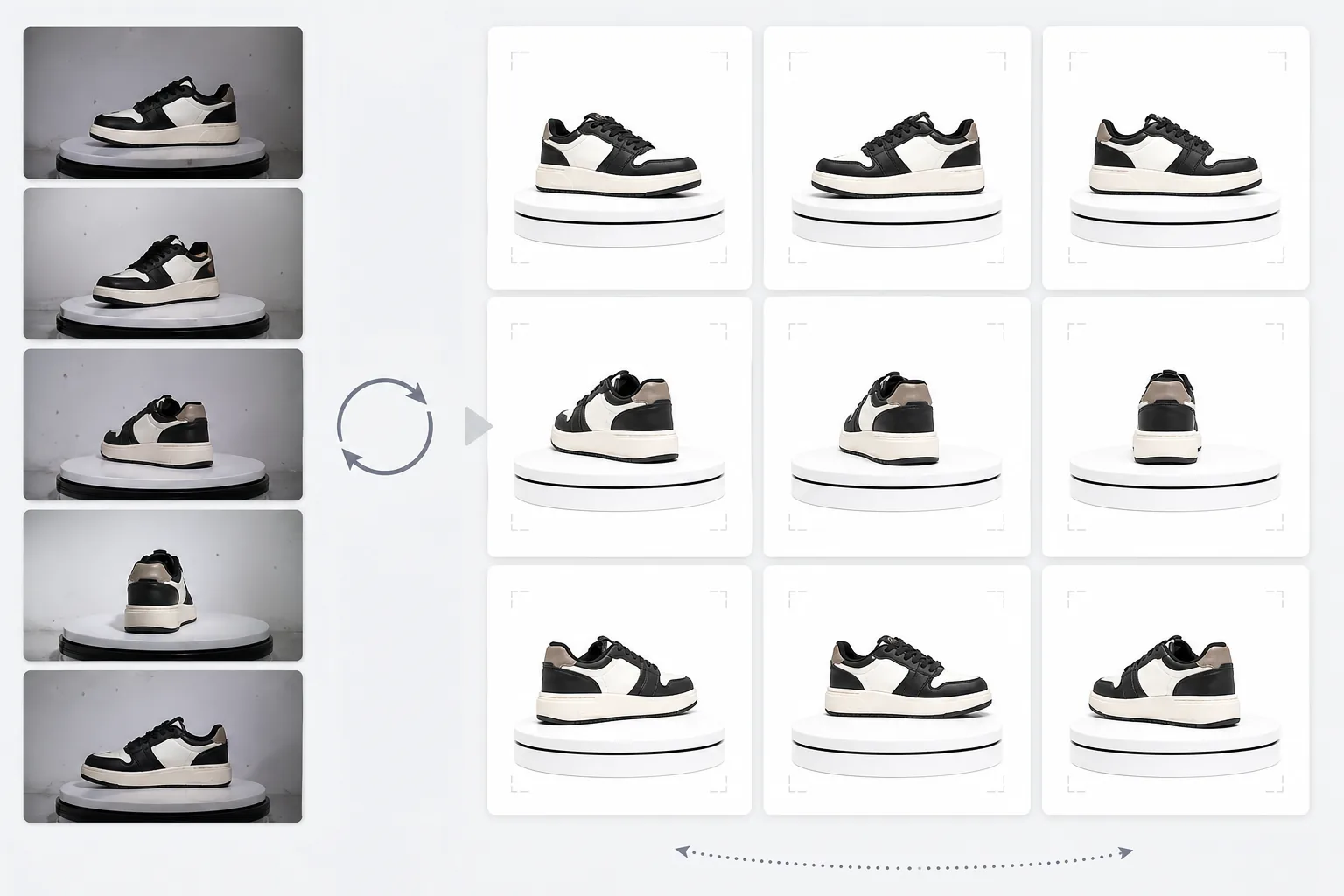
Bu şablon ne yapar
Çok açılı ürün fotoğraflarını, e-ticaret sitelerindeki 360 derecelik etkileşimli döndürme görüntüleyicilerine uygun tutarlı bir sete dönüştürür. Bir ürünü döner tabla üzerinde 24 veya 36 açıdan fotoğrafladığınızda, arka plan, aydınlatma ve gölgedeki küçük tutarsızlıklar birikir ve titrek, profesyonel olmayan bir döndürme deneyimi yaratır. Bu şablon, ürünü her açıdan tutarlı kenar işlemesiyle ayırmak için Background Eraser'ı kullanır, ürünün dönerken sıcak ve soğuk tonlar arasında titremmemesi için aydınlatma ve renk sıcaklığını tüm karelerde normalleştirir ve bir karede görünüp diğerinde görünmediğinde dikkat dağıtıcı hale gelen tozu, parmak izlerini ve yüzey kusurlarını gidermek için Magic Eraser'ı kullanır.
Şablon ayarları
| Arka plan | Saf beyaz (#FFFFFF) — tüm döndürme karelerinde tutarlı |
| Aydınlatma normalleştirmesi | Kareler arası tutarlılık (açılar arasındaki titremeyi giderir) |
| Yüzey temizliği | Kare başına tozu, parmak izlerini ve yansımaları giderir |
| Ürün ortalama | Pürüzsüz bir döndürme ekseni için her karede ürünü otomatik ortalar |
| Çıktı boyutları | Kare başına 1500 × 1500 px (web 360 görüntüleyicileri için optimize edilmiş) |
| Kare sayısı | 12, 24 veya 36 kareli dizileri destekler |
Bu şablon nasıl kullanılır
Döner tabla fotoğraflarınızı yükleyin
Tutarlı aralıklarla bir döner tabla üzerinde çekilen döndürme fotoğraflarının tam setini (12, 24 veya 36 kare) yükleyin. Şablonun bunları doğru döndürme sırasında işlemesi için dosyaları sıralı olarak adlandırın (001.jpg'den 036.jpg'ye). Şablon her türlü arka plandaki fotoğrafları işler — beyaz fon, gri veya renkli.
Arka plan kaldırma ve tutarlılık
Background Eraser, aynı kenar algılama ayarlarını kullanarak her kareden arka planı kaldırır ve ürün hatlarının tüm açılarda tutarlı olmasını sağlar. Ürün her karede otomatik olarak ortalanır, böylece döndürme ekseni sabit kalır ve döndürme sallanmaz.
Kareler arası normalleştirme
Aydınlatma, renk sıcaklığı ve pozlama tüm karelerde normalleştirilir. Bu, döner tabla aydınlatması her açıdan tam olarak düzgün olmadığında ortaya çıkan ince parlaklık ve renk dalgalanmalarını giderir. Bazı açılarda görünen yüzey kusurları tutarlılık için temizlenir.
Kare dizisini dışa aktarın
JPEG formatında kare başına 1500 × 1500 px olan tam kare dizisini indirin. Dosyalar sıralı olarak numaralandırılır ve Magic 360, Sirv veya Webrotate 360 gibi 360 görüntüleyici eklentilerine doğrudan içe aktarılmaya hazırdır. Toplam dosya boyutu hızlı web yüklemesi için optimize edilmiştir.
En iyi sonuçlar için profesyonel ipuçları
- ✓Serbest elle döndürme yerine derece işaretleri olan manuel bir döner tabla kullanın. Tutarlı 10 derecelik aralıklar (36 kare) en pürüzsüz döndürmeyi üretir. Şablon hafif döndürme tutarsızlıklarını işleyebilir, ancak eşit aralık gözle görülür şekilde daha pürüzsüz bir sonuç üretir.
- ✓Kameranızı bir tripoda sabitleyin ve tüm kareler için manuel pozlama ayarlarını kullanın. Otomatik pozlama, kameranın her açıda parlaklığı farklı şekilde ayarlamasına neden olur ve şablonun daha sonra düzeltmesi gereken titreme etkisini yaratır. Manuel ayarlar şablona daha temiz bir başlangıç noktası sağlar.
- ✓Çekimden önce ürününüzü iyice temizleyin — toz ve parmak izleri, ürün döndükçe görünüp kaybolduklarından, tek bir statik fotoğrafa kıyasla 360 döndürmede daha görünür ve dikkat dağıtıcıdır. Şablon bunları giderir, ancak temiz başlamak daha iyi sonuçlar üretir.
E-commerce workflow
Product photo hub
Use this template with the full ecommerce product photo workflow for marketplace backgrounds, cleanup, compression, resizing, and listing-ready exports.
View ecommerce product photo workflowSık sorulan sorular
Kaç kareye ihtiyacım var?
+
36 kare (10 derecelik aralıklar) çoğu ürün için en pürüzsüz döndürmeyi üretir. 24 kare (15 derecelik aralıklar) ince detayı olmayan ürünler için kabul edilebilir. 12 kare (30 derecelik aralıklar) tanınabilir bir döndürme için minimumdur ancak saatler veya elektronik gibi detaylı ürünler için kesik kesik hissettirir.
Bir videodan kareleri işleyebilir miyim?
+
Evet, kareleri bir döner tabla videosundan eşit aralıklarla çıkarırsanız. Kareleri mevcut en yüksek çözünürlükte dışa aktarın ve tam 360 derece boyunca eşit açısal dağılım sağlayın. Video kareleri, hareket bulanıklığı ve video sıkıştırması nedeniyle özel sabit fotoğraflardan daha düşük kalitede olabilir.
Hangi 360 görüntüleyici eklentileri uyumludur?
+
Sıralı JPEG çıktısı, Magic 360, Sirv 360, Webrotate 360, jQuery Reel ve özel uygulamalar dahil tüm büyük 360 görüntüleyici çözümleriyle uyumludur. Tutarlı boyutlar ve adlandırma kuralı içe aktarmayı kolaylaştırır.
Alışveriş yapanlara bekledikleri 360 ürün görünümünü sunun
Döner tabla fotoğraflarını yükleyin ve ürün sayfalarınızdaki etkileşimli 360 döndürme görüntüleyicileri için hazır, tutarlı ve temiz bir kare dizisi elde edin.
Ücretsiz deneyinRelated templates
More e-commerce templates for your workflow.
Ürün fotoğrafları için saf beyaz arka plan şablonu. Amazon, Shopify ve pazara hazır ayarlar, dönüştüren temiz, profesyonel ürün görselleri sağlar.
Etsy için optimize edilmiş listeleme fotoğraf şablonu. Yaşam tarzı çekimlerini 2000 piksel çözünürlükte temiz beyaz arka planlara dönüştürür, el yapımı ürün ayrıntılarını geliştirir ve Etsy'nin görsel kurallarına uygundur.
eBay için optimize edilmiş listeleme fotoğraf şablonu. Galeri görüntüleri için beyaz arka plan, durum belgeleme geliştirmesi ve eBay'in görüntü standartlarını karşılayan çok açılı düzenler.
Yüzükler, kolyeler ve saatler için profesyonel mücevher fotoğrafçılığı şablonu. Yansımaları kontrol eder, değerli taş ışıltısını artırır ve temiz arka planlar üzerinde pazara hazır görüntüler sunar.
Pazar yeri listeleri için profesyonel mobilya fotoğraf şablonu. Odadaki dağınıklığı ortadan kaldırın, gerçek boyutları gösterin ve parçaları temiz arka planlar üzerinde veya tarz sahibi oda bağlamlarında sunun.
Kırışıklık giderme, tiftik temizleme, saf beyaz arka planlar ve doğru kumaş rengiyle düz döşemeli giysi fotoğraflarını temizleyin. Shopify, Amazon ve butik mağazalar için hazır.