
Elektronik Ürün Fotoğrafı
Tüketici elektroniğini showroom kalitesinde netlikle sunun. Bu şablon, ekranlardan ve parlak yüzeylerden parmak izlerini ve lekeleri kaldırır, bağlantı noktası ve düğme ayrıntılarını keskinleştirir, arayüz öğelerinin görünür olması için ekran görüntülerini geliştirir ve pazar yeri ilanları ile marka sayfaları için hazır, temiz ürün görselleri üretir.
Bu şablonu ücretsiz deneyinE-commerce template preview
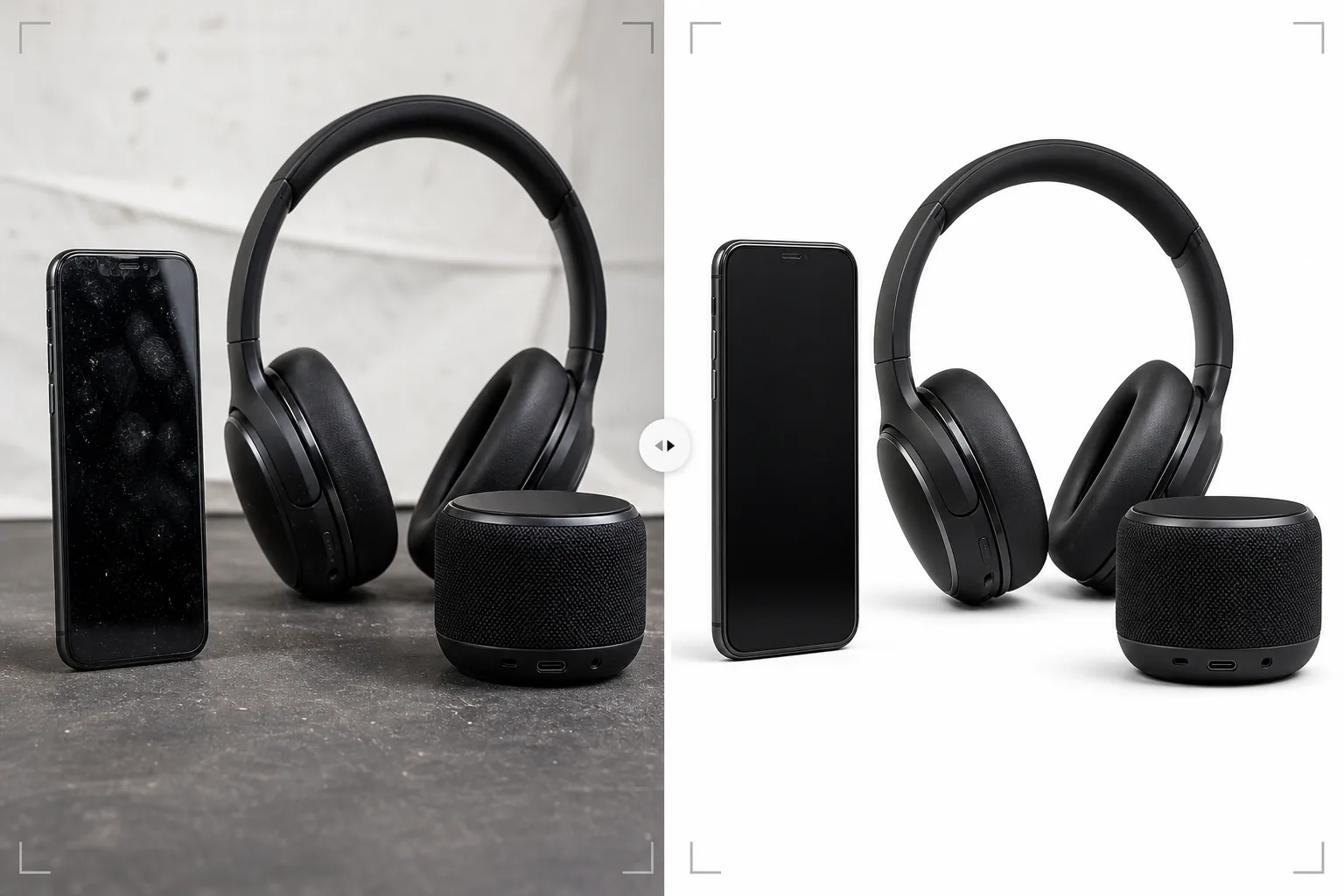
Bu şablon ne yapar
Tüketici elektroniğinin — akıllı telefonlar, dizüstü bilgisayarlar, tabletler, kulaklıklar, hoparlörler ve aksesuarlar — yansıtıcı yüzeylerin, karmaşık bağlantı noktalarının ve ekran görüntülerinin özel işleme gerektirdiği belirli fotoğrafçılık zorluklarını ele alır. Parlak ekranlar ve metal gövdeler ürün elden geçirilirken anında parmak izi toplar ve Magic Eraser bunları, yüksek büyütmede ortaya çıkan toz parçacıkları ve yüzeydeki mikro çiziklerle birlikte kaldırır. AI Enhance, alıcıların yapı kalitesini değerlendirirken yakından incelediği USB bağlantı noktası içleri, düğme dokuları, hoparlör ızgara desenleri ve marka metni gibi ince ayrıntıları keskinleştirir. Background Eraser, antenler, bağlantı noktaları ve kablo açıklıkları dahil karmaşık şekillerin çevresinde temiz kenarlarla ürünleri izole eder.
Şablon ayarları
| Yüzey temizliği | Ekranlardan ve gövdeden parmak izlerini, tozu ve mikro çizikleri kaldırın |
| Ayrıntı keskinleştirme | Bağlantı noktası, düğme, hoparlör ızgarası ve marka metni geliştirme |
| Ekran görüntüsü | Ekrandaki arayüzü aydınlatın ve keskinleştirin (ya da temiz bir ekran görüntüsüyle değiştirin) |
| Arka plan | Saf beyaz (#FFFFFF) veya premium konumlandırma için gradyan |
| Çıktı boyutları | 2500 × 2500 px (alıcı incelemesi için yüksek çözünürlüklü yakınlaştırma) |
| Metal kaplama | Anodize alüminyum, fırçalanmış çelik ve mat plastik dokularını geliştirin |
Bu şablon nasıl kullanılır
Elektronik fotoğrafınızı yükleyin
Cihazın ürün fotoğraflarını yükleyin — ön, arka, yan görünümler ve bağlantı noktaları ile düğmelerin ayrıntı görünümleri. Şablon akıllı telefonları, dizüstü bilgisayarları, tabletleri, kulaklıkları, hoparlörleri, akıllı saatleri ve aksesuarları işler. Cihazda ekran varsa, ekranın açık olduğunu gösteren en az bir açı ekleyin.
Yüzey temizliği ve parmak izi kaldırma
Magic Eraser, ekranlardan, metal gövdelerden ve parlak plastik yüzeylerden parmak izlerini, lekeleri ve tozu kaldırır. Numune birimlerin elden geçirilmesinden kaynaklanan küçük çizikler ve sürtünme izleri de kaldırılır. Yapay zeka, fırçalanmış metal dokusu ve mat dokular gibi kasıtlı yüzey özelliklerini korur.
Ayrıntı ve ekran geliştirme
AI Enhance, bağlantı noktası açıklıklarını, düğme kenarlarını, hoparlör ızgara desenlerini ve marka metnini keskinleştirir. Cihazda ekran varsa, ekrandaki arayüz öğeleri görünür ve çekici olacak şekilde ekran aydınlatılır ve keskinleştirilir. Stüdyo aydınlatmasından kaynaklanan ekran parlaması, ekranın aktif görünümü korunarak azaltılır.
Pazar yeri veya marka sitesi için dışa aktarın
Tam yakınlaştırma özellikli pazar yeri ilanları için 2500 × 2500 px olarak indirin ya da marka web siteleri ve pazarlama materyalleri için özel boyutlarda indirin. Arka plan seçenekleri arasında pazar yerleri için saf beyaz ve premium marka konumlandırması için gradyan veya koyu arka planlar bulunur.
En iyi sonuçlar için profesyonel ipuçları
- ✓Fotoğraf için ürünü elden geçirirken pamuklu eldiven giyin. Elektronikteki parmak izleri en yaygın rötuş sorunudur ve şablon bunları etkili biçimde kaldırsa da, parmak izi olmayan bir kaynak fotoğraf nihai görüntüde daha fazla orijinal yüzey dokusunu korur.
- ✓Ekranları boş veya kapalı bir ekran yerine gerçek bir arayüz gösterilirken çekin. Aktif bir ekran, alıcılara cihazın kullanımdayken nasıl göründüğünü gösterir. Şablon, ekran yüzeyindeki stüdyo aydınlatması parlamasını azaltırken görüntülenen içeriği keskinleştirir ve aydınlatır.
- ✓Bağlantı noktası düzenini özellikle gösteren bir fotoğraf ekleyin — USB, kulaklık girişi, kart yuvası, şarj bağlantı noktası. Bu ayrıntı çekimleri, elektronik ilanlarında en çok görüntülenen görseller arasındadır ve şablon, konektör ayrıntısını net biçimde göstermek için bağlantı noktası içlerini keskinleştirir.
- ✓Kulaklıklar ve hoparlörler için sürücü veya ızgara ayrıntısını net gösteren bir açı ekleyin. Şablon, yapı kalitesini ve akustik tasarımın inceliğini aktarmak için file ve ızgara dokularını geliştirir.
E-commerce workflow
Product photo hub
Use this template with the full ecommerce product photo workflow for marketplace backgrounds, cleanup, compression, resizing, and listing-ready exports.
View ecommerce product photo workflowSık sorulan sorular
Bu, parlak siyah elektroniği işleyebilir mi?
+
Parlak siyah yüzeyler (piyano siyahı akıllı telefonlar ve dizüstü bilgisayar çerçeveleri gibi) her şeyi yansıttığı için zorludur. Şablon parmak izlerini kaldırır ve çevresel yansımaları azaltır, ancak parlak yüzey kalitesini aktarmak için bir miktar yansıma korunur. En iyi sonuçlar için parlak siyah ürünleri, çevresel yansıma kaynaklarının minimum olduğu kontrollü bir ortamda çekin.
Peki LED göstergeli ürünler?
+
LED durum ışıkları, çevre birimlerindeki RGB aydınlatma ve ekran görüntüleri korunur ve geliştirilir. Şablon, aydınlatılan öğeleri tanır ve ürün yüzeyindeki parıltı etkisini korurken onları keskinleştirir.
Boş bir ekrana ekran görüntüsü ekleyebilir miyim?
+
Şablon, mevcut ekran içeriğine sahip fotoğrafları optimize eder ancak boş ekranlara yeni ekran görüntüleri birleştirmez. Ekran değiştirme birleştirmesi için cihazı ekranı açıkken çekin; şablon görüntülenen içeriği geliştirir.
Elektronik ürünler internette de elde olduğu kadar iyi görünsün
Ürün fotoğraflarını yükleyin ve pazar yeri ilanları ile marka ürün sayfaları için hazır, parmak izi olmayan, ayrıntıları keskin görseller elde edin.
Ücretsiz deneyinRelated templates
More e-commerce templates for your workflow.
Ürün fotoğrafları için saf beyaz arka plan şablonu. Amazon, Shopify ve pazara hazır ayarlar, dönüştüren temiz, profesyonel ürün görselleri sağlar.
Etsy için optimize edilmiş listeleme fotoğraf şablonu. Yaşam tarzı çekimlerini 2000 piksel çözünürlükte temiz beyaz arka planlara dönüştürür, el yapımı ürün ayrıntılarını geliştirir ve Etsy'nin görsel kurallarına uygundur.
eBay için optimize edilmiş listeleme fotoğraf şablonu. Galeri görüntüleri için beyaz arka plan, durum belgeleme geliştirmesi ve eBay'in görüntü standartlarını karşılayan çok açılı düzenler.
Yüzükler, kolyeler ve saatler için profesyonel mücevher fotoğrafçılığı şablonu. Yansımaları kontrol eder, değerli taş ışıltısını artırır ve temiz arka planlar üzerinde pazara hazır görüntüler sunar.
Pazar yeri listeleri için profesyonel mobilya fotoğraf şablonu. Odadaki dağınıklığı ortadan kaldırın, gerçek boyutları gösterin ve parçaları temiz arka planlar üzerinde veya tarz sahibi oda bağlamlarında sunun.
Kırışıklık giderme, tiftik temizleme, saf beyaz arka planlar ve doğru kumaş rengiyle düz döşemeli giysi fotoğraflarını temizleyin. Shopify, Amazon ve butik mağazalar için hazır.