
Diş Gülümsemesini İyileştirme
Muayenehanenizin işini sergileyen profesyonel öncesi-sonrası dental pazarlama görselleri oluşturun. Bu şablon doğal görünümlü diş beyazlatma uygular, klinik arka plan karmaşasını kaldırır, hasta portre arka planlarını standartlaştırır ve tedavi odası fotoğraflarında yaygın olan sert tepe aydınlatmasını dengeler.
Bu şablonu ücretsiz deneyinProfessional template preview
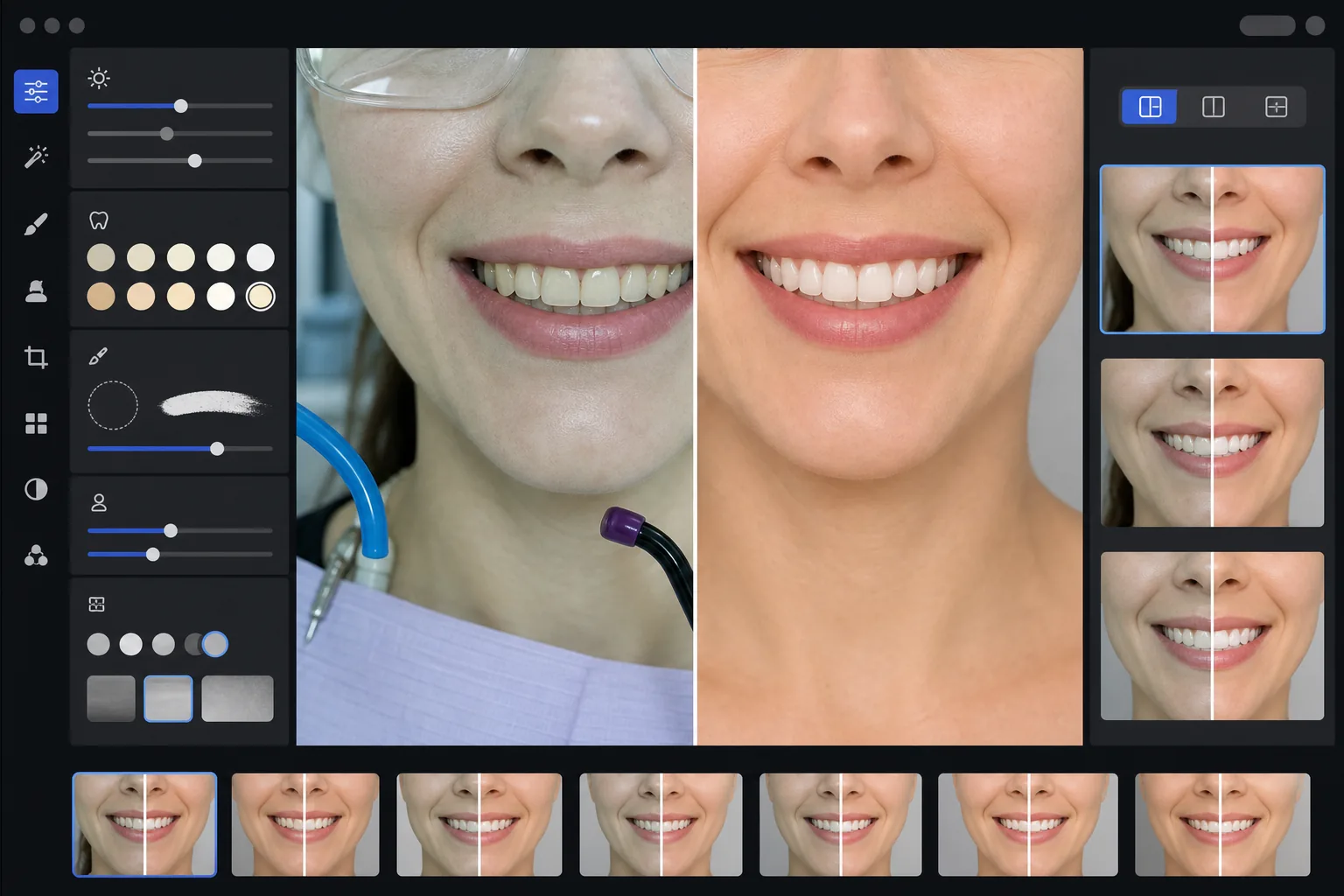
Bu şablon ne yapar
Klinik diş fotoğraflarını muayenehane web siteleri, sosyal medya ve hasta eğitim materyalleri için cilalanmış pazarlama görsellerine dönüştürür. AI Enhance, dental tedavi odası aydınlatmasının çekici olmayan yeşil-beyaz tonunu düzeltir ve doğal görünen ince bir diş beyazlatma uygular — dişleri yapay göstermeden 2-3 ton aydınlatır. Magic Eraser, emme hortumları, ışınlama cihazları, dudaklardaki artikülasyon kâğıdı izleri ve koruyucu gözlükler gibi klinik arka plan ögelerini kaldırır. Hasta portre arka planları, tüm vaka galeriniz boyunca temiz, tutarlı bir arka plana standartlaştırılır.
Şablon ayarları
| Diş beyazlatma | Doğal +2 ila +3 ton aydınlatma (yarı saydamlığı ve mine dokusunu korur) |
| Aydınlatma düzeltmesi | Dental tedavi odası gün ışığı dengesi (yeşil-beyaz klinik tonu kaldırır) |
| Arka plan | Yumuşak vinyetli, tutarlı nötr gri veya beyaz arka plan |
| Cilt tonu | Ağız çevresi sıcaklık düzeltmesi (dental aydınlatmadan kaynaklanan solukluğu azaltır) |
| Dudak rengi | Doğal doygunluk geri kazanımı (solmuş klinik aydınlatmayı dengeler) |
Bu şablon nasıl kullanılır
Klinik fotoğrafları yükleyin
Gülümseme yakın çekimlerini, portre tarzı öncesi-sonrası fotoğraflarını veya tedavi odanızda çekilen ağız içi görüntüleri yükleyin. Şablon, dişe özgü kameralardan, halka flaşlı DSLR'lardan ve tedavi odası ışıkları altında çekilen akıllı telefon fotoğraflarından gelen görüntülerle çalışır.
Klinik aydınlatmayı düzeltin
AI Enhance, tepedeki dental ünit ışıklarından gelen yeşil-beyaz renk tonunu nötralize eder, ağız çevresindeki cilt tonlarını ısıtır ve doğal dudak rengini geri kazandırır. Diş rengi, gerçekçi ve dürüst kalırken sonucu en iyi şekilde göstermek için ince bir biçimde aydınlatılır.
Arka planları ve dikkat dağıtıcıları temizleyin
Magic Eraser, görünür hortumları, ışınlama cihazı uçlarını, önlük klipslerini, dudaklardaki artikülasyon kâğıdı lekelerini ve arka plandaki klinik ekipmanları kaldırır. Arka plan, tüm öncesi-sonrası çiftlerinizde eşleşen tutarlı nötr bir arka planla değiştirilir.
Pazarlama kullanımı için dışa aktarın
Tek tek iyileştirilmiş görüntüleri veya yan yana öncesi-sonrası bileşimlerini indirin. Çıktı; web sitesi galerileri, Instagram gönderileri, Google Business Profile ve basılı hasta broşürleri için 8x10 inç baskılara uygun çözünürlükte boyutlandırılır.
En iyi sonuçlar için profesyonel ipuçları
- ✓Öncesi-sonrası çiftleri için hem tedavi öncesi hem de tedavi sonrası görüntüleri aynı açı, mesafe ve aydınlatma konumundan fotoğraflayın. Şablon ikisi arasındaki pozlama farklarını düzeltebilir, ancak orijinal kamera açısını eşleştirmek en ikna edici karşılaştırmayı üretir.
- ✓Diş beyazlatma kasıtlı olarak ölçülüdür — dişleri kâğıt beyazı yapmak yerine 2-3 vita tonu aydınlatır. Bu, olası hastalara daha doğal ve güvenilir görünür. Gerçek klinik sonucunuz çarpıcıysa, hafif iyileştirmeli dürüst bir fotoğraf, aşırı işlenmiş bir görüntüden daha ikna edicidir.
- ✓Diş çalışmasının en eksiksiz görünümünü elde etmek için ağız içi gülümseme çekimlerinde yanak ekartörü kullanın. Şablon, cilt tonlarını ısıtarak ve gülümseme bölgesine odaklanmak için kırparak ekartör destekli fotoğrafların hafif klinik görünümünü işler.
- ✓Tüm öncesi-sonrası çiftlerinde tutarlı arka plan rengi, parlaklık ve sıcaklık sağlamak için tüm vaka galerinizi tek bir grupta işleyin. Web sitenizdeki vakalar arasındaki uyumsuz aydınlatma profesyonel izlenimi zayıflatır.
Araçlar
Sık sorulan sorular
Bu, yanıltıcı dental reklam olarak kabul edilir mi?
+
Beyazlatma iyileştirmesi 2-3 vita tonuyla sınırlıdır ve minenin doğal yarı saydamlığını ve yüzey dokusunu korur. Bu, profesyonel fotoğrafçılık aydınlatmasının ve beyaz dengesinin doğal olarak etkilediği aralığın içinde kalır. Şablon diş şeklini, hizalamasını veya diş eti konturunu değiştirmez — yalnızca sonuçların fotoğraflarda gerçekte olduğundan daha kötü görünmesine neden olan klinik aydınlatmanın çekici olmayan renk etkilerini düzeltir.
Bu, yan yana öncesi-sonrası bileşimleri oluşturabilir mi?
+
Evet. Şablon, tek tek iyileştirilmiş görüntüler üretebilir veya ortada bir ayraç, tutarlı bir arka plan ve öncesi/sonrası etiketleriyle yan yana bir bileşim oluşturabilir. Çiftteki her iki görüntü de aynı arka plan işlemini alır, böylece karşılaştırma görsel olarak temiz ve profesyonel olur.
Bu, ağız içi kamera fotoğraflarıyla çalışır mı?
+
Evet. Ağız içi kamera görüntüleri tipik olarak yüzey dokusunu soluklaştıran çok sert, doğrudan aydınlatmaya sahiptir. Şablon mine ayrıntısını geri kazandırır, aşırı beyaz tonu düzeltir ve diş anatomisini doğal şekilde göstermek için kontrastı ayarlar. Sonuç, ham ağız içi çekiminden daha ayrıntılı ve daha doğal görünür.
Profesyonel pazarlama fotoğraflarıyla diş çalışmanızı sergileyin
Klinik fotoğrafları yükleyin ve web siteniz, sosyal medyanız ve hasta broşürleriniz için hazır, doğal şekilde iyileştirilmiş ve tutarlı bir tarzda düzenlenmiş öncesi-sonrası görüntüler elde edin.
Ücretsiz deneyinRelated templates
More professional templates for your workflow.
Profesyonel LinkedIn headshot şablonu. Temiz arka plan, doğal cilt iyileştirmesi ve 14 kat daha fazla profil görüntüleme sağlayan parlak görünüm.
Evde uyumlu pasaport ve vize fotoğrafları oluşturun. Beyaz arka plan, doğru kafa boyutu oranı, 2×2 inç ABD standardı ve Dışişleri Bakanlığı gereksinimlerini karşılayan 600 DPI çıktı.
Aktörler ve modeller için profesyonel vesikalık şablonu. Ajans gönderimleri için 8×10 baskıya hazır çıktı, doğal rötuş ve temiz arka planlar ile cast direktörü standartlarını karşılayın.