
Öncesi & Sonrası Kaydırıcısı
Çalışmanızın etkisini, mükemmel şekilde hizalanmış öncesi ve sonrası karşılaştırma görselleriyle gösterin. Bu şablon, tutarlı çerçeveleme, ışık dengesi ve boyutları koruyan gösteriye hazır çiftler oluşturur — görsel dönüşümün hikâyeyi anlattığı portföyler, vaka çalışmaları, sosyal kanıt ve ürün pazarlaması için idealdir.
Bu şablonu ücretsiz deneyinMarketing template preview
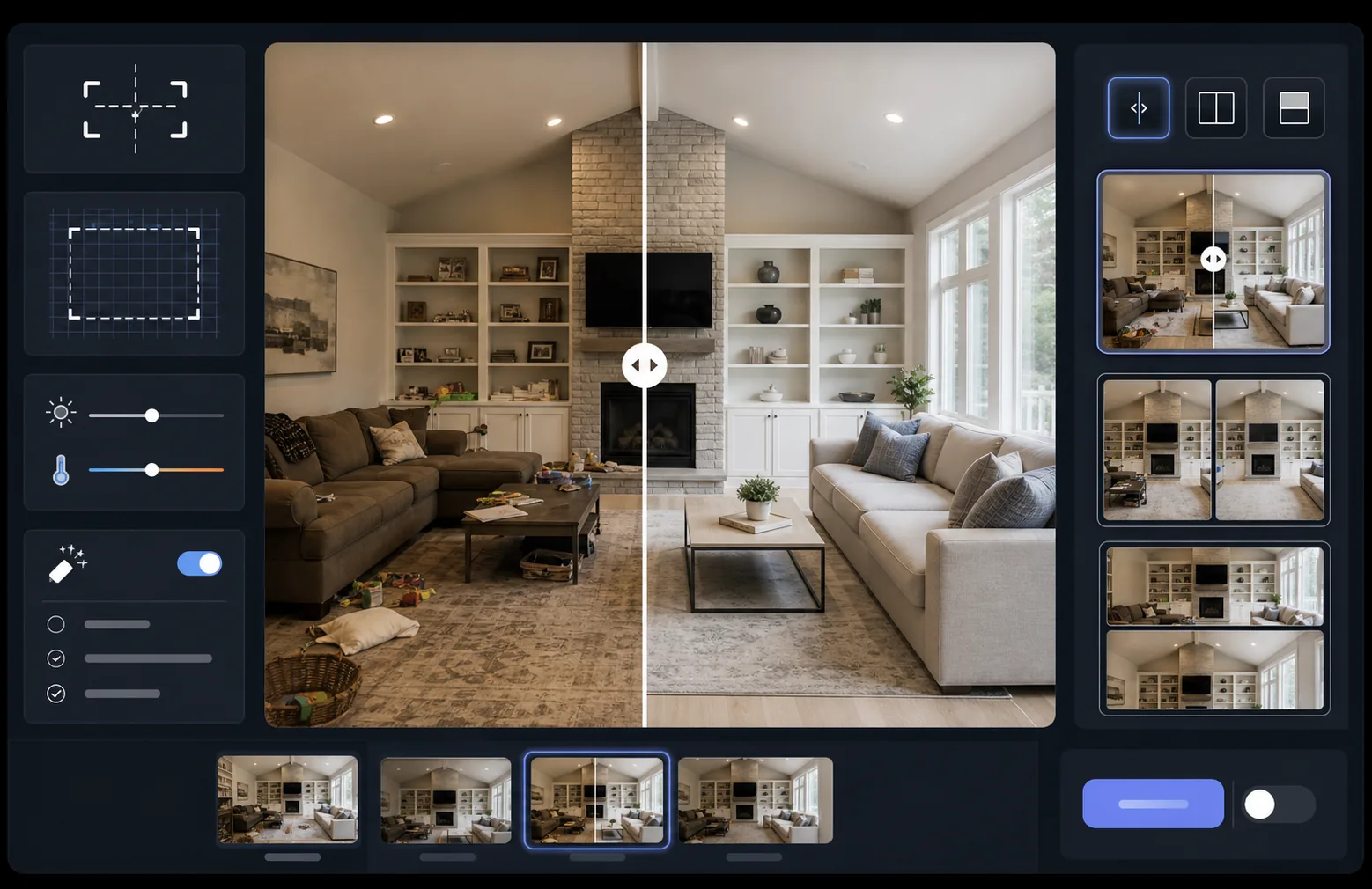
Bu şablon ne yapar
İki görseli — bir öncesi ve bir sonrası — kaydırıcı widget'larına, yan yana düzenlere veya animasyonlu açığa çıkarmalara hazır, mükemmel şekilde hizalanmış bir karşılaştırma çiftine dönüştürür. AI Enhance, iki kare arasındaki pozlamayı ve beyaz dengesini normalleştirir, böylece dönüşüm, ışık farklılıkları karşılaştırmayı bulanıklaştırmadan net bir şekilde görünür. Magic Eraser, herhangi bir karedeki, amaçlanan dönüşümün parçası olmayan tesadüfi dikkat dağıtıcı unsurları temizleyebilir.
Şablon ayarları
| Düzen | Kaydırıcıya hazır çift, yan yana veya dikey istiflenmiş (seçilebilir) |
| Çıktı boyutu | Kare başına 1600×1200px (eşleşen boyutlar) |
| Hizalama | Otomatik kayıt — çekimler arasında perspektif ve çerçevelemeyi eşleştirir |
| Işık normalleştirme | Çift boyunca pozlamayı ve beyaz dengesini dengeler |
| Etiket bindirmesi | Özelleştirilebilir konumlu, isteğe bağlı 'Before' / 'After' etiketleri |
| Kenarlık | 1px nötr gri ayırıcı veya kesintisiz kenar (seçilebilir) |
Bu şablon nasıl kullanılır
Öncesi görselinizi yükleyin
Başlangıç durumunu gösteren orijinal, değiştirilmemiş fotoğrafı yükleyin. Bu, renovasyon öncesi bir oda, iyileştirme öncesi bir ürün, tedavi öncesi bir cilt veya göstermek istediğiniz herhangi bir görsel dönüşüm olabilir.
Sonrası görselinizi yükleyin
Tamamlanmış dönüşümü gösteren sonuç fotoğrafını yükleyin. Öncesi çekimiyle aynı açı ve mesafeden fotoğraf çekmeye çalışın. Şablon, çerçeveleme ve perspektifteki küçük farklılıkları otomatik olarak hizalayacaktır.
Normalleştirin ve hizalayın
Şablon, iki görseli otomatik olarak kaydeder, böylece karşılık gelen öğeler piksel piksel hizalanır. Pozlama ve beyaz dengesi normalleştirilir, böylece çekim seansları arasındaki ışık farklılıkları gerçek dönüşümden dikkat dağıtmaz.
Karşılaştırmayı dışa aktarın
Çıktı formatınızı seçin — kaydırıcı widget'ı için eşleşen çift, sosyal medya için yan yana bileşik veya e-posta pazarlaması için dikey istif. İsteğe bağlı Before/After etiketleri ekleyin ve web için optimize edilmiş veya baskı kalitesinde çözünürlükte dışa aktarın.
En iyi sonuçlar için profesyonel ipuçları
- ✓Mümkünse öncesi ve sonrasını tam olarak aynı konumdan fotoğraflayın — tripod yerinizi işaretleyin veya aynı noktada durun. Yapay zekânın hizalamayı düzeltmesi ne kadar az gerekirse, karşılaştırma o kadar net olur.
- ✓Hizalanmış karşılaştırmaların belli belirsiz kaymış görünmesine neden olan perspektif bozulması farklılıklarını önlemek için her iki çekimde de aynı odak uzaklığını kullanın.
- ✓Öncesi ve sonrası arasındaki ilgisiz değişiklikleri Magic Eraser kullanarak kaldırın — bir bitki yer değiştirdiyse veya yeni bir nesne belirdiyse, izleyicilerin amaçlanan dönüşüme odaklanması için onu silin.
- ✓Web kaydırıcı yerleştirmeleri için her iki görseli de aynı boyutlarda dışa aktarın ve kaydırıcının ayırma çizgisi boyunca sıkıştırma kusurlarını önlemek için kayıpsız PNG kullanın.
Araçlar
Sık sorulan sorular
Öncesi ve sonrası fotoğraflar biraz farklı açılardan çekildiyse ne olur?
+
Otomatik kayıt sistemi; kamera açısı, mesafe ve çerçevelemedeki orta düzeydeki farklılıkları yönetir. Her iki görseldeki karşılık gelen referans noktalarını belirler ve eşleşmeleri için onları dönüştürür. En iyi sonuçlar için açı farkı 15 derecenin altında olmalıdır.
Bunu dönüşümleri gösteren video küçük resimleri için kullanabilir miyim?
+
Evet. Yan yana bileşik çıktı, YouTube ve sosyal medya video küçük resimleri için idealdir. Etiketli bölünmüş ekran düzeni, tıklamaları artıran bir dönüşüm hikâyesini anında iletir.
Işık normalleştirme, gösterilen gerçek sonuçları değiştirir mi?
+
Hayır. Işık normalleştirme yalnızca genel pozlamayı ve beyaz dengesini ayarlar, böylece her iki kare de aynı koşullarda çekilmiş gibi görünür. Gerçek dönüşüm — öznedeki değişiklikler — tam olarak fotoğraflandığı şekliyle korunur.
Sonuçlarınızı yan yana gösterin
Öncesi ve sonrası fotoğraflarınızı yükleyin ve saniyeler içinde mükemmel şekilde hizalanmış, profesyonelce sunulan bir karşılaştırma görseli elde edin. Bırakın dönüşüm kendini anlatsın.
Ücretsiz deneyin