
Az pozlanmış bir fotoğraf nasıl düzeltilir?
Çok karanlık çıkan, flaşsız iç mekan çekimleri, konunun bir siluet olduğu arkadan aydınlatmalı portreler veya parlak noktaları korumak için kameranın düşük pozlama yaptığı akşam anlık çekimleri; az pozlanmış fotoğraflar, çamurlu gölgelerdeki ayrıntıları gizler. Magic Eraser'nin AI Enhance özelliği, pozlamayı akıllı bir şekilde artırır, önemli noktaları vurgulamadan gizli ayrıntıları kurtarır.
Last updated
Koyu fotoğrafları şimdi düzeltin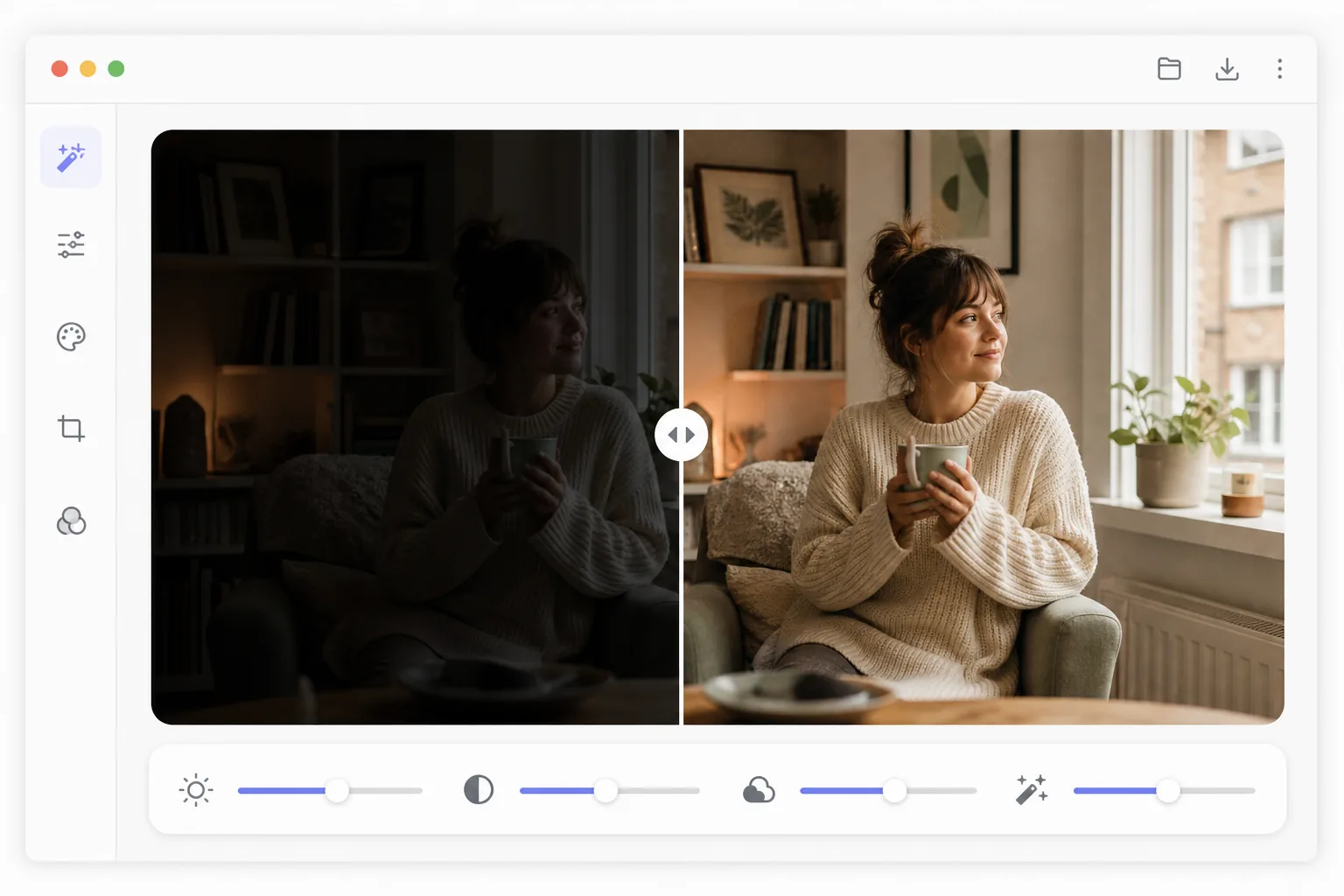
Karanlık bir fotoğrafı basitçe aydınlatmak neden berbat görünüyor?
Az pozlanmış (karanlık) bir fotoğrafı düzeltmek için Magic Eraser'ı web'de, iOS'ta veya Android'de açın, AI Enhance'i seçin, karanlık görüntüyü yükleyin ve pozlamayı yapay zekânın düzeltmesine izin verin — gölgeleri açarak gizli kalan detayları geri getirir, parlak alanları korur, fotoğrafı aydınlatınca ortaya çıkan paraziti temizler ve sahnenin doğal atmosferini bozmaz. Üstelik ücretsiz, kayıt gerektirmez. İşte parlaklık çubuğunu sürüklemekten farkı tam da bu: çubuk parlak alanları yakar ve grenli görüntüyü daha da belirginleştirir. En iyi sonucu 1–2 stop az pozlanmış fotoğraflarda verir; çok karanlık kareler de kurtarılır, ama daha fazla parazitle. Az pozlanmış bir fotoğraf için basit çözüm, parlaklık kaydırıcısını yukarı sürüklemektir. Bu, tüm tonları eşit şekilde kaldırır, doğru şekilde pozlanmış tüm vurguları ortadan kaldırır, gölgelerde gizlenen sensör gürültüsünü güçlendirir (görünür gren ve renk beneklenmesi oluşturur), genel renk dengesini sensörün gürültü taban rengine doğru kaydırır ve düz, solgun orta tonlar üretir. Profesyonel pozlama düzeltmesi, parlak noktaları tutarken gölgeleri seçerek kaldırmayı, yeni ortaya çıkan gölge ayrıntısına gürültü azaltma uygulamayı, karanlık sensör verileri güçlendirildiğinde oluşan renk kaymasını düzeltmeyi ve orta tonlardaki kontrastı geri yüklemeyi gerektirir. Bu süreç, birbirine göre dikkatlice dengelenen birden fazla Lightroom veya Photoshop ayarlamasını içerir. Magic Eraser'den AI Enhance tüm bu düzeltmeleri aynı anda gerçekleştirerek sahne içeriğine bağlı olarak hangi alanların ne kadar kaldırılması gerektiğini anlar.
Before you start
Yetersiz pozlamayı üç adımda düzeltin
Start with fotoğrafı yükle. The result preview above and tips below use this guide's existing content; no separate before-and-after proof is assumed.
- 1
Fotoğrafı yükle
Web, iOS veya Android'de Magic Eraser'yi açın ve AI Enhance'ü seçin. Az pozlanmış fotoğrafı yükleyin; çok karanlık bir iç mekan çekimi, arkadan aydınlatılmış bir portre veya ayrıntıların gölgelerde kaybolduğu bir akşam sahnesi. JPEG, PNG, HEIC ve RAW formatları desteklenir. RAW dosyaları kurtarma için en fazla gölge veriyi korur.
- 2
AI pozlama düzeltmesini uygula
Yapay zeka, optimum pozlamayı belirlemek için görüntü histogramını ve sahne içeriğini analiz eder. Gizli ayrıntıları ortaya çıkarmak için gölgeleri kaldırır, patlamayı önlemek için parlak noktaları tutar, gölgeler aydınlatıldığında görünür hale gelen gürültüyü azaltır ve karanlık sensör verilerinin güçlendirilmesinden kaynaklanan renk kaymasını düzeltir. Düzeltme sahneye uyum sağlar; portrelerde yüz öncelikli pozlama elde edilir, manzaralarda ise gökyüzü ve ön plan dengelenir.
- 3
İnce ayar yapın ve dışa aktarın
Önceki/sonra geçişini kullanarak geliştirilmiş fotoğrafı inceleyin. Otomatik düzeltmenin ayarlanması gerekiyorsa, yapay zekanın akıllı gölge kurtarma ve gürültü azaltma özelliklerini korurken tercih ettiğiniz parlaklık düzeyini ayarlamak için manuel pozlama kaydırıcısını kullanın. Yapay zeka fotoğrafın havasını korur; akşam çekimleri gün ışığı kadar parlak değil, sıcak kalır. Tam çözünürlükte dışa aktarın.
Şunun için en iyisi:
- Mevcut ışığın yetersiz olduğu durumlarda flaşsız çekilen iç mekan fotoğrafçılığı
- Konunun yüzünün parlak bir arka plana karşı çok karanlık olduğu arkadan aydınlatmalı portreler
- Kameranın sahneyi az pozladığı akşam ve gece fotoğrafçılığı
- Düşük ışıkta yüksek deklanşör hızlarıyla çekilen konser ve etkinlik fotoğrafları
- Pencerelerin kameranın odayı az ışıklandırmasına neden olduğu emlak iç mekanları
En iyi sonuçlar için ipuçları
RAW formatında çekilen fotoğraflar, JPEG'e göre daha fazla gölge verisini korur, böylece RAW dosyaları aydınlatıldığında daha fazla ayrıntıyı kurtarır. Oldukça az pozlanmış JPEG'ler (3+ durak altında), 8 bitlik formatta degradeleri yumuşatacak ton derinliği bulunmadığından, kurtarılan gölgelerde şeritlenme veya posterizasyon görülebilir. JPEG ile en iyi sonuçları elde etmek için, 1-2 duraktan fazla düşük pozlanmış çekim yapmayın. Yapay zeka, mevcut olduğunda yüzlere öncelik vererek genel sahne ruh hali için daha karanlık kalsa bile portre konularının iyi pozlanmasını sağlar. Gayrimenkul fotoğrafçılığı için yapay zeka, iç mekan parlaklığını pencere görünümleriyle dengeler; bu, odaların karanlık olduğu ve pencerelerin patladığı durumlarda sık karşılaşılan bir zorluktur. Düzeltilen görüntü, önceden karanlık olan alanlarda sıcak veya soğuk renk gölgesi gösteriyorsa, pozlama düzeltmesinden sonra beyaz dengesine ince ayar yapmak için renk sıcaklığı kaydırıcısını kullanın.
Sık sorulan sorular
- Bir fotoğrafın ne kadar karanlık kısmı kurtarılabilir?
- 1-2 duraklamayla az pozlanan fotoğraflar, mükemmel kalite ve minimum gürültüyle iyileşir. 3 durak altındaki fotoğraflar, özellikle JPEG'lerde bir miktar gürültüyle kurtarılabilir. 4 duraktan sonra görüntü verileri önemli ölçüde kötüleşir. RAW dosyaları, piksel başına daha fazla ton bilgisi depoladıkları için aşırı kurtarma işlemini JPEG'den daha iyi gerçekleştirir.
- Pozlamayı düzeltmek fotoğrafa gürültü katar mı?
- Parlayan gölgeler her zaman bir miktar sensör gürültüsünü ortaya çıkarır, ancak yapay zeka, pozlama artışıyla eş zamanlı olarak hedeflenen gürültü azaltmayı uygular. Sonuç, gürültüyü azaltmadan artıran parlaklık kaydırıcısını manuel olarak yükseltmekten çok daha temizdir. Düzeltilen fotoğrafların çoğu minimum düzeyde görünür gürültü gösterir.
- Düşük pozlama düzeltmesi ücretsiz midir?
- Evet. AI Enhance maruz kalma düzeltmesi, Magic Eraser'nin günlük kullanım limitleriyle birlikte ücretsiz kullanımına dahildir. Aydınlatılmış fotoğrafınızı yükleyin, otomatik olarak düzeltin ve dışa aktarın. Premium, sınırları kaldırır ve büyük fotoğraf setleri için toplu işlemenin kilidini açar.
- Android veya iPhone'da karanlık bir fotoğrafı nasıl düzeltirim?
- Magic Eraser'ı herhangi bir mobil tarayıcıda ya da iOS veya Android uygulamasında açın, karanlık fotoğrafı galerinizden yükleyin ve AI Enhance'i seçin. Yapay zekâ fotoğrafı doğrudan telefonunuzda aydınlatır — gölgeleri açar ve paraziti birlikte azaltır — sonra düzeltilmiş halini galerinize geri kaydeder. Masaüstü sürümüyle aynı şekilde çalışır; tarayıcıyı kullanırsanız uygulama kurmanıza gerek kalmaz, bu da kapalı mekânda ya da arkadan ışıkta çektiğiniz bir kareyi hemen ardından kurtarmak için çok pratiktir. Biraz daha parlak veya daha karanlık isterseniz manuel çubuğu kullanın.
- Yüzün siluet olarak göründüğü arkadan ışıklı bir fotoğrafı aydınlatabilir mi?
- Evet — bu en sık karşılaşılan durumlardan biri. Özne arkadan aydınlatıldığında (pencere, parlak gökyüzü), kamera arka plana göre pozlama yapar ve yüz kararır. Yapay zekâ, gölgede kalan yüzü açarken parlak arka planı koruyup yakmaz; ayrıca yüzlere öncelik verir, böylece sahnenin geneli atmosferli kalsa bile kişi düzgün pozlanmış çıkar. Neredeyse tamamen siluet olmuş bir karede geri getirilecek detay azdır, bu yüzden en doğal sonucu en azından biraz tonu görünen bir yüz verir.