
Bir fotoğrafa arka plan nasıl eklenir
Sıkıcı bir arka planı daha iyi bir şeyle değiştirin: profesyonel vesikalık çekimler için bir stüdyo arka planı, yaratıcı portreler için manzaralı bir konum veya pazarlama materyalleri için markalı bir arka plan. Magic Eraser kaldırma ve değiştirme işlemlerini tek bir iş akışında gerçekleştirir.
Last updated
Şimdi arka planı ekle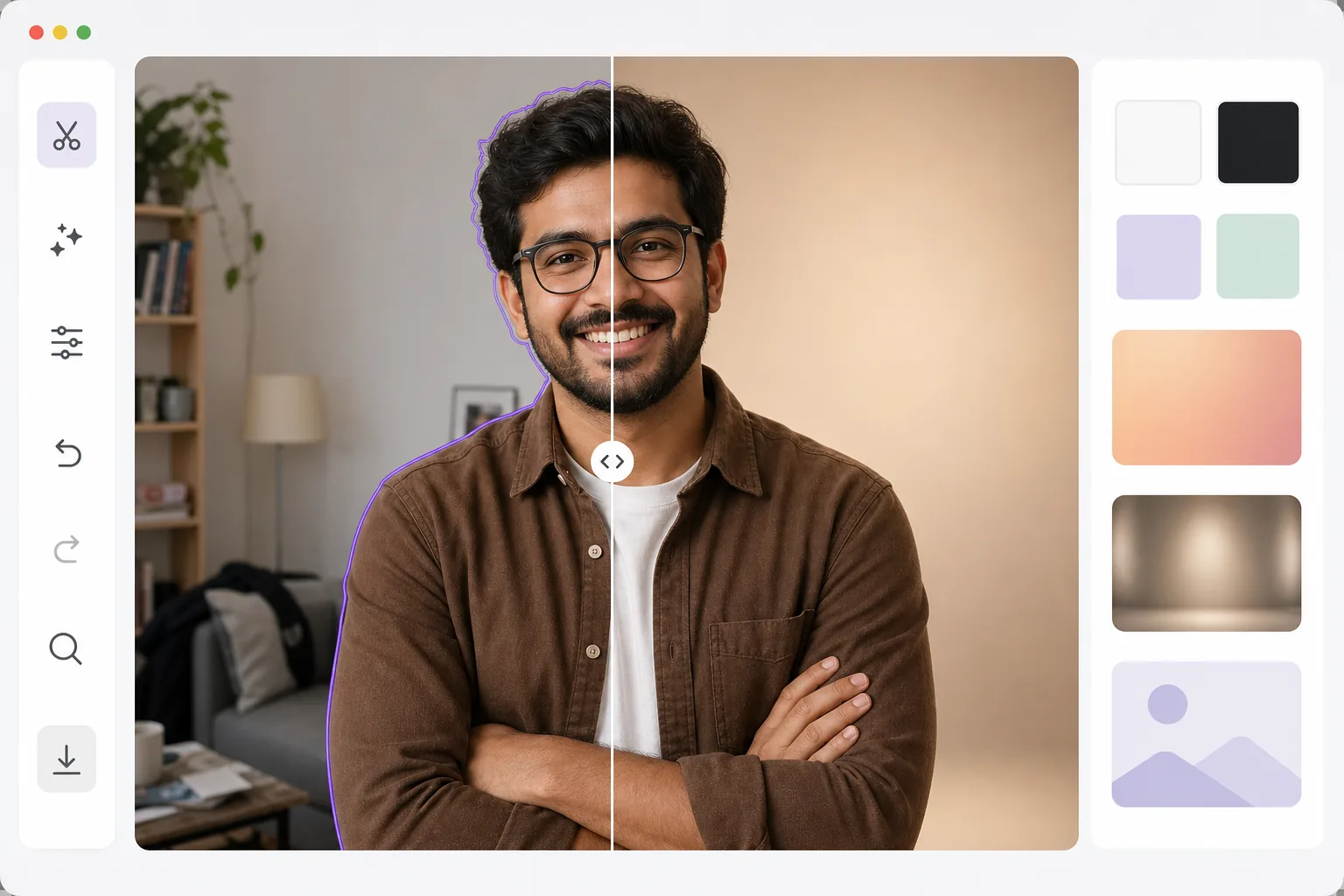
Bir fotoğrafa arka plan nasıl eklenir
Bir fotoğrafa arka plan eklemek için web'de, iOS'ta veya Android'de Magic Eraser'ı açın, görseli yükleyin, AI'ın mevcut arka planı kaldırmasını bekleyin ve ardından konuyu yeni bir arka plana yerleştirin — düz bir renk, bir gradyan, bir stüdyo fonu ya da kendi yüklediğiniz bir görsel. Ücretsizdir ve kayıt gerektirmez. AI, konuyu temiz kenarlarla (saç, gözlük, ince ayrıntılar) ayıklar; böylece kesilen görüntü beyaz bir kutu yerine yeni arka planın üzerine doğal şekilde oturur. İnandırıcı bir sonuç için, ışık yönü konuyla uyumlu bir arka plan seçin ve yumuşak bir zemin gölgesi ekleyin. Arka plan herhangi bir fotoğrafın ruh halini, bağlamını ve profesyonelliğini belirler. Beyaz arka planda bir üründe 'e-ticaret' yazıyor. Bulanık bir ofise karşı çekilmiş bir fotoğrafta 'kurumsal' yazıyor. Gün batımına karşı bir portre 'yaşam tarzı' diyor. Arka plan değiştirme, fotoğraf çekildikten sonra bu anlatımı kontrol etmenizi sağlar. Süreç iki yapay zeka adımını içeriyor: birincisi, kenar korumayla hassas nesne çıkarma; ikincisi, eşleşen renk sıcaklığı, aydınlatma yönü ve gölge yerleşimiyle yeni arka plan üzerinde kompozisyon oluşturmak. Sonuç, nesnenin üzerine yapıştırılmış değil, aslında o ortamda fotoğraflanmış gibi görünmelidir.
Before you start
Üç adımda arka plan ekleyin
Start with orijinal arka planı yükleyin ve kaldırın. The result preview above and tips below use this guide's existing content; no separate before-and-after proof is assumed.
- 1
Orijinal arka planı yükleyin ve kaldırın
Web, iOS veya Android'de Magic Eraser'yi açın ve Background Eraser'ı seçin. Fotoğrafınızı yükleyin ve yapay zekanın mevcut arka planı kaldırmasına izin verin. Nesne hassas kenarlarla çıkarılır; saç, gözlük ve ince ayrıntılar korunur.
- 2
Yeni arka planınızı seçin
Düz renkler (beyaz, siyah, özel), degradeler, önceden ayarlanmış stüdyo arka planları arasından seçim yapın veya yeni arka plan olarak kendi görselinizi yükleyin. Nesneyi yeni arka plan üzerinde konumlandırın ve ölçeklendirin. Kompozisyonu çerçevelemek için kırpmayı ayarlayın.
- 3
Ayarla ve dışa aktar
Kompozite ince ayar yapın: parlaklığı arka plan aydınlatmasına uyacak şekilde ayarlayın, topraklama için hafif bir gölge ekleyin ve doğal karışım için kenar yumuşaklığını ayarlayın. Web, baskı veya sosyal medya için istediğiniz çözünürlükte dışa aktarın.
Şunun için en iyisi:
- Ev arka planlarını stüdyo arka planlarıyla değiştirerek profesyonel fotoğraflar oluşturma
- Tutarlı beyaz veya markalı arka planlara sahip e-ticaret ürün fotoğrafçılığı
- Sosyal medya içerik oluşturucuları kendilerini yaratıcı veya istek uyandıran ortamlara yerleştiriyor
- Markalı arka planlara sahip kampanya görselleri üreten pazarlama ekipleri
- Video görüşmesi arka planları — sanal toplantı profilleri için profesyonel bir hareketsiz görüntü oluşturma
En iyi sonuçlar için ipuçları
Konu ve arka plan arasındaki aydınlatma yönünü eşleştirin; konu soldan aydınlatılıyorsa benzer aydınlatmaya sahip bir arka plan seçin. Eşleşmeyen aydınlatma, birleştirilmiş fotoğrafların en yaygın görülen özelliğidir. Nesneyi yeni arka plana sabitlemek için hafif bir alt gölge veya zemin gölgesi ekleyin. Profesyonel vesikalık çekimler için, düz renkler veya basit degradeler her zaman doğal arka planlardan daha parlak görünür. Özel bir arka plan görüntüsü kullanırken nesneyi net odak noktası olarak tutmak için görüntüyü hafifçe bulanıklaştırın (sığ alan derinliğini simüle ederek).
Sık sorulan sorular
- Kendi resmimi arka plan olarak kullanabilir miyim?
- Evet. Yedek arka plan olarak herhangi bir resmi yükleyin. Araç, çıkarılan nesnenizi uygun ölçeklendirme ve konumlandırmayla yeni görüntüde birleştirir.
- Nesne ile arka plan arasındaki ışıklandırma eşleşiyor mu?
- Araç, nesnenin orijinal aydınlatmasını korur. En doğal sonuçlar için benzer aydınlatma yönüne ve renk sıcaklığına sahip arka planları seçin.
- Arka plan değiştirme ücretsiz mi?
- Evet. Arka plan kaldırma ve değiştirme, ücretsiz kullanımda günlük kullanım limitleriyle mevcuttur. Premium, sınırları kaldırır ve toplu işleme ekler.
- Android veya iPhone'da bir fotoğrafa nasıl arka plan eklerim?
- Magic Eraser'ı herhangi bir mobil tarayıcıda ya da iOS veya Android uygulamasında açın, fotoğrafı galerinizden yükleyin ve AI'ın mevcut arka planı kaldırmasını bekleyin. Ardından yeni bir arka plan seçin — düz bir renk, hazır bir fon ya da fotoğraflarınızdan bir görsel — ve konuyu parmaklarınızla ölçeklendirip konumlandırın. Dışa aktarın; tamamlanan fotoğraf doğrudan galerinize kaydedilir. Masaüstü sürümüyle aynı şekilde çalışır ve tarayıcıyı kullanırsanız herhangi bir uygulama kurmanız gerekmez.
- Arka plan eklemekle saydam bir PNG arasındaki fark nedir?
- Arka planı kaldırmak, konuyu saydam bir zeminde bırakır — arkasında hiçbir şey olmayan, bir tasarıma yerleştirmeye hazır bir PNG. Arka plan eklemek ise bir adım daha ileri gider: konuyu yeni ve görünür bir arka plana (bir renk, gradyan veya görsel) yerleştirir ve tamamlanmış, tek katmana indirgenmiş bir fotoğraf olarak dışa aktarır. Başka yerlerde tekrar kullanmak için bir kesilmiş görüntü istiyorsanız saydam PNG'yi dışa aktarın; yeni bir ortamda eksiksiz bir resim istiyorsanız arka planı ekleyip JPG ya da PNG olarak dışa aktarın.