
การฟื้นฟูภาพถ่ายวินเทจ
ชุบชีวิตภาพถ่ายเก่าอันล้ำค่าให้กลับมามีชีวิตอีกครั้ง เทมเพลตนี้ซ่อมแซมความเสียหายที่เวลาหลายทศวรรษสร้างไว้กับภาพถ่ายที่พิมพ์ออกมา — ลบรอยขีดข่วน รอยพับ และคราบสกปรก ฟื้นฟูสีจากภาพพิมพ์ที่ซีดจาง และแม้กระทั่งแปลงต้นฉบับซีเปียหรือขาวดำให้เป็นภาพสีเต็มที่สมจริง พร้อมทั้งรักษาเอกลักษณ์ที่เหมาะสมกับยุคสมัยของภาพไว้
ลองใช้เทมเพลตนี้ฟรีRestoration template preview
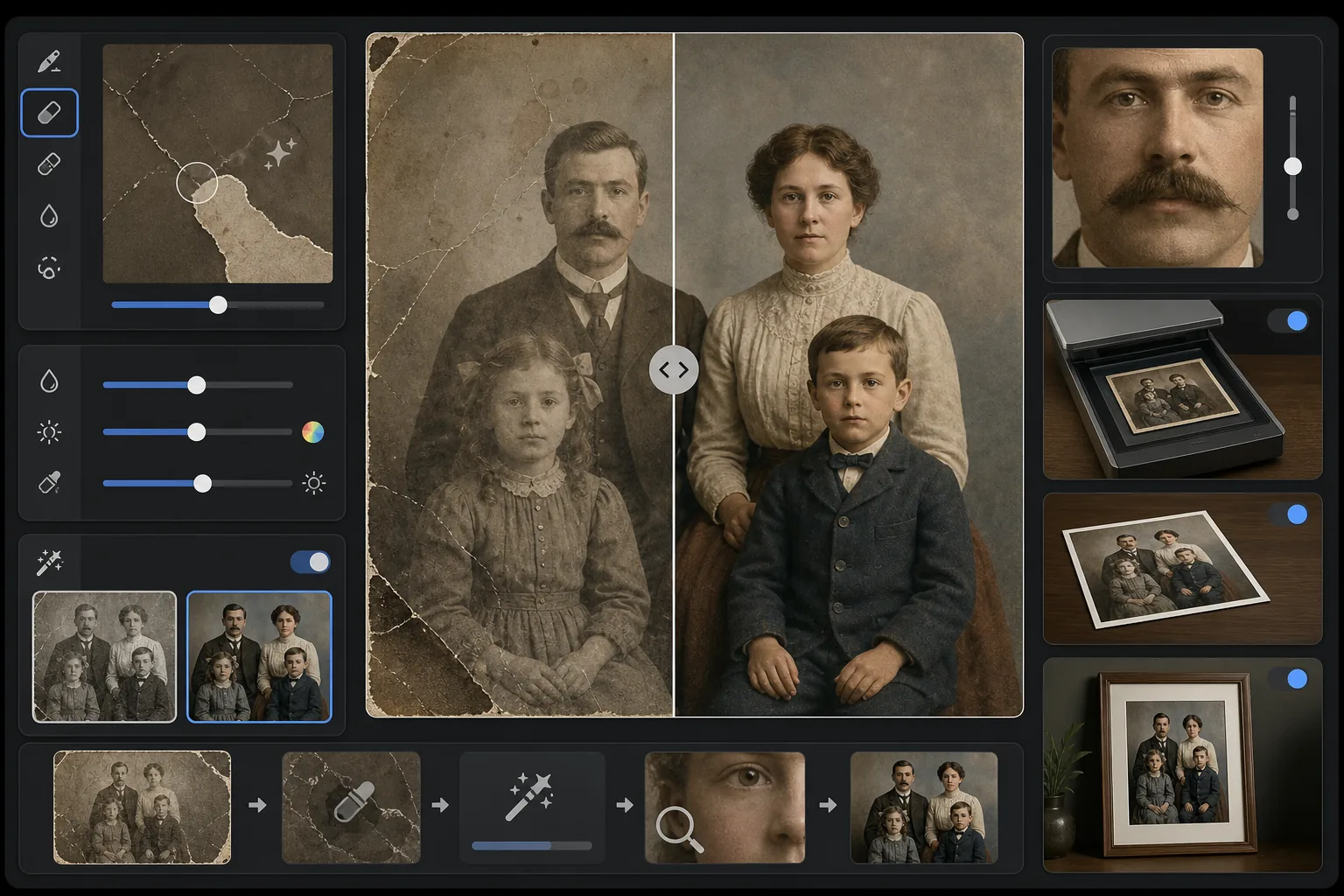
เทมเพลตนี้ทำอะไร
ซ่อมแซมความเสียหายทางกายภาพและผลกระทบจากการเสื่อมสภาพบนภาพถ่ายวินเทจที่สแกนแล้ว Magic Eraser ลบรอยขีดข่วน รอยพับ คราบน้ำ จุดเชื้อรา และขอบที่ฉีกขาด โดยสร้างเนื้อหาภาพที่หายไปขึ้นใหม่จากบริบทโดยรอบ AI Enhance ฟื้นฟูสีที่เปลี่ยนไปหรือซีดจางตลอดหลายทศวรรษ เพิ่มความคมชัดของรายละเอียดที่นุ่มลงตามกาลเวลา และสามารถลงสีภาพขาวดำหรือซีเปียด้วยสีที่ถูกต้องตามยุคสมัยซึ่งเคารพต่อยุคของภาพต้นฉบับ
การตั้งค่าเทมเพลต
| การซ่อมแซมความเสียหาย | เข้มข้น — ลบรอยขีดข่วน รอยพับ คราบสกปรก และขอบที่ฉีกขาด |
| การฟื้นฟูสี | สเปกตรัมเต็ม — ฟื้นฟูเม็ดสีที่ซีดจางให้กลับมาสดใสเหมือนเดิม |
| โหมดลงสี | ปิด อ่อน หรือเต็ม (สำหรับต้นฉบับขาวดำและซีเปีย) |
| การฟื้นฟูรายละเอียด | สร้างใบหน้าและรายละเอียดเล็กๆ ที่นุ่มลงจากอายุและความละเอียดในการสแกนต่ำขึ้นใหม่ |
| ขนาดผลลัพธ์ | ตรงกับขนาดสแกนต้นฉบับ พร้อมตัวเลือกขยายขนาด 2× |
| การรักษายุคสมัย | คงพื้นผิวเกรนและคุณภาพโทนสีที่เหมาะสมกับยุคสมัยไว้ |
วิธีใช้เทมเพลตนี้
สแกนหรือถ่ายภาพต้นฉบับ
สแกนภาพวินเทจที่ 600 DPI ขึ้นไปเพื่อให้ได้รายละเอียดที่ฟื้นฟูได้มากที่สุด หากไม่สามารถสแกนได้ ให้ถ่ายภาพพิมพ์บนพื้นผิวเรียบภายใต้แสงที่สม่ำเสมอและกระจายตัว — หลีกเลี่ยงแฟลชซึ่งจะสร้างจุดสะท้อนแสงบนภาพพิมพ์มันวาว
ซ่อมแซมความเสียหายทางกายภาพ
Magic Eraser ระบุและลบรอยขีดข่วน รอยพับ ความเสียหายจากน้ำ จุดเชื้อรา และคราบเทป AI สร้างพื้นที่ที่หายไปขึ้นใหม่โดยวิเคราะห์เนื้อหาภาพโดยรอบ — เติมมุมที่ฉีกขาด เชื่อมรอยแตกที่พาดผ่านใบหน้า และลบคราบที่เปลี่ยนสี
ฟื้นฟูหรือเพิ่มสี
สำหรับภาพพิมพ์สีที่ซีดจาง AI Enhance ฟื้นฟูจานสีต้นฉบับโดยย้อนกลับวิธีการเฉพาะที่ชั้นสีย้อมต่างๆ เสื่อมสภาพไปตามกาลเวลา สำหรับต้นฉบับขาวดำหรือซีเปีย การลงสีแบบเลือกได้จะเพิ่มสีที่สมจริงโดยอิงจากเบาะแสตามบริบท เช่น โทนผิว ใบไม้ ท้องฟ้า และลวดลายผ้า
เพิ่มความคมชัดและส่งออก
การฟื้นฟูรายละเอียดเพิ่มความคมชัดของลักษณะใบหน้า ข้อความ และรายละเอียดเล็กๆ ที่เวลาหลายทศวรรษทำให้นุ่มลง ส่งออกที่ความละเอียดสแกนต้นฉบับ หรือขยายเป็น 2× เพื่อพิมพ์ในขนาดที่ใหญ่กว่าต้นฉบับ
เคล็ดลับมืออาชีพเพื่อผลลัพธ์ที่ดีที่สุด
- ✓สแกนที่ความละเอียดสูงสุดที่เครื่องสแกนของคุณรองรับ — ขั้นต่ำ 600 DPI ควรเป็น 1200 DPI ยิ่งจับรายละเอียดได้มาก AI ก็ยิ่งมีข้อมูลมากขึ้นในการสร้างพื้นที่ที่เสียหายขึ้นใหม่
- ✓หากภาพติดอยู่ในกรอบหรืออัลบั้ม ให้ถ่ายภาพในตำแหน่งนั้นแทนที่จะเสี่ยงทำให้ฉีกขาด — เทมเพลตสามารถลบขอบกรอบและสิ่งแปลกปลอมของหน้าอัลบั้มได้
- ✓สำหรับการลงสีภาพถ่ายเชิงประวัติศาสตร์ โปรดให้บริบทเกี่ยวกับยุคสมัย (ทศวรรษ) และสถานที่หากเป็นไปได้ — สีของเสื้อผ้า สีรถยนต์ และวัสดุก่อสร้างแตกต่างกันอย่างมากตามช่วงเวลาและภูมิภาค
- ✓ประมวลผลพื้นที่ที่เสียหายที่สุดของภาพก่อนเป็นการทดสอบก่อนที่จะเรียกใช้การฟื้นฟูแบบเต็ม — สิ่งนี้ช่วยให้คุณยืนยันได้ว่าคุณภาพการสร้างใหม่ตรงกับความคาดหวังของคุณ
เครื่องมือ
คำถามที่พบบ่อย
สามารถแก้ไขภาพที่มีส่วนหายไป เช่น มุมที่ฉีกขาดได้หรือไม่?
+
ได้ AI สร้างพื้นที่ที่หายไปขึ้นใหม่โดยใช้บริบทจากภาพโดยรอบ สำหรับพื้นหลังเช่นท้องฟ้า ผนัง และใบไม้ ผลลัพธ์จะไร้รอยต่อ สำหรับส่วนของใบหน้าหรือรายละเอียดสำคัญที่หายไป การสร้างใหม่นั้นน่าประทับใจ แต่อาจต้องปรับด้วยมือเล็กน้อยสำหรับลักษณะสำคัญ
การลงสีภาพขาวดำมีความแม่นยำเพียงใด?
+
การลงสีใช้การวิเคราะห์ตามบริบทเพื่อกำหนดสีที่สมจริง — โทนผิว สีฟ้าของท้องฟ้า สีเขียวของใบไม้ และสีผ้าทั่วไปมีความแม่นยำสูง สีเฉพาะของวัตถุที่ AI ไม่สามารถระบุได้จากบริบท (เช่น เฉดสีที่แน่นอนของชุด) จะดูเป็นไปได้มากกว่าที่จะรับประกันความแม่นยำ
การฟื้นฟูจะลบเอกลักษณ์วินเทจของภาพออกไปหรือไม่?
+
ไม่ การตั้งค่าการรักษายุคสมัยจะคงพื้นผิวเกรนและคุณภาพโทนสีที่เหมาะสมกับยุคสมัยซึ่งทำให้ภาพวินเทจมีเอกลักษณ์ไว้ ความเสียหายทางกายภาพ เช่น รอยขีดข่วนและคราบสกปรกจะถูกลบออก แต่คุณภาพการถ่ายภาพของยุคต้นฉบับจะได้รับการเคารพ — ภาพจากทศวรรษ 1940 ยังคงดูเหมือนภาพจากทศวรรษ 1940 เพียงแต่ไม่เสียหาย
กอบกู้ความทรงจำของครอบครัวคุณ
อัปโหลดภาพสแกนของภาพถ่ายที่เสียหาย ซีดจาง หรือเก่าใดๆ แล้วดูการสึกหรอหลายทศวรรษหายไป รอยขีดข่วนหายไป สีได้รับการฟื้นฟู ความทรงจำได้รับการเก็บรักษา
ลองใช้ฟรี