
ภาพทิวทัศน์พร้อมพิมพ์
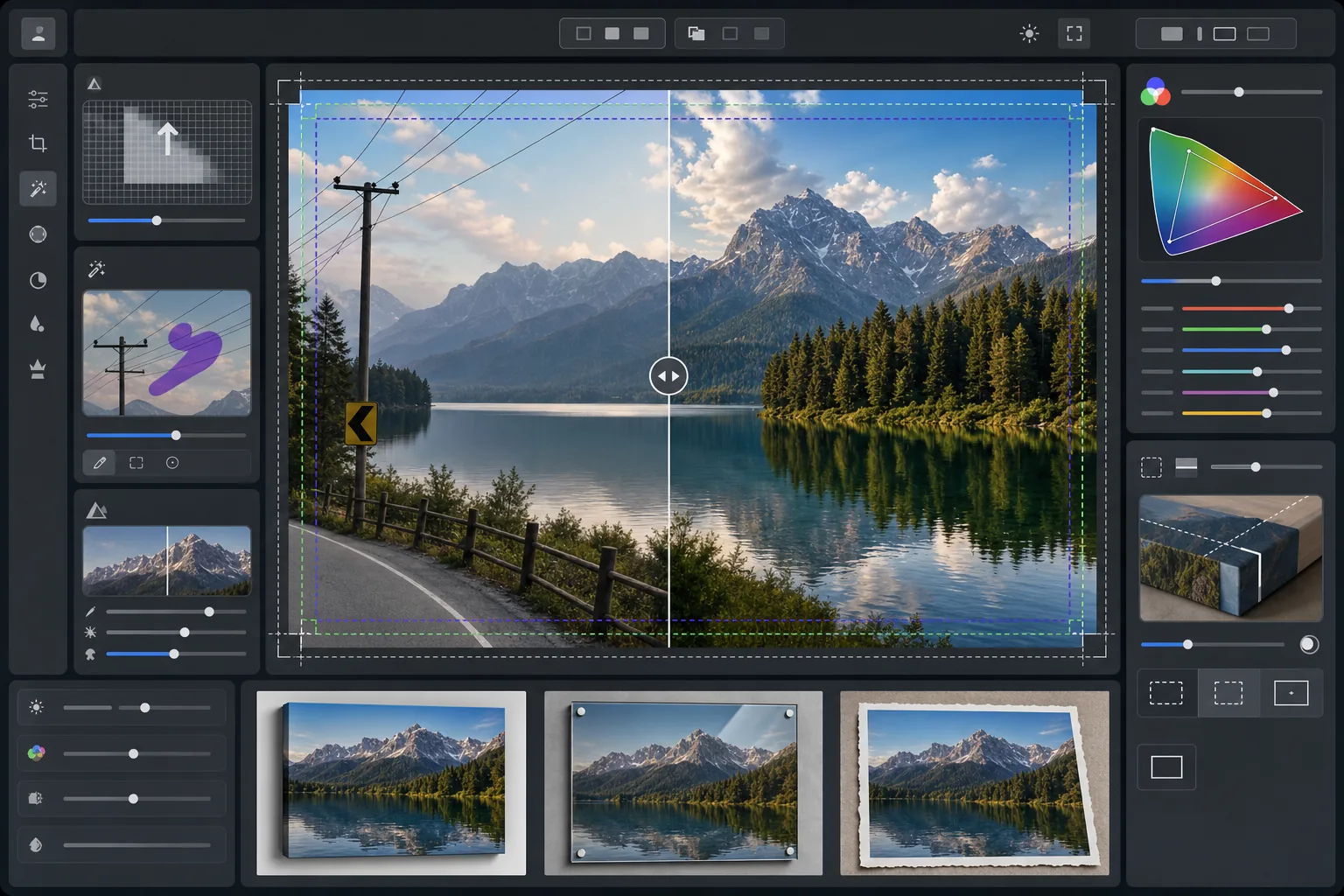
เปลี่ยนภาพถ่ายทิวทัศน์ให้เป็นไฟล์พร้อมพิมพ์ขนาดใหญ่ที่ 300 DPI เทมเพลตนี้ขยายขนาดภาพสำหรับงานพิมพ์ขนาด 16x20 นิ้วและใหญ่กว่า พร้อมทั้งลบสิ่งรบกวนสายตาอย่างสายไฟ ป้ายจราจร และรั้วที่ดึงความสนใจไปจากทิวทัศน์ธรรมชาติ การปรับสีได้รับการปรับให้เหมาะสมสำหรับวัสดุแคนวาส โลหะ และกระดาษศิลปะ
ลองใช้เทมเพลตนี้ฟรีPhotography template preview
เทมเพลตนี้ทำอะไร
เตรียมภาพถ่ายทิวทัศน์สำหรับการพิมพ์ขนาดใหญ่ระดับมืออาชีพด้วยการขยายความละเอียดให้ตรงตามข้อกำหนด 300 DPI ที่ขนาด 16x20 นิ้วและสูงกว่านั้น AI Enhance เพิ่มจำนวนพิกเซลโดยไม่ทำให้เกิดสิ่งแปลกปลอม คงรายละเอียดอันละเอียดของใบไม้ พื้นผิวน้ำ และก้อนเมฆไว้ Magic Eraser ลบสายไฟ เสาไฟ ป้ายจราจร รั้ว และสิ่งรบกวนที่มนุษย์สร้างขึ้นอื่นๆ ที่รบกวนองค์ประกอบภาพตามธรรมชาติ สีจะถูกปรับให้เข้ากับขอบเขตสีที่กว้างขึ้นและคุณสมบัติการสะท้อนแสงที่แตกต่างกันของแคนวาสหุ้มเฟรม ภาพพิมพ์โลหะอะลูมิเนียม และกระดาษฝ้ายศิลปะ
การตั้งค่าเทมเพลต
| เป้าหมายการขยายขนาด | อย่างน้อย 6000×4000px (300 DPI ที่ 20×13 นิ้ว) |
| การเพิ่มความคมชัด | อันชาร์ปมาสก์ที่เหมาะกับงานพิมพ์ (รัศมี 1.2, ปริมาณ 80%) |
| โปรไฟล์สี | ProPhoto RGB (ขอบเขตสีสูงสุดสำหรับการพิมพ์งานศิลปะ) |
| ช่วงไดนามิก | เงา +0.8 EV, การกู้คืนไฮไลต์ -0.3 EV |
| การลดสัญญาณรบกวน | รับรู้ความสว่าง (คงเกรนบนท้องฟ้า ปรับใบไม้ให้เนียน) |
| รูปแบบเอาต์พุต | TIFF 16 บิตพร้อมโปรไฟล์ ICC ฝังในตัว |
วิธีใช้เทมเพลตนี้
อัปโหลดภาพถ่ายทิวทัศน์ของคุณ
อัปโหลดภาพทิวทัศน์จากกล้องหรือสมาร์ทโฟนใดก็ได้ AI จะวิเคราะห์ความละเอียดต้นฉบับและคำนวณตัวคูณการขยายขนาดที่จำเป็นเพื่อให้ถึง 300 DPI ที่ขนาดพิมพ์เป้าหมายของคุณ แม้แต่ภาพสมาร์ทโฟน 12 ล้านพิกเซลก็สามารถขยายขนาดได้อย่างคมชัดสำหรับงานพิมพ์ 16x20
ลบสิ่งรบกวนสายตา
Magic Eraser ระบุและลบสายไฟ เสาไฟ ป้ายจราจร รั้ว ขยะ และองค์ประกอบที่มนุษย์สร้างขึ้นอื่นๆ ที่ดึงความสนใจไปจากฉากธรรมชาติ AI จะสร้างไล่ระดับสีท้องฟ้า ขอบแนวต้นไม้ และพื้นผิวภูมิประเทศที่อยู่เบื้องหลังวัตถุที่ถูกลบขึ้นใหม่
เพิ่มประสิทธิภาพสำหรับเอาต์พุตการพิมพ์
AI Enhance ขยายภาพไปยังความละเอียดเป้าหมายของคุณพร้อมเพิ่มความคมชัดสำหรับระยะการมองงานพิมพ์ สีจะถูกปรับไปยังขอบเขต ProPhoto RGB เพื่อรักษาช่วงสีเขียว สีน้ำเงิน และโทนพระอาทิตย์ตกทั้งหมดที่ sRGB สำหรับผู้บริโภคตัดทิ้งไว้
ส่งออกสำหรับวัสดุพิมพ์ของคุณ
ดาวน์โหลดเป็น TIFF 16 บิตพร้อมโปรไฟล์ ICC ฝังในตัวที่ตรงกับเอาต์พุตของคุณ — แคนวาสหุ้มเฟรม ภาพพิมพ์โลหะ หรือกระดาษศิลปะ ไฟล์นี้มีระยะเผื่อตัดตกและเครื่องหมายตัดที่ห้องแล็บพิมพ์มืออาชีพส่วนใหญ่ต้องการ
เคล็ดลับมืออาชีพเพื่อผลลัพธ์ที่ดีที่สุด
- ✓สำหรับแคนวาสหุ้มเฟรม ให้เพิ่มระยะเผื่อตัดตก 1.5 นิ้วในแต่ละด้านเพื่อให้ภาพหุ้มรอบโครงเฟรมโดยไม่ตัดเข้าไปในองค์ประกอบหลัก เทมเพลตนี้มีไกด์พื้นที่ปลอดภัยสำหรับการหุ้มแกลเลอรีในเอาต์พุต
- ✓ภาพพิมพ์โลหะสะท้อนแสงและขยายความคมชัด ดังนั้นให้ลดแถบเลื่อนความคมชัดลง 10-15% เมื่อเทียบกับที่ดูดีบนหน้าจอ เงาที่ดูมีรายละเอียดบนจอภาพของคุณอาจกลายเป็นดำสนิททั้งหมดบนวัสดุอะลูมิเนียม
- ✓เมื่อลบสายไฟยาวที่พาดผ่านทั้งเฟรม AI จะจัดการเป็นช่วงๆ เพื่อผลลัพธ์ที่สะอาดที่สุด ให้ใช้ภาพต้นฉบับที่ท้องฟ้าด้านหลังสายไฟมีการไล่ระดับสีที่เนียนแทนที่จะเป็นรูปแบบเมฆที่ซับซ้อน
- ✓ประมวลผลที่ขนาดใหญ่ที่สุดที่คุณอาจจะพิมพ์ แม้ว่าออร์เดอร์ปัจจุบันของคุณจะเล็กกว่าก็ตาม การลดขนาดไฟล์ 24x36 เป็น 16x20 ไม่มีการสูญเสีย แต่คุณไม่สามารถขยายไฟล์ 16x20 เป็น 24x36 ในภายหลังได้โดยไม่สูญเสียคุณภาพ
เครื่องมือ
คำถามที่พบบ่อย
ฉันสามารถพิมพ์ได้ใหญ่แค่ไหนจากภาพสมาร์ทโฟน?
+
ภาพสมาร์ทโฟน 12 ล้านพิกเซล (4032x3024) สามารถขยายขนาดได้อย่างคมชัดถึง 8000x6000 พิกเซล ซึ่งรองรับการพิมพ์ 300 DPI ที่ขนาด 26x20 นิ้ว ที่ระยะการมองมาตรฐานสำหรับงานพิมพ์ขนาดใหญ่ (ประมาณ 1 ถึง 1.2 เมตร) แม้แต่งานพิมพ์ขนาด 24x36 นิ้วก็ดูคมชัดจากภาพต้นฉบับสมาร์ทโฟนที่ขยายด้วย AI
การลบสายไฟจะทิ้งร่องรอยที่มองเห็นได้หรือไม่?
+
AI สร้างไล่ระดับสีท้องฟ้า ขอบเมฆ และแนวต้นไม้ที่อยู่เบื้องหลังสายไฟที่ถูกลบขึ้นใหม่โดยใช้ข้อมูลพิกเซลโดยรอบ ในสภาพท้องฟ้าที่เรียบเนียน การลบแทบจะตรวจจับไม่ได้ ท้องฟ้าที่ซับซ้อนพร้อมเมฆที่ดูดราม่าอาจแสดงการผสมผสานเล็กน้อยเมื่อตรวจสอบในระยะใกล้มาก แต่ที่ระยะการมองงานพิมพ์ปกติผลลัพธ์จะสะอาด
ฉันควรส่งไฟล์รูปแบบใดไปยังห้องแล็บพิมพ์?
+
ห้องแล็บมืออาชีพส่วนใหญ่ยอมรับไฟล์ TIFF 16 บิตพร้อมโปรไฟล์ ICC ฝังในตัว ซึ่งเป็นเอาต์พุตเริ่มต้นของเทมเพลตนี้ หากห้องแล็บของคุณขอ JPEG ให้ส่งออกที่คุณภาพ 100 ในพื้นที่สี Adobe RGB หลีกเลี่ยง sRGB สำหรับงานพิมพ์ขนาดใหญ่เนื่องจากมันตัดสีเขียวสดและสีน้ำเงินเข้มที่พบได้บ่อยในภาพถ่ายทิวทัศน์
พิมพ์ภาพทิวทัศน์ของคุณในทุกขนาดได้อย่างมั่นใจ
อัปโหลดภาพถ่ายทิวทัศน์และรับไฟล์พร้อมพิมพ์ที่ลบสายไฟออกแล้ว ขยายความละเอียด และปรับสีให้เหมาะสมสำหรับแคนวาส โลหะ หรือกระดาษศิลปะ
ลองใช้ฟรี