
การจัดสไตล์การถ่ายภาพอาหาร
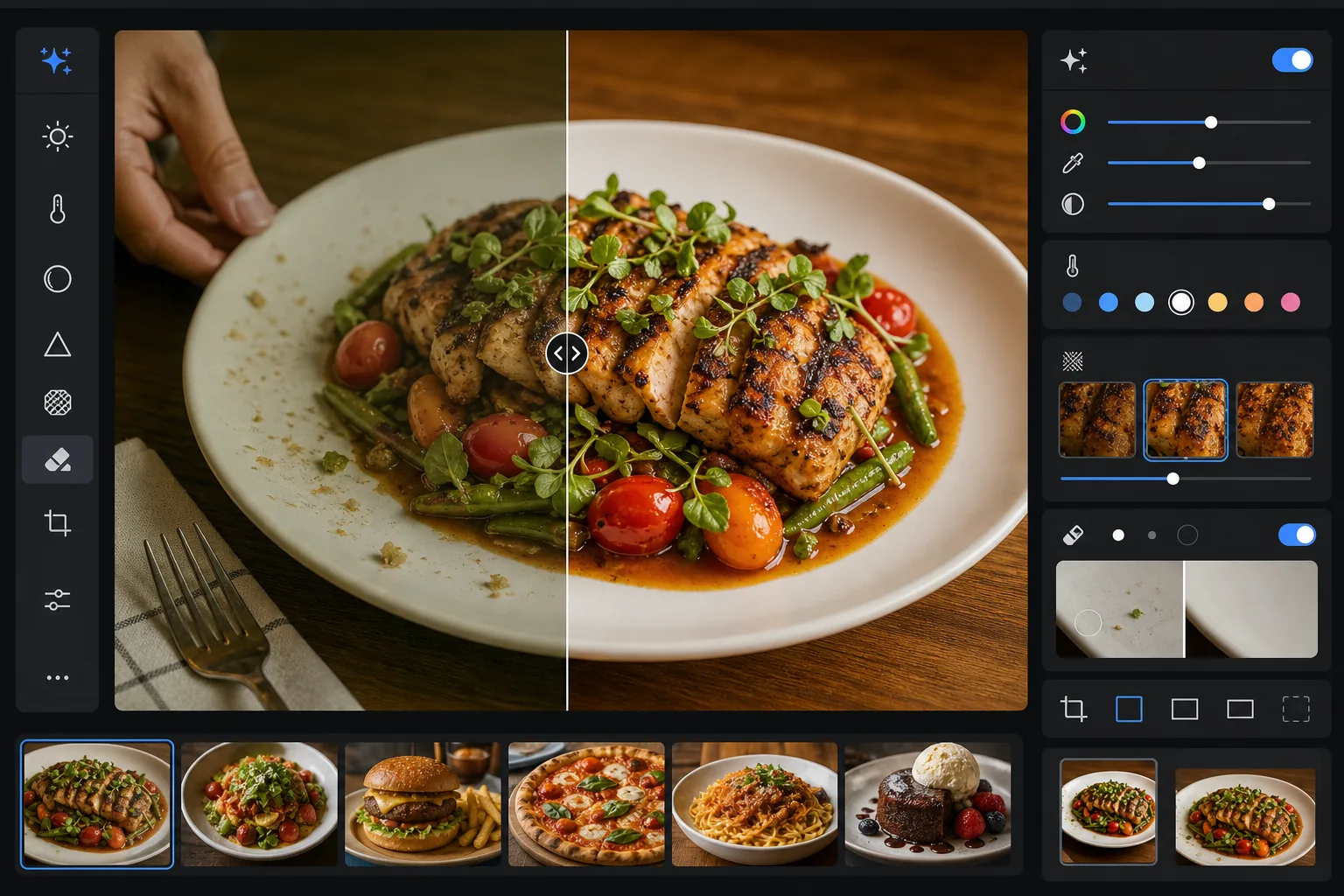
ทำให้อาหารดูน่ารับประทานในรูปถ่ายเท่ากับตอนอยู่บนจาน เทมเพลตนี้เพิ่มความสดใสของสีให้กับซอส ผักใบเขียว และโปรตีน ลบอุปกรณ์ที่หลงเข้ามา รอยนิ้วมือบนจาน และมือที่ปรากฏ ปรับพื้นผิวของเปลือกและของตกแต่งให้คมชัด และปรับโทนภาพให้เป็นโทนอุ่นชวนรับประทานที่แสดงผลได้ดีบน Instagram และบอร์ดเมนู
ลองใช้เทมเพลตนี้ฟรีFood & Beverage template preview
เทมเพลตนี้ทำอะไร
แก้ปัญหาช่องว่างระหว่างหน้าตาอาหารเมื่อเห็นจริงกับเมื่อถ่ายออกมา แสงในร้านอาหารและแสงจากด้านบนมักทำให้เกิดโทนสีเหลืองหรือเขียวที่ทำให้วัตถุดิบสดดูหม่นหมอง AI Enhance ปรับสมดุลแสงขาวให้ผักเขียวสดใส สีแดงเข้มข้น และสีขาวสะอาด โดยไม่เพิ่มความอิ่มตัวมากเกินจนดูไม่เป็นธรรมชาติ Magic Eraser ลบองค์ประกอบที่รบกวนสายตา — ส้อมที่ลืมไว้ในเฟรม มือพนักงานเสิร์ฟที่ขอบภาพ รอยน้ำบนขอบจาน เศษอาหารบนพื้นโต๊ะ การปรับความคมชัดแบบเลือกจุดช่วยขับเน้นพื้นผิวของผิวที่ย่าง เปลือกกรอบ และสมุนไพรสดที่ทำให้ภาพอาหารดูมีสัมผัส
การตั้งค่าเทมเพลต
| ความสดใสของสี | +15 ความสดใส, +8 ความอิ่มตัว (เลือกเฉพาะสีแดง เขียว เหลือง) |
| สมดุลแสงขาว | โทนกลางที่ปรับให้เหมาะกับอาหาร (ลบโทนเหลือง คงโทนอุ่นไว้) |
| การปรับพื้นผิวให้คมชัด | รับรู้รายละเอียด (ขับเน้นเปลือก รอยย่าง รายละเอียดสมุนไพร) |
| การทำความสะอาดจาน | ตรวจจับคราบเปื้อน รอยหยด และรอยนิ้วมือบนขอบจานโดยอัตโนมัติ |
| ระดับความอุ่น | +5 ความอุ่น พร้อมเส้นโค้งโทนสีสไตล์ชั่วโมงทอง |
| เอาต์พุต | 1080×1080px (Instagram), 2400×1600px (เมนู/เว็บไซต์) ส่งออกสองรูปแบบ |
วิธีใช้เทมเพลตนี้
อัปโหลดรูปอาหารของคุณ
อัปโหลดรูปอาหารที่จัดจานแล้ว ถ่ายจากด้านบน มุม 45 องศา หรือถ่ายตรงหน้า แสงธรรมชาติจากหน้าต่างให้จุดเริ่มต้นที่ดีที่สุด แต่เทมเพลตก็รองรับแสงฟลูออเรสเซนต์ในร้านอาหารและโคมไฟตั้งโต๊ะทังสเตนโทนอุ่นด้วยเช่นกัน
เพิ่มสีและพื้นผิว
AI Enhance แก้ไขโทนสีที่เพี้ยน เพิ่มความสดใสแบบเลือกจุดเพื่อให้สีเขียว แดง และโทนทองโดดเด่นโดยไม่ดูเป็นสีนีออน และปรับพื้นผิวให้คมชัด เช่น รอยไหม้จากการย่าง น้ำตาลเคลือบ และใบสมุนไพรสด ระดับความอุ่นเพิ่มบรรยากาศชั่วโมงทองที่ชวนรับประทาน
จัดเฟรมให้สะอาด
Magic Eraser ลบอุปกรณ์ที่หลงเข้ามา มุมผ้าเช็ดปาก มือที่ปรากฏ รอยนิ้วมือและรอยซอสหยดบนขอบจาน เศษอาหารบนโต๊ะ และพร็อพใดๆ ที่ทำให้องค์ประกอบรกตา AI เติมพื้นที่ที่ทำความสะอาดแล้วด้วยพื้นผิวโต๊ะหรือจานโดยรอบ
ส่งออกสำหรับแพลตฟอร์มของคุณ
ดาวน์โหลดในรูปแบบเดียวหรือทั้งสองรูปแบบ: 1080x1080px จัตุรัสสำหรับ Instagram และโซเชียลมีเดีย หรือ 2400x1600px แนวนอนสำหรับเว็บไซต์ร้านอาหาร บอร์ดเมนูดิจิทัล และรายการในแอปส่งอาหาร ทั้งสองได้รับการปรับสีให้เหมาะกับการแสดงผลบนหน้าจอในระบบ sRGB
เคล็ดลับมืออาชีพเพื่อผลลัพธ์ที่ดีที่สุด
- ✓ถ่ายภายใน 90 วินาทีแรกหลังจัดจาน ผักกาดจะเหี่ยว ซอสจะเป็นฝ้า น้ำแข็งจะละลาย และไอจะหยุดลอยขึ้นอย่างรวดเร็ว หากคุณพลาดช่วงเวลานั้น เทมเพลตสามารถเพิ่มสีและพื้นผิวได้แต่ไม่สามารถกู้คืนสลัดที่เหี่ยวหรือไอศกรีมที่ละลายได้
- ✓สำหรับภาพถ่ายวางแบนจากด้านบน ตรวจสอบให้แน่ใจว่าแหล่งกำเนิดแสงอยู่ด้านข้างมากกว่าอยู่เหนือศีรษะโดยตรง แสงด้านข้างสร้างเงาเล็กๆ บนพื้นผิวอาหารที่อัลกอริทึมการปรับความคมชัดจะขยายให้เด่นขึ้น — แสงจากด้านบนโดยตรงจะทำให้เงาเหล่านั้นแบนราบและทำให้อาหารดูมีมิติน้อยลง
- ✓เมื่อลบส้อมหรืออุปกรณ์ที่ทับอยู่บนอาหาร AI จะสร้างพื้นผิวอาหารด้านหลังขึ้นใหม่ เพื่อผลลัพธ์ที่สะอาดที่สุด ควรให้อุปกรณ์วางอยู่บนพื้นที่เรียบง่าย เช่น ขอบจานหรือผ้าปูโต๊ะ มากกว่าฝังอยู่ในอาหารเอง
- ✓สำหรับเมนูร้านอาหาร ให้ประมวลผลรูปอาหารทั้งหมดในชุดเดียวเพื่อให้การปรับสีและความอุ่นสม่ำเสมอตลอดทั้งเมนู อุณหภูมิสีที่ไม่สม่ำเสมอระหว่างรูปทำให้เมนูดูไม่เป็นมืออาชีพ แม้ว่าแต่ละรูปจะดูดีก็ตาม
เครื่องมือ
คำถามที่พบบ่อย
สิ่งนี้จะทำให้อาหารของฉันดูอิ่มตัวสีเกินจริงหรือไม่?
+
การเพิ่มสีถูกปรับเทียบมาสำหรับการถ่ายภาพอาหารโดยเฉพาะ — โดยมุ่งเป้าไปที่ช่วงความอิ่มตัวที่อาหารตกอยู่ตามธรรมชาติ (สีเขียวของสมุนไพร สีแดงของมะเขือเทศและเนื้อ โทนทองของขนมปังและของทอด) ในขณะที่ส่งผลต่อสีอื่นน้อยกว่า ผลลัพธ์ดูน่ารับประทานและสดใสโดยไม่ก้าวข้ามไปสู่โทนนีออนหรือดูเป็นพลาสติก
ฉันสามารถใช้สิ่งนี้กับรายการในแอปส่งอาหารได้หรือไม่?
+
ได้ เอาต์พุต 2400x1600px เกินข้อกำหนดด้านภาพของ DoorDash, Uber Eats, Grubhub และแพลตฟอร์มส่งอาหารอื่นๆ การปรับสีและความคมชัดได้รับการปรับให้เหมาะกับการดูบนหน้าจอเล็ก ซึ่งภาพอาหารต้องสะดุดตาทันทีในขนาดภาพย่อ
สิ่งนี้ใช้ได้กับเครื่องดื่มและค็อกเทลหรือไม่?
+
ได้ เทมเพลตจัดการกับของเหลว เครื่องแก้ว และของตกแต่งได้ดี การเพิ่มความสดใสของสีทำงานได้ดีเป็นพิเศษกับค็อกเทลที่มีของตกแต่งเป็นผลไม้และสีเป็นชั้นๆ การทำความสะอาดลบรอยนิ้วมือบนพื้นผิวแก้ว วงน้ำ และอุปกรณ์บาร์ที่ทิ้งไว้ในเฟรม
ทำให้รูปอาหารทุกจานดูเหมือนผ่านการจัดสไตล์อย่างมืออาชีพ
อัปโหลดรูปอาหารจากโทรศัพท์หรือกล้องของคุณ แล้วได้ภาพที่สดใส สะอาด พร้อมสำหรับ Instagram ที่ทำให้ผู้ชมรู้สึกหิว
ลองใช้ฟรีRelated templates
More food & beverage templates for your workflow.