
ตัวเลื่อนก่อนและหลัง
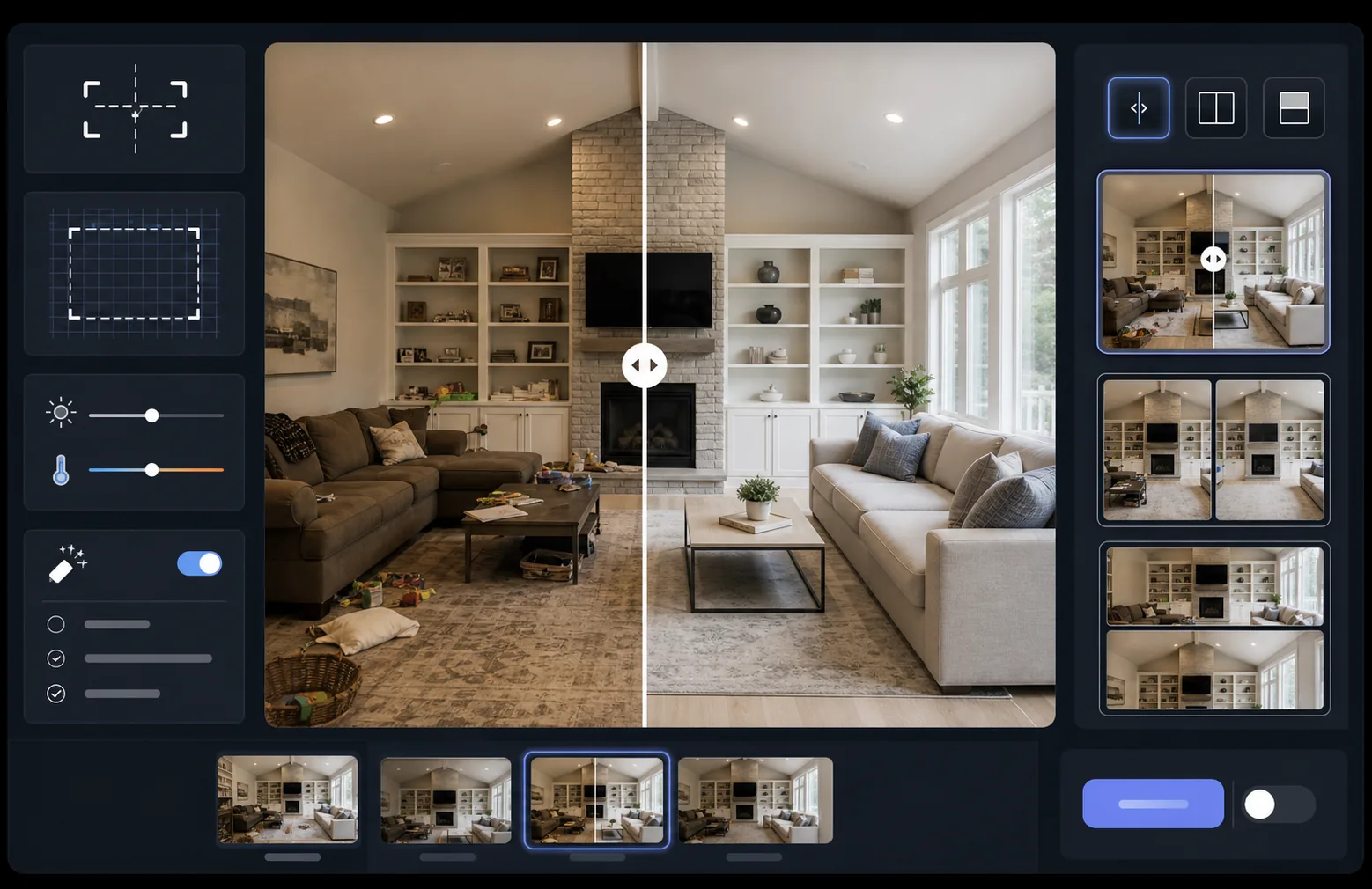
แสดงผลกระทบของงานของคุณด้วยภาพเปรียบเทียบก่อนและหลังที่จัดตำแหน่งอย่างสมบูรณ์แบบ เทมเพลตนี้สร้างคู่ภาพที่พร้อมสำหรับการสาธิตซึ่งคงการจัดเฟรม ความสมดุลของแสง และขนาดที่สม่ำเสมอ — เหมาะอย่างยิ่งสำหรับพอร์ตโฟลิโอ กรณีศึกษา หลักฐานทางสังคม และการตลาดผลิตภัณฑ์ที่การเปลี่ยนแปลงเชิงภาพเป็นผู้เล่าเรื่อง
ลองใช้เทมเพลตนี้ฟรีMarketing template preview
เทมเพลตนี้ทำอะไร
ประมวลผลภาพสองภาพ — ก่อนและหลัง — ให้เป็นคู่เปรียบเทียบที่จัดตำแหน่งอย่างสมบูรณ์แบบ พร้อมสำหรับวิดเจ็ตตัวเลื่อน เลย์เอาต์แบบเคียงข้างกัน หรือการเผยภาพแบบเคลื่อนไหว AI Enhance ปรับการเปิดรับแสงและสมดุลแสงขาวระหว่างสองเฟรมให้เป็นมาตรฐานเดียวกัน เพื่อให้เห็นการเปลี่ยนแปลงได้อย่างชัดเจนโดยไม่มีความแตกต่างของแสงมารบกวนการเปรียบเทียบ Magic Eraser สามารถลบสิ่งรบกวนที่เกิดขึ้นโดยบังเอิญในเฟรมใดเฟรมหนึ่งซึ่งไม่ได้เป็นส่วนหนึ่งของการเปลี่ยนแปลงที่ตั้งใจไว้
การตั้งค่าเทมเพลต
| เลย์เอาต์ | คู่ภาพที่พร้อมสำหรับตัวเลื่อน แบบเคียงข้างกัน หรือเรียงซ้อนแนวตั้ง (เลือกได้) |
| ขนาดเอาต์พุต | 1600×1200px ต่อเฟรม (ขนาดตรงกัน) |
| การจัดตำแหน่ง | การลงทะเบียนอัตโนมัติ — จับคู่มุมมองและการจัดเฟรมระหว่างภาพถ่าย |
| การปรับมาตรฐานแสง | ปรับสมดุลการเปิดรับแสงและสมดุลแสงขาวทั่วทั้งคู่ภาพ |
| การซ้อนป้ายกำกับ | ป้ายกำกับ 'Before' / 'After' แบบเลือกได้ พร้อมตำแหน่งที่ปรับแต่งได้ |
| เส้นขอบ | เส้นแบ่งสีเทากลาง 1px หรือขอบไร้รอยต่อ (เลือกได้) |
วิธีใช้เทมเพลตนี้
อัปโหลดภาพก่อนของคุณ
อัปโหลดภาพต้นฉบับที่ไม่ได้แก้ไขซึ่งแสดงสถานะเริ่มต้น อาจเป็นห้องก่อนการปรับปรุง ผลิตภัณฑ์ก่อนการปรับปรุง ผิวก่อนการดูแล หรือการเปลี่ยนแปลงเชิงภาพใด ๆ ที่คุณต้องการสาธิต
อัปโหลดภาพหลังของคุณ
อัปโหลดภาพผลลัพธ์ที่แสดงการเปลี่ยนแปลงที่เสร็จสมบูรณ์ พยายามถ่ายจากมุมและระยะเดียวกันกับภาพก่อน เทมเพลตจะจัดตำแหน่งความแตกต่างเล็กน้อยในการจัดเฟรมและมุมมองโดยอัตโนมัติ
ปรับมาตรฐานและจัดตำแหน่ง
เทมเพลตจะลงทะเบียนภาพทั้งสองโดยอัตโนมัติเพื่อให้องค์ประกอบที่สอดคล้องกันจัดตำแหน่งแบบพิกเซลต่อพิกเซล การเปิดรับแสงและสมดุลแสงขาวจะถูกปรับเป็นมาตรฐานเพื่อให้ความแตกต่างของแสงระหว่างการถ่ายแต่ละครั้งไม่เบี่ยงเบนความสนใจจากการเปลี่ยนแปลงที่แท้จริง
ส่งออกภาพเปรียบเทียบ
เลือกรูปแบบเอาต์พุตของคุณ — คู่ภาพที่จับคู่กันสำหรับวิดเจ็ตตัวเลื่อน ภาพประกอบแบบเคียงข้างกันสำหรับโซเชียลมีเดีย หรือเรียงซ้อนแนวตั้งสำหรับการตลาดอีเมล เพิ่มป้ายกำกับ Before/After แบบเลือกได้ และส่งออกที่ความละเอียดที่เหมาะสมสำหรับเว็บหรือคุณภาพการพิมพ์
เคล็ดลับจากมืออาชีพเพื่อผลลัพธ์ที่ดีที่สุด
- ✓ถ่ายภาพก่อนและหลังจากตำแหน่งเดียวกันทุกประการหากเป็นไปได้ — ทำเครื่องหมายตำแหน่งขาตั้งกล้องของคุณหรือยืนในจุดเดียวกัน ยิ่ง AI ต้องแก้ไขการจัดตำแหน่งน้อยเท่าไร การเปรียบเทียบก็จะยิ่งคมชัดมากขึ้นเท่านั้น
- ✓ใช้ทางยาวโฟกัสเดียวกันสำหรับทั้งสองภาพเพื่อหลีกเลี่ยงความแตกต่างของการบิดเบือนมุมมองที่ทำให้การเปรียบเทียบที่จัดตำแหน่งแล้วดูเหลื่อมล้ำเล็กน้อย
- ✓ลบการเปลี่ยนแปลงที่ไม่เกี่ยวข้องระหว่างภาพก่อนและหลังโดยใช้ Magic Eraser — หากต้นไม้ขยับหรือมีวัตถุใหม่ปรากฏขึ้น ให้ลบออกเพื่อให้ผู้ชมจดจ่อกับการเปลี่ยนแปลงที่ตั้งใจไว้
- ✓สำหรับการฝังตัวเลื่อนบนเว็บ ให้ส่งออกภาพทั้งสองในขนาดที่เหมือนกันและใช้ PNG แบบไม่สูญเสียคุณภาพเพื่อป้องกันอาตีแฟกต์จากการบีบอัดตามแนวเส้นแบ่งของตัวเลื่อน
เครื่องมือ
คำถามที่พบบ่อย
จะเกิดอะไรขึ้นหากภาพก่อนและหลังถ่ายจากมุมที่แตกต่างกันเล็กน้อย?
+
ระบบลงทะเบียนอัตโนมัติจัดการกับความแตกต่างปานกลางในมุมกล้อง ระยะ และการจัดเฟรม โดยจะระบุจุดอ้างอิงที่สอดคล้องกันในภาพทั้งสองและแปลงให้ตรงกัน เพื่อผลลัพธ์ที่ดีที่สุด ความแตกต่างของมุมควรน้อยกว่า 15 องศา
ฉันสามารถใช้สิ่งนี้สำหรับภาพขนาดย่อของวิดีโอที่แสดงการเปลี่ยนแปลงได้หรือไม่?
+
ได้ เอาต์พุตภาพประกอบแบบเคียงข้างกันเหมาะอย่างยิ่งสำหรับภาพขนาดย่อของวิดีโอบน YouTube และโซเชียลมีเดีย เลย์เอาต์แบบแบ่งหน้าจอพร้อมป้ายกำกับสื่อสารเรื่องราวการเปลี่ยนแปลงได้ทันทีซึ่งกระตุ้นการคลิก
การปรับมาตรฐานแสงเปลี่ยนแปลงผลลัพธ์จริงที่แสดงหรือไม่?
+
ไม่ การปรับมาตรฐานแสงเพียงปรับการเปิดรับแสงโดยรวมและสมดุลแสงขาวเพื่อให้ทั้งสองเฟรมดูเหมือนถูกถ่ายภายใต้สภาวะเดียวกัน การเปลี่ยนแปลงที่แท้จริง — การเปลี่ยนแปลงของวัตถุ — จะถูกคงไว้อย่างถูกต้องตามที่ถ่ายไว้ทุกประการ
แสดงผลลัพธ์ของคุณแบบเคียงข้างกัน
อัปโหลดภาพก่อนและหลังของคุณ แล้วรับภาพเปรียบเทียบที่จัดตำแหน่งอย่างสมบูรณ์แบบและนำเสนออย่างมืออาชีพภายในไม่กี่วินาที ปล่อยให้การเปลี่ยนแปลงพูดแทนตัวมันเอง
ลองใช้ฟรี