
วิธีลบพื้นหลังออกจากรูปถ่ายสินค้า
Amazon ต้องใช้พื้นหลังสีขาวล้วน รายการของ Shopify ดูดีที่สุดเมื่อมีพื้นหลังสอดคล้องกัน และสื่อทางการตลาดจำเป็นต้องมีการตัดส่วนที่โปร่งใสเพื่อประกอบเข้าด้วยกัน การมาสก์ผลิตภัณฑ์ด้วยตนเองที่มีขอบที่ซับซ้อน — โซ่เครื่องประดับ, พื้นผิวผ้า, ขวดใส — ใช้เวลา 10-30 นาทีต่อภาพ Background Eraser ของ Magic Eraser สร้างการตัดที่แม่นยำในไม่กี่วินาที
Last updated
ลบพื้นหลังทันที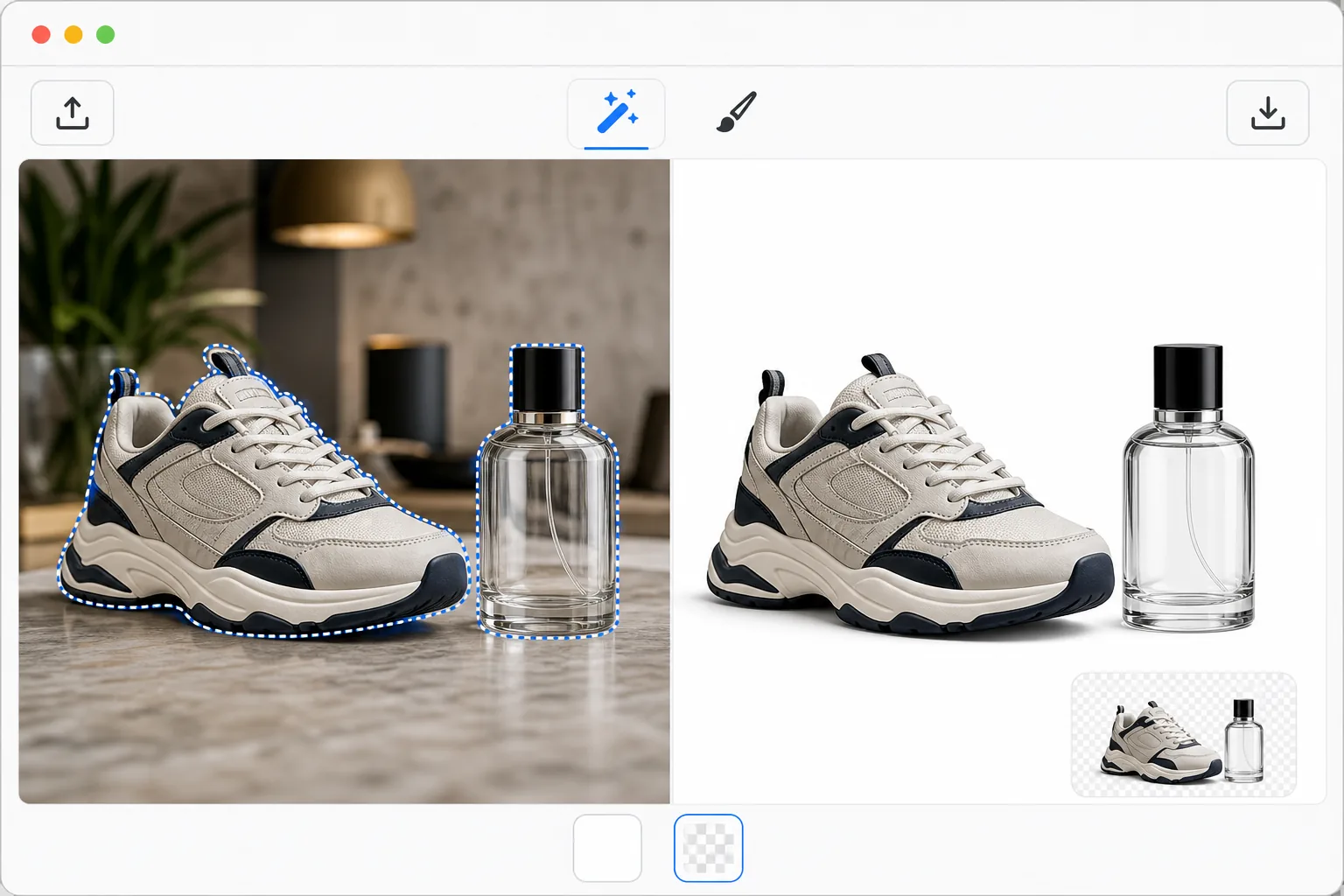
เหตุใดการลบพื้นหลังผลิตภัณฑ์จึงต้องการความแม่นยำ
ภาพถ่ายผลิตภัณฑ์อีคอมเมิร์ซจำเป็นต้องมีการตรวจจับขอบที่สมบูรณ์แบบด้วยพิกเซล โซ่เครื่องประดับที่มีผมบางต้องแยกออกจากพื้นหลังอย่างหมดจด ผลิตภัณฑ์ที่โปร่งใสและกึ่งโปร่งใส (ขวดแก้ว แว่นกันแดด ผ้าโปร่ง) จำเป็นต้องลบพื้นหลังออกโดยยังคงรักษาคุณภาพการมองทะลุได้ ขอบที่ไม่ชัดบนตุ๊กตาและสิ่งทอจะต้องคงขอบเขตที่อ่อนนุ่มไว้ แทนที่จะถูกตัดอย่างแข็ง สามารถเก็บเงาไว้เพื่อให้ดูเป็นธรรมชาติหรือลบออกเพื่อให้มีรอยตัดลอยที่ดูสะอาดตา หลักเกณฑ์ด้านภาพของ Amazon ต้องใช้พื้นหลังสีขาวบริสุทธิ์ (RGB 255,255,255) โดยไม่มีสิ่งแปลกปลอมที่มองเห็นได้รอบๆ ขอบผลิตภัณฑ์ การมาสก์ด้วยตนเองใน Photoshop ด้วยเครื่องมือปากกาให้ความแม่นยำ แต่ใช้เวลา 10-30 นาทีต่อผลิตภัณฑ์ที่ซับซ้อน Background Eraser ของ Magic Eraser ใช้ AI ที่ได้รับการฝึกมากับรูปภาพผลิตภัณฑ์นับล้านเพื่อจัดการกับ Edge Case เหล่านี้โดยอัตโนมัติ
Before you start
ลบพื้นหลังในสามขั้นตอน
Start with อัพโหลดรูปภาพสินค้า. The result preview above and tips below use this guide's existing content; no separate before-and-after proof is assumed.
- 1
อัพโหลดรูปภาพสินค้า
เปิด Magic Eraser บนเว็บ, iOS หรือ Android แล้วเลือก Background Eraser อัปโหลดภาพผลิตภัณฑ์ของคุณ — ถ่ายด้วยสีพื้นหลังหรือพื้นผิวใดก็ได้ AI จัดการผลิตภัณฑ์บนโต๊ะ การตั้งค่าไลฟ์สไตล์ ฉากหลังในสตูดิโอ หรือแม้แต่สภาพแวดล้อมกลางแจ้ง รองรับรูปแบบ JPEG, PNG, HEIC และ WebP ที่ความละเอียดใดก็ได้
- 2
ตรวจจับและปรับแต่งขอบอัตโนมัติ
AI ตรวจจับขอบเขตผลิตภัณฑ์ทันทีและลบพื้นหลังออก สำหรับผลิตภัณฑ์มาตรฐาน (อุปกรณ์อิเล็กทรอนิกส์ ไม้แขวนเสื้อ สินค้าในบรรจุภัณฑ์) โดยทั่วไปการตรวจจับอัตโนมัติจะสมบูรณ์แบบในการผ่านครั้งแรก สำหรับขอบที่ซับซ้อน เช่น เครื่องประดับ เครื่องประดับผม หรือสิ่งของที่โปร่งใส ให้ซูมเข้าและใช้แปรงปรับแต่งด้วยตนเองเพื่อปรับส่วนของขอบที่ต้องการ สลับระหว่างการแสดงตัวอย่างพื้นหลังโปร่งใสและสีขาว
- 3
เลือกพื้นหลังและส่งออก
เลือกพื้นหลังสุดท้ายของคุณ: PNG โปร่งใสสำหรับคอมโพสิต สีขาวบริสุทธิ์สำหรับการปฏิบัติตามข้อกำหนดของ Amazon และ Marketplace หรือสีที่กำหนดเองเพื่อให้ตรงกับแบรนด์ของคุณ เพิ่มเงาตกกระทบเล็กน้อยหากคุณต้องการให้ผลิตภัณฑ์ดูเรียบๆ แทนที่จะลอยอยู่ ส่งออกที่ความละเอียดสูงสุด — ช่องเจาะจะรักษาทุกพิกเซลของรายละเอียดผลิตภัณฑ์ดั้งเดิม
ดีที่สุดสำหรับ
- ผู้ขายใน Amazon และ Marketplace ที่ต้องการพื้นหลังสีขาวล้วนซึ่งตรงตามข้อกำหนดด้านรูปภาพของแพลตฟอร์ม
- ร้านค้า Shopify และอีคอมเมิร์ซสร้างแกลเลอรีผลิตภัณฑ์ที่สอดคล้องกันและมีพื้นหลังที่เหมือนกัน
- ทีมการตลาดสร้างส่วนประกอบผลิตภัณฑ์สำหรับแบนเนอร์ โฆษณา และกราฟิกโซเชียลมีเดีย
- Dropshippers ที่ได้รับรูปถ่ายของซัพพลายเออร์ที่มีพื้นหลังไม่สอดคล้องกันซึ่งจำเป็นต้องมีการสร้างมาตรฐาน
- ช่างภาพส่งภาพตัดผลิตภัณฑ์ให้กับลูกค้าเชิงพาณิชย์เพื่อใช้ในแคตตาล็อกและการพิมพ์
เคล็ดลับเพื่อผลลัพธ์ที่ดีที่สุด
Shoot products on a contrasting background for the cleanest AI detection — a white product on a dark backdrop (or vice versa) separates better than a white product on a light gray surface. การจัดแสงในสตูดิโอที่สม่ำเสมอจะช่วยลดสีที่หกจากพื้นหลังไปยังขอบผลิตภัณฑ์ ซึ่งทำให้ช่องเจาะดูสะอาดตา For transparent products like glass bottles, the AI preserves the see-through quality when the background behind the product has enough contrast to define the edges. Batch processing works well when your products are shot in a consistent setup — the AI applies the same detection quality across hundreds of images. For Amazon compliance, verify the exported white background reads as pure white (255,255,255) using an eyedropper tool, not off-white (250,250,250) which Amazon may reject.
คำถามที่พบบ่อย
- สามารถใช้ได้กับผลิตภัณฑ์โปร่งใสและผลิตภัณฑ์แก้วหรือไม่
- ใช่. AI จดจำวัสดุกึ่งโปร่งใสและรักษาคุณภาพการมองทะลุ ขวดแก้ว บรรจุภัณฑ์ใส และผ้าโปร่งถูกตัดออกโดยมีความโปร่งใสเหมือนเดิม แทนที่จะถูกมองว่าเป็นของแข็ง เอฟเฟกต์ความโปร่งใสจะยังคงอยู่เมื่อวางบนพื้นหลังใหม่
- ฉันสามารถประมวลผลภาพถ่ายสินค้าหลายร้อยภาพในคราวเดียวได้หรือไม่
- ใช่. พรีเมียมประกอบด้วยการประมวลผลแบบแบตช์ที่ใช้การลบพื้นหลังกับแคตตาล็อกผลิตภัณฑ์ทั้งหมด อัปโหลดโฟลเดอร์รูปภาพแล้ว AI จะประมวลผลแต่ละภาพโดยอัตโนมัติ ช่องเจาะทั้งหมดใช้การตรวจจับคุณภาพเดียวกัน เพื่อให้มั่นใจว่าการรักษาขอบมีความสม่ำเสมอทั่วทั้งกลุ่มผลิตภัณฑ์ทั้งหมดของคุณ
- การลบพื้นหลังผลิตภัณฑ์ฟรีหรือไม่?
- ใช่. ฟีเจอร์การตัดผลิตภัณฑ์ของ Background Eraser รวมอยู่ในรุ่นฟรีของ Magic Eraser โดยมีขีดจำกัดการใช้งานรายวัน อัปโหลด ลบอัตโนมัติ เลือกพื้นหลัง และส่งออก พรีเมียมลบข้อจำกัดและเพิ่มการประมวลผลเป็นชุด พื้นหลังที่กำหนดเอง และการส่งออกที่มีความละเอียดสูง