
วิธีทำภาพถ่ายแบบ HD
รูปภาพความละเอียดต่ำจากโทรศัพท์รุ่นเก่า การดาวน์โหลดเว็บ อีเมลที่บีบอัด และภาพที่ครอบตัดจะดูนุ่มนวลและเป็นพิกเซลบนจอแสดงผลความละเอียดสูงสมัยใหม่ AI Enhance ของ Magic Eraser เพิ่มสเกลจำนวนพิกเซลในขณะที่สร้างรายละเอียดที่คมชัดและเป็นธรรมชาติ — เปลี่ยนภาพขนาดเล็กที่นุ่มนวลให้เป็นภาพถ่ายคุณภาพ HD เหมาะสำหรับจอแสดงผลขนาดใหญ่ การพิมพ์ และการใช้งานระดับมืออาชีพ
Last updated
สร้างภาพแบบ HD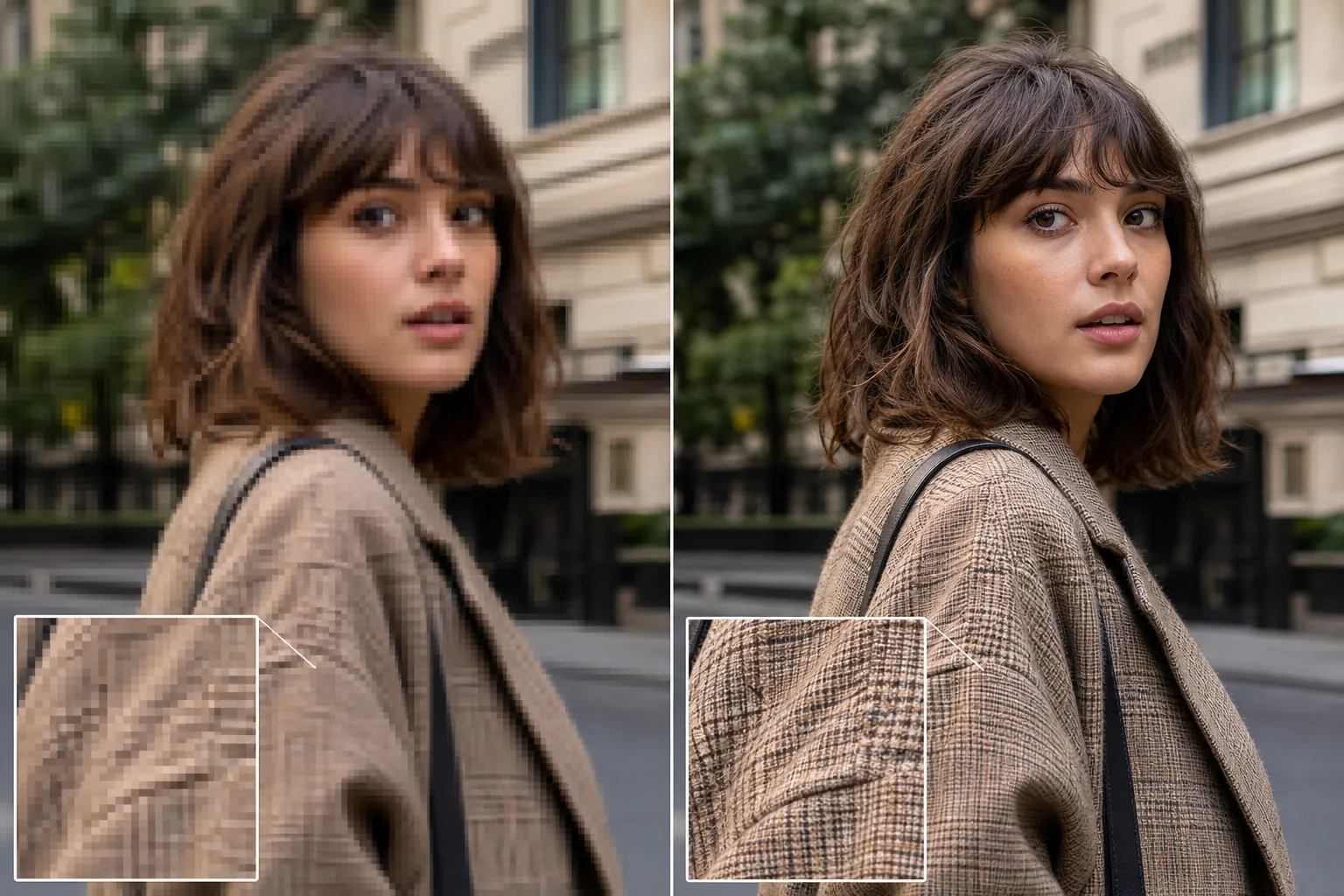
อะไรทำให้ภาพถ่าย HD และเหตุใดความละเอียดจึงมีความสำคัญ
วิธีทำให้ภาพเป็น HD: เปิด Magic Eraser บนเว็บ, iOS หรือ Android เลือก AI Enhance อัปโหลดภาพความละเอียดต่ำ แล้วปล่อยให้ AI ขยายความละเอียดให้ — มันจะเพิ่มจำนวนพิกเซลพร้อมสร้างรายละเอียดที่คมชัดอย่างแท้จริง (พื้นผิวผิว เส้นผม ขอบตัวอักษร) แทนที่จะแค่ขยายภาพที่เบลอและไม่คมให้ใหญ่ขึ้น ใช้งานได้ฟรี ไม่ต้องสมัครสมาชิก นี่คือความแตกต่างจากการปรับขนาดภาพแบบธรรมดา ที่ทำให้ภาพใหญ่ขึ้นแต่ไม่ได้ชัดขึ้น ได้ผลดีที่สุดกับภาพต้นฉบับขนาดเล็กหรือถูกบีบอัด — ภาพถ่ายจากมือถือรุ่นเก่า ภาพที่โหลดจากเว็บ ภาพที่ครอปมา — และยิ่งภาพต้นฉบับสะอาดเท่าไหร่ ผลลัพธ์ HD ก็ยิ่งคมชัดมากขึ้นเท่านั้น HD (ความคมชัดสูง) ในการถ่ายภาพหมายความว่าภาพมีพิกเซลเพียงพอที่จะปรากฏความคมชัดตามขนาดการแสดงผลที่ต้องการ รูปภาพที่ดูดีเป็นภาพขนาดย่อของโซเชียลมีเดีย (200x200 พิกเซล) จะมีลักษณะเป็นบล็อกและเป็นพิกเซลเมื่อแสดงเป็นแบนเนอร์ฮีโร่ (1920x1080) หรือพิมพ์ที่ 8x10 นิ้ว (2400x3000 พิกเซลที่ 300 DPI) จำนวนพิกเซลจะกำหนดขนาดสูงสุดที่รูปภาพสามารถแสดงได้โดยไม่สูญเสียคุณภาพที่มองเห็นได้ การลดขนาดแบบดั้งเดิมในโปรแกรมแก้ไขรูปภาพ (ขนาดรูปภาพของ Photoshop, การปรับขนาดของตัวอย่าง) ใช้อัลกอริธึมการแก้ไข (bicubic, bilinear, Lanczos) ที่เพิ่มจำนวนพิกเซลโดยการผสมผสานพิกเซลที่มีอยู่ทางคณิตศาสตร์ ซึ่งจะทำให้ภาพมีขนาดใหญ่ขึ้นแต่ไม่คมชัดขึ้น โดยจะให้ภาพที่นุ่มนวลและนุ่มนวลในขนาดใหม่ แทนที่จะเพิ่มรายละเอียดที่แท้จริง ผลลัพธ์เมื่อใช้กำลังขยาย 2 เท่าจะดูเหมือนเป็นเวอร์ชันเบลอของต้นฉบับ แทนที่จะเป็นเวอร์ชันคุณภาพสูงกว่า การลดขนาด AI ทำงานแตกต่างออกไป: แบบจำลองนี้ได้รับการฝึกฝนกับรูปภาพนับล้านภาพที่ความละเอียดหลายระดับ และเรียนรู้ว่ารายละเอียดเล็กๆ น้อยๆ (รูขุมขนของผิวหนัง เนื้อผ้า เส้นผม ขอบข้อความ ใบไม้) มีลักษณะอย่างไรที่ความละเอียดสูง เมื่อขยายขนาดภาพที่มีความละเอียดต่ำ มันจะสร้างรายละเอียดเล็กๆ น้อยๆ ดังที่ภาพจะมีหากถ่ายด้วยความละเอียดสูงกว่า ผลลัพธ์ที่ได้จะคมชัดยิ่งขึ้นจริงๆ ไม่ใช่แค่ใหญ่ขึ้นเท่านั้น สิ่งนี้มองเห็นได้ชัดเจนในใบหน้า (โดยที่ AI เพิ่มพื้นผิวตามธรรมชาติและรายละเอียดดวงตา), ข้อความ (โดยที่ AI ทำให้ขอบตัวอักษรคมชัดเพื่อให้อ่านง่าย) และพื้นผิวที่เป็นธรรมชาติ (โดยที่ AI สร้างรายละเอียดใบไม้ น้ำ และผ้าที่การแก้ไขไม่สามารถสร้างได้)
Before you start
สร้างภาพถ่าย HD ในสามขั้นตอน
Start with อัปโหลดภาพความละเอียดต่ำ. The result preview above and tips below use this guide's existing content; no separate before-and-after proof is assumed.
- 1
อัปโหลดภาพความละเอียดต่ำ
เปิด Magic Eraser บนเว็บ, iOS หรือ Android วางรูปภาพความละเอียดต่ำลงไป เช่น รูปภาพขนาดเล็กจากหน้าเว็บ รูปภาพในโทรศัพท์เก่า ไฟล์แนบอีเมลที่บีบอัด ส่วนที่ครอบตัดของรูปภาพขนาดใหญ่ หรือรูปภาพใดๆ ที่ดูนุ่มนวลหรือเป็นพิกเซลในขนาดที่คุณต้องการ รองรับ JPEG, PNG, HEIC และ WebP ทั้งหมด
- 2
ใช้ AI Enhance เพื่อยกระดับ
เลือก AI Enhance AI วิเคราะห์เนื้อหาภาพและเพิ่มสเกล ซึ่งโดยทั่วไปจะเป็น 2x ถึง 4x จากความละเอียดดั้งเดิม ในขณะที่สร้างรายละเอียดที่คมชัดและเป็นธรรมชาติด้วยจำนวนพิกเซลใหม่ รูปภาพที่มีความกว้าง 500 พิกเซลจะกลายเป็นความกว้าง 1,000-2,000 พิกเซลพร้อมรายละเอียดที่แท้จริงที่ความละเอียดใหม่ ไม่ใช่แค่ความนุ่มนวลที่สอดแทรกเท่านั้น AI จัดการการลดสัญญาณรบกวน การปรับความคมชัด และ Color correction ไปพร้อมๆ กับการอัปสเกล ทำให้เกิดผลลัพธ์ HD ที่สะอาดตาในการส่งผ่านครั้งเดียว
- 3
ตรวจสอบและส่งออกที่ความละเอียด HD
เปรียบเทียบผลลัพธ์ที่ได้รับการปรับปรุงกับต้นฉบับที่จอแสดงผลขนาดเดียวกัน ความแตกต่างจะมองเห็นได้มากที่สุดในพื้นที่ที่มีรายละเอียดปลีกย่อย (ใบหน้า ข้อความ พื้นผิว ขอบ) เวอร์ชันปรับปรุงควรปรากฏคมชัดอย่างเป็นธรรมชาติ แทนที่จะผ่านการประมวลผลแบบเทียม ส่งออกด้วยความละเอียดที่ได้รับการปรับปรุงเต็มที่สำหรับกรณีการใช้งานเป้าหมายของคุณ: 1920x1080 หรือใหญ่กว่าสำหรับจอแสดงผล HD, 3840x2160 สำหรับ 4K หรือความละเอียดที่เหมาะสม DPI สำหรับการพิมพ์ (300 DPI ที่ขนาดการพิมพ์)
ดีที่สุดสำหรับ
- ภาพถ่ายในโทรศัพท์เก่าจากสมาร์ทโฟนรุ่นแรกๆ (กล้อง 2-5 ล้านพิกเซล) ที่ต้องการการแสดงผลและคุณภาพการพิมพ์ที่ทันสมัย
- รูปภาพที่มาจากเว็บซึ่งบันทึกหรือดาวน์โหลดด้วยความละเอียดต่ำ และจำเป็นต้องพิมพ์หรือแสดงในขนาดที่ใหญ่กว่า
- ภาพถ่ายที่ครอบตัดซึ่งการซูมเข้าไปในวัตถุจะลดความละเอียดที่ใช้งานจริงให้ต่ำกว่าระดับ HD
- ไฟล์แนบอีเมลและข้อความที่ถูกบีบอัดโดยแพลตฟอร์มการส่งและสูญเสียการแก้ปัญหาระหว่างการส่ง
- รูปภาพโซเชียลมีเดียที่ถูกนำมาใช้ใหม่สำหรับการพิมพ์ การนำเสนอ หรือสื่อทางการตลาดที่ต้องการความละเอียดสูงกว่า
- ภาพนิ่งของกล้องวงจรปิดและกล้องรักษาความปลอดภัยที่ต้องขยายขนาดเพื่อวัตถุประสงค์ในการระบุตัวตนหรือเอกสาร
เคล็ดลับเพื่อผลลัพธ์ที่ดีที่สุด
ความละเอียดเริ่มต้นจะกำหนดว่า AI สามารถยกระดับด้วยผลลัพธ์ที่เป็นธรรมชาติได้ไกลแค่ไหน ภาพกว้าง 1000 พิกเซลที่เพิ่มสเกล 2x เป็น 2000 พิกเซลให้คุณภาพระดับ HD ที่ยอดเยี่ยมพร้อมรายละเอียดที่ดูสมจริง ภาพขนาดย่อกว้าง 200 พิกเซลที่อัปเกรดจาก 4x เป็น 800 พิกเซลจะสร้างภาพที่ได้รับการปรับปรุงอย่างเห็นได้ชัด แต่ AI กำลังสร้างรายละเอียดจำนวนมากจากแหล่งข้อมูลที่จำกัดมาก ผลลัพธ์ที่ได้ดูดีกว่าต้นฉบับ แต่อาจไม่ตรงกับภาพ 800 พิกเซลที่ถ่ายโดยธรรมชาติ สำหรับการพิมพ์โดยเฉพาะ: คำนวณความละเอียดเป้าหมายของคุณเป็น print_width_inches × 300 = pixel_width_needed การพิมพ์ขนาด 8x10 ต้องการความละเอียด 2400×3000 พิกเซล หากภาพต้นฉบับของคุณมีขนาด 800×1000 AI จะต้องเพิ่มสเกล 3 เท่า ซึ่งอยู่ในช่วงที่มีประสิทธิภาพ สำหรับงานพิมพ์ขนาด 16×20 ที่ 300 DPI (4800×6000) คุณต้องมีภาพต้นฉบับที่มีขนาดอย่างน้อย 1200×1500 เพื่อให้ AI สามารถสร้างรายละเอียดคุณภาพภาพถ่ายตามขนาดการพิมพ์ได้ สำหรับการแสดงผลบนเว็บ: HD (1920×1080) เป็นเป้าหมายมาตรฐาน รูปภาพในโทรศัพท์ส่วนใหญ่ในช่วง 5 ปีที่ผ่านมาเกินความละเอียดนี้อยู่แล้ว แต่รูปภาพเก่า ภาพที่ดาวน์โหลด และภาพหน้าจอมักจะขาด AI Enhance เชื่อมช่องว่างโดยไม่มีความนุ่มนวลเหมือนการปรับขนาดแบบดั้งเดิม
คำถามที่พบบ่อย
- AI การลดขนาดเป็น HD ฟรีหรือไม่
- ใช่. เทียร์ฟรีของ Magic Eraser ประกอบด้วย AI Enhance สำหรับการขยายขนาดโดยจำกัดการใช้งานรายวัน พรีเมียม ($29.99/ปี) ขจัดข้อจำกัดและเปิดใช้งานเอาต์พุตความละเอียดสูงสุดสำหรับงานพิมพ์ขนาดใหญ่และจอแสดงผล 4K
- AI สามารถอัปสเกลได้ขนาดไหน?
- โดยทั่วไปการเพิ่มสเกลที่มีประสิทธิภาพคือ 2x ถึง 4x ภาพกว้าง 1,000 พิกเซลที่อัปเกรดเป็น 2,000-4,000 พิกเซลจะให้ผลลัพธ์ที่คมชัดและดูเป็นธรรมชาติ เกินกว่า 4 เท่า AI จะสร้างเนื้อหามากกว่าที่เก็บรักษาไว้ และผลลัพธ์ที่ได้ก็สื่อความหมายได้มากกว่าความซื่อสัตย์ต่อต้นฉบับ
- การลดขนาด AI ดีกว่าการปรับขนาด Photoshop หรือไม่
- ใช่ สำหรับเนื้อหาเกี่ยวกับภาพถ่าย การปรับขนาดของ Photoshop ใช้การประมาณค่าทางคณิตศาสตร์ (bicubic, bilinear) ซึ่งทำให้ภาพใหญ่ขึ้นแต่นุ่มนวลขึ้น การเพิ่มขนาด AI จะสร้างรายละเอียดตามจริง เช่น พื้นผิว การทอผ้า ความคมชัดของข้อความ ขอบใบไม้ ซึ่งการประมาณค่าไม่สามารถสร้างขึ้นได้ ความแตกต่างจะมองเห็นได้มากที่สุดเมื่อใช้กำลังขยาย 2 เท่าขึ้นไป
- ฉันสามารถสร้างภาพหน้าจอแบบ HD ได้หรือไม่
- ใช่. ภาพหน้าจอเป็นเป้าหมายการลดขนาดทั่วไปเนื่องจากจับภาพที่ความละเอียดหน้าจอ (มักจะเป็น 1x หรือ 2x ของขนาดจอแสดงผล) และต้องมีขนาดใหญ่ขึ้นสำหรับการนำเสนอ การพิมพ์ หรือการตลาด AI Enhance ทำให้ข้อความ องค์ประกอบ UI และเนื้อหารูปภาพภายในภาพหน้าจอคมชัดขึ้นพร้อมทั้งขยายขนาดเป็นความละเอียดเป้าหมาย
- การลดขนาดจะทำให้ภาพเบลอมีความคมชัดหรือไม่?
- การเพิ่มขนาด AI ช่วยลดความนุ่มนวล (ขาดรายละเอียดเล็กๆ น้อยๆ ที่ความละเอียดปัจจุบัน) และความเบลอปานกลาง (กล้องสั่นเล็กน้อย ซอฟต์โฟกัส) มันให้ผลลัพธ์ที่คมชัดกว่าเดิมอย่างเห็นได้ชัด ภาพเบลอจากการเคลื่อนไหวอย่างหนัก (การเคลื่อนไหวของวัตถุอย่างรวดเร็ว) หรือการพร่ามัวอย่างรุนแรงได้รับการปรับปรุงบางส่วน แต่ไม่สามารถย้อนกลับได้ทั้งหมด ข้อมูลภาพมีรอยเปื้อนโดยพื้นฐาน แทนที่จะแก้ไขไม่ได้ผล