
วิธีแก้ไขภาพไม่ชัด
กล้องสั่นระหว่างการถ่ายภาพกลางคืนโดยถือกล้องด้วยมือ, โฟกัสอัตโนมัติไปที่พื้นหลังแทนที่จะเป็นวัตถุ, เด็กเคลื่อนที่เร็วกว่าความเร็วชัตเตอร์, กล้องโทรศัพท์ประสบปัญหาในที่แสงน้อย — ภาพเบลอเกิดขึ้นซึ่งไม่สามารถถ่ายใหม่ได้ AI Enhance ของ Magic Eraser วิเคราะห์ประเภทและระดับของความเบลอ และใช้การปรับความคมชัดตามเป้าหมายที่จะกู้คืนรายละเอียดโดยไม่ต้องสร้างสิ่งแปลกปลอม
Last updated
แก้ไขภาพเบลอ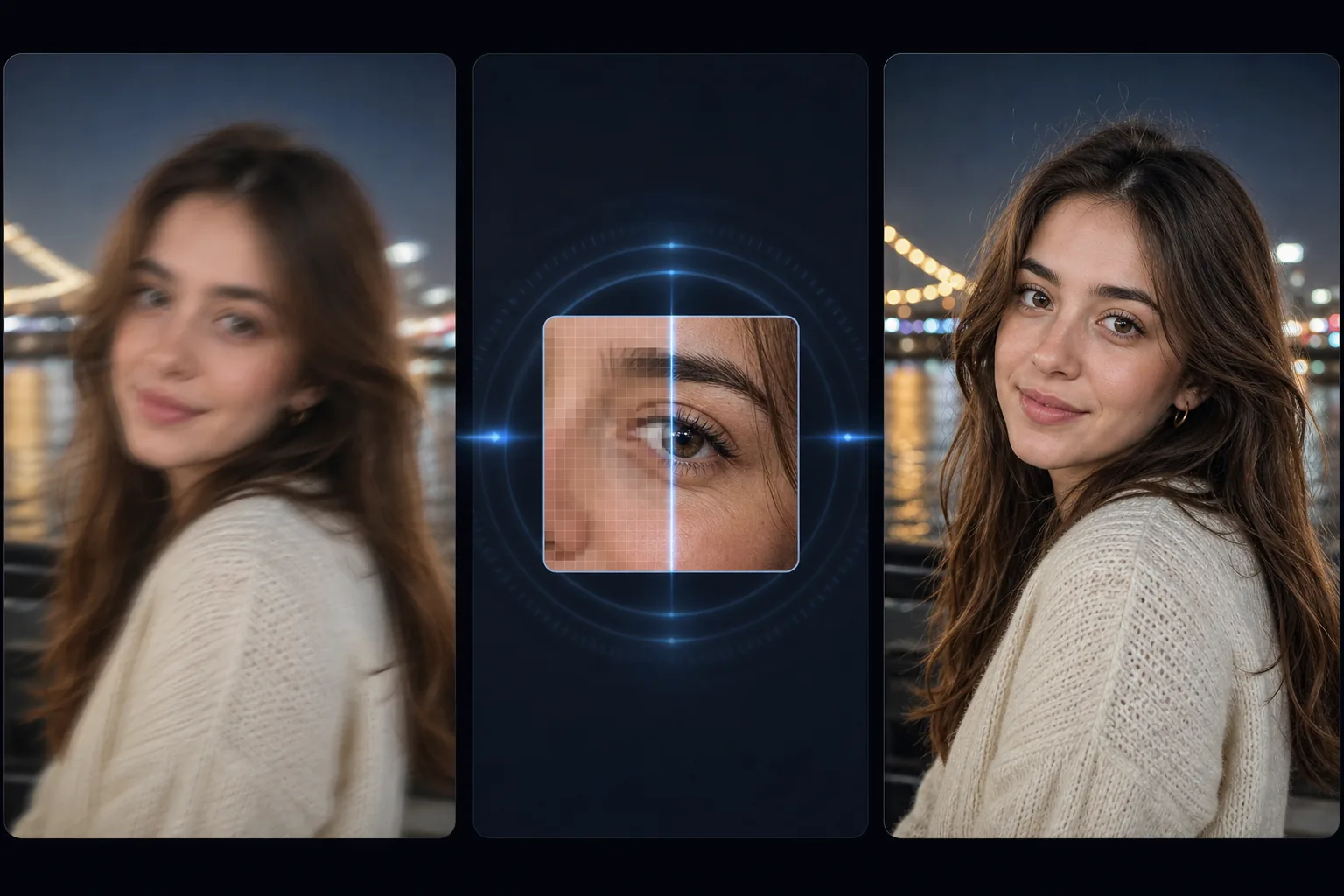
ประเภทของการเบลอและสิ่งที่ AI สามารถกู้คืนได้จากแต่ละประเภท
วิธีแก้รูปเบลอ เปิด Magic Eraser บนเว็บ iOS หรือ Android อัปโหลดรูป แล้วใช้ AI Enhance ระบบจะตรวจจับว่าเบลอแบบไหนและปรับความคมชัดแบบเจาะจงเพื่อดึงรายละเอียดตามขอบกลับคืนมา ใช้ฟรี ไม่ต้องสมัครสมาชิก รูปจะคืนกลับมาได้มากแค่ไหนขึ้นอยู่กับความเบลอ อาการมือสั่นเล็กน้อยและความนุ่มจากแสงน้อยฟื้นได้ดี โฟกัสหลุดเล็กน้อยฟื้นได้บางส่วน ส่วนภาพที่เบลอจากการเคลื่อนไหวรุนแรงหรือซับเจกต์ที่หลุดโฟกัสหนัก ๆ ทำได้แค่ปรับให้ดีขึ้นเท่านั้น ไม่สามารถทำให้คมจริง ๆ ได้ เพราะรายละเอียดนั้นไม่เคยถูกบันทึกไว้ตั้งแต่แรก เริ่มจากไฟล์ต้นฉบับ (ไม่ใช่ภาพแคปหน้าจอ) และมองภาพที่เบลอหนักเป็นการปรับให้ดีที่สุดเท่าที่ทำได้ ไม่ใช่การกู้คืนที่การันตีผล ภาพเบลอทั้งหมดไม่เหมือนกัน และแต่ละประเภทก็มีเพดานการฟื้นตัวที่แตกต่างกัน การสั่นของกล้อง (ภาพทั้งหมดมีรอยเปื้อนในทิศทางเดียวอย่างสม่ำเสมอเนื่องจากกล้องเคลื่อนที่ระหว่างการเปิดรับแสง) เป็นวิธีการที่สามารถกู้คืนได้มากที่สุด โดยรายละเอียดจะเลื่อนไปแต่ไม่ถูกทำลาย และ AI สามารถย้อนกลับการเลื่อนเพื่อสร้างขอบที่คมชัดขึ้นมาใหม่ได้ การพลาดโฟกัสอัตโนมัติ (วัตถุที่ต้องการนั้นนุ่มนวลในขณะที่ระนาบความลึกอีกอันนั้นคมชัด) สามารถฟื้นตัวได้ดีสำหรับการพร่ามัวเล็กน้อย และบางส่วนสามารถกู้คืนได้สำหรับการพร่ามัวที่หนักหน่วง ขึ้นอยู่กับระยะห่างจากระนาบโฟกัสของวัตถุ ภาพเบลอจากการเคลื่อนไหวจากการเคลื่อนไหวของวัตถุ (พื้นหลังที่คมชัดแต่เป็นภาพคน รถยนต์ หรือสัตว์ที่เคลื่อนไหวอย่างเบลอ) สามารถกู้คืนได้บางส่วน โดย AI สามารถทำให้ขอบของวัตถุที่กำลังเคลื่อนไหวคมชัดขึ้นและกู้คืนรายละเอียดที่ค้างอยู่บางส่วนได้ แต่รอยเปื้อนจากการเคลื่อนไหวทิศทางที่รุนแรงจะสูญเสียข้อมูลที่ไม่สามารถสร้างใหม่ได้ทั้งหมด ความนุ่มนวลในสภาวะแสงน้อย (โดยทั่วไปภาพจะดูนุ่มนวลและมีเม็ดหยาบเนื่องจากกล้องใช้ความเร็วชัตเตอร์ต่ำและ ISO สูงในสภาพแสงน้อย) ตอบสนองต่อ AI Enhancement ได้ดี เนื่องจากมีความนุ่มนวลเล็กน้อยและโครงสร้างรายละเอียดพื้นฐานไม่เสียหาย แต่มีสัญญาณรบกวน AI จัดการทั้งสี่ประเภทโดยการวิเคราะห์รูปแบบการเบลอทั่วทั้งภาพและใช้การแก้ไขที่เหมาะสม — การลดการหมุนวนที่สม่ำเสมอสำหรับการสั่นของกล้อง, การปรับความคมชัดของขอบสำหรับการพร่ามัว, การฟื้นฟูทิศทางสำหรับภาพเบลอจากการเคลื่อนไหว และการรวมการลดสัญญาณรบกวนบวกกับการปรับความคมชัดเพื่อความนุ่มนวลในที่แสงน้อย ผลลัพธ์ที่ได้คือภาพที่คมชัดยิ่งขึ้นอย่างมาก โดยสามารถเก็บรายละเอียดได้มากเท่าที่ประเภทความเบลอจะเอื้ออำนวย
Before you start
แก้ไขภาพเบลอในสามขั้นตอน
Start with อัพโหลดภาพเบลอๆ. The result preview above and tips below use this guide's existing content; no separate before-and-after proof is assumed.
- 1
อัพโหลดภาพเบลอๆ
เปิด Magic Eraser บนเว็บ, iOS หรือ Android ลองถ่ายภาพที่เบลอ เช่น ภาพที่ใช้มือถือกล้องสั่น ภาพบุคคลที่โฟกัสผิด ภาพในโทรศัพท์ที่มีแสงน้อย ภาพแอ็กชั่นช็อตที่มีภาพเบลอจากการเคลื่อนไหว AI จัดการแหล่งที่มาใดก็ได้: กล้องโทรศัพท์, DSLR, ภาพพิมพ์ที่สแกน, ภาพที่ดาวน์โหลด รองรับ JPEG, PNG, HEIC และ WebP
- 2
สมัคร AI Enhance
เลือก AI Enhance AI ตรวจจับประเภทและระดับความเบลอที่มีอยู่ และใช้การแก้ไขแบบกำหนดเป้าหมาย สำหรับการสั่นของกล้อง กล้องจะกลับทิศทางการสเมียร์ สำหรับการพร่ามัว จะทำให้ขอบนุ่มนวลขึ้นและคืนรายละเอียดพื้นผิว สำหรับภาพเบลอจากการเคลื่อนไหวบนวัตถุที่กำลังเคลื่อนที่ จะช่วยลดเส้นทิศทาง เพื่อความนุ่มนวลในที่แสงน้อย กล้องจะปรับให้คมชัดขึ้นพร้อมๆ กับลดสัญญาณรบกวนที่เกิดจากสภาพแสงน้อย การแก้ไขทั้งหมดเกิดขึ้นในรอบเดียว คุณไม่จำเป็นต้องระบุประเภทภาพเบลอด้วยตัวเอง
- 3
เปรียบเทียบและส่งออก
ใช้มุมมองก่อน/หลังเพื่อดูเอฟเฟกต์ความคมชัด ตรวจสอบส่วนที่สำคัญที่สุด: ใบหน้า (ความชัดเจนของดวงตา พื้นผิว) ข้อความ (หากมีอยู่ในภาพ) และขอบละเอียด (เส้นผม พื้นผิวผ้า เส้นสถาปัตยกรรม) สำหรับภาพที่พร่ามัวเล็กน้อย AI มักจะคืนความคมชัดที่เกือบเต็ม สำหรับภาพถ่ายที่เบลอมาก การปรับปรุงมีความสำคัญมาก แต่รายละเอียดเล็กๆ น้อยๆ ที่ถูกทำลายจากการเบลอนั้นไม่สามารถกู้คืนได้ทั้งหมด ส่งออกด้วยความละเอียดเต็ม
ดีที่สุดสำหรับ
- ภาพถ่ายกลางคืนและแสงน้อยแบบมือถือซึ่งความเร็วชัตเตอร์ต่ำทำให้กล้องสั่นและทำให้ภาพทั้งหมดดูนุ่มนวล
- โฟกัสอัตโนมัติพลาดจุดที่กล้องโฟกัสไปที่พื้นหลังแทนที่จะเป็นวัตถุที่ต้องการ ส่งผลให้วัตถุมีความนุ่มนวล
- ภาพถ่ายในโทรศัพท์ที่มีแสงน้อยที่เซ็นเซอร์ชดเชยด้วย ISO สูง (ทำให้เกิดเกรน) และชัตเตอร์ช้า (ให้ความนุ่มนวล)
- ภาพถ่ายแอ็คชั่นและกีฬาที่วัตถุเคลื่อนที่เร็วกว่าความเร็วชัตเตอร์ ทำให้เกิดภาพเบลอในทิศทางที่เคลื่อนไหว
- ภาพถ่ายของเด็กและสัตว์เลี้ยงที่มีการเคลื่อนไหวที่คาดเดาไม่ได้ระหว่างการรับแสงทำให้เกิดภาพเบลอบางส่วน
- ภาพถ่ายที่พิมพ์แล้วที่สแกนโดยที่งานพิมพ์มีความนุ่มนวลเล็กน้อยอยู่แล้ว และการสแกนไม่ได้เพิ่มความคมชัดเพิ่มเติม
เคล็ดลับเพื่อผลลัพธ์ที่ดีที่สุด
ระดับความเบลอจะกำหนดว่า AI สามารถกู้คืนได้มากเพียงใด ภาพเบลอเล็กน้อย (ภาพดูนุ่มนวลเล็กน้อย แต่คุณยังสามารถอ่านข้อความและดูลักษณะใบหน้าได้อย่างชัดเจน) กู้คืนได้เกือบทั้งหมด — AI จะคืนความคมชัดดั้งเดิมเป็นหลัก ความเบลอปานกลาง (ภาพนุ่มนวลอย่างเห็นได้ชัด ข้อความอ่านยาก ลักษณะใบหน้ามองเห็นได้แต่ไม่มีรายละเอียด) ดีขึ้นอย่างมาก แต่อาจไม่ถึงความคมชัดของภาพที่คมชัดตั้งแต่แรกเริ่ม ความเบลอที่หนักหน่วง (ภาพนุ่มนวลมาก มองเห็นรูปร่างได้แต่รายละเอียดหายไป มองเห็นรอยเปื้อนทิศทางที่ชัดเจน) ปรับปรุงความคมชัดโดยรวมให้ดีขึ้นอย่างมาก แต่รายละเอียดที่ดีจะถูกสร้างขึ้นบางส่วนแทนที่จะกู้คืนกลับคืนมา เพื่อผลลัพธ์ที่ดีที่สุดในภาพถ่ายที่พร่ามัวเล็กน้อย AI Enhance ในการผ่านครั้งเดียวก็เพียงพอแล้ว สำหรับภาพถ่ายที่มีความพร่ามัวปานกลาง การเรียกใช้ AI Enhance หนึ่งครั้งจะให้การปรับปรุงมากที่สุด — การผ่านครั้งที่สองจะให้ผลลัพธ์ที่ลดลงและอาจนำไปสู่สิ่งแปลกปลอมที่มีความคมชัดมากเกินไป สำหรับภาพถ่ายที่มีการเบลอแบบผสม (บางพื้นที่คมชัด และบางพื้นที่เบลอ — ซึ่งมักเกิดจากการพลาดโฟกัสอัตโนมัติ) AI จะใช้การปรับความคมชัดตามสัดส่วนตามระดับความเบลอในแต่ละภูมิภาค เพื่อให้ส่วนที่คมชัดยังคงดูเป็นธรรมชาติในขณะที่พื้นที่ที่พร่ามัวได้รับการแก้ไข
คำถามที่พบบ่อย
- การแก้ไขภาพเบลอฟรีหรือไม่?
- ใช่. เทียร์ฟรีของ Magic Eraser ประกอบด้วย AI Enhance สำหรับการแก้ไขภาพเบลอโดยจำกัดการใช้งานรายวัน พรีเมียม ($29.99/ปี) ขจัดข้อจำกัดและช่วยให้ได้ผลลัพธ์คุณภาพสูงขึ้น
- AI สามารถแก้ไขภาพที่เบลอมากได้หรือไม่?
- ขึ้นอยู่กับระดับความเบลอ ภาพถ่ายที่พร่ามัวเล็กน้อย (ความนุ่มนวลเล็กน้อย ข้อความที่อ่านได้ คุณสมบัติที่จดจำได้) สามารถกลับคืนสู่ความคมชัดที่ใกล้เคียงต้นฉบับได้ ภาพถ่ายที่มีความพร่ามัวปานกลางจะดีขึ้นอย่างมาก ภาพถ่ายที่มีการเบลออย่างมาก (รูปร่างที่จดจำได้แต่รายละเอียดหายไป) มีการปรับปรุงความชัดเจนโดยรวม แต่รายละเอียดเล็กๆ น้อยๆ นั้นสร้างขึ้นโดย AI บางส่วน แทนที่จะกู้คืนจากข้อมูลต้นฉบับ AI ไม่สามารถสร้างรายละเอียดที่ถูกทำลายทั้งหมดด้วยความพร่ามัวที่รุนแรงได้
- มันใช้งานได้กับภาพเบลอจากการเคลื่อนไหวหรือไม่?
- ใช่. ภาพเบลอจากการเคลื่อนไหวจากวัตถุที่กำลังเคลื่อนที่ (นักวิ่งที่เบลอกับพื้นหลังที่คมชัด รถที่กำลังเคลื่อนที่โดยมีแนวทิศทาง) ตอบสนองต่อ AI Enhancement AI ช่วยลดความเบลอของทิศทางและกู้คืนรายละเอียดขอบของวัตถุที่กำลังเคลื่อนไหว ภาพเบลอจากการเคลื่อนไหวด้วยแสงจะฟื้นตัวได้ดี ภาพเบลอจากการเคลื่อนไหวอย่างหนัก (รอยเปื้อนทิศทางที่รุนแรง) จะลดลง แต่ความนุ่มนวลของทิศทางบางส่วนอาจยังคงอยู่
- มันจะลับคมมากเกินไปและสร้างสิ่งประดิษฐ์หรือไม่?
- AI ใช้การเพิ่มความคมชัดตามสัดส่วนกับความเบลอที่ตรวจพบ ดังนั้นพื้นที่ที่มีความคมอยู่แล้วจะได้รับการประมวลผลเพียงเล็กน้อย ในขณะที่พื้นที่ที่พร่ามัวจะได้รับการแก้ไขที่เข้มขึ้น วิธีนี้จะช่วยป้องกันสิ่งประดิษฐ์รัศมีที่มีความคมชัดมากเกินไปซึ่ง Unsharp Mask ที่ก้าวร้าวใน Photoshop สร้างขึ้น สำหรับภาพที่คมชัดอยู่แล้วซึ่งไม่จำเป็นต้องแก้ไขความเบลอ AI Enhance จะใช้การปรับปรุงคุณภาพโดยรวมอย่างละเอียดโดยไม่ทำให้คมชัดเกินไป
- มันสามารถแก้ไขภาพที่วัตถุอยู่ในโฟกัสผิดได้หรือไม่?
- บางส่วน. หากวัตถุที่ต้องการอยู่นอกโฟกัสเล็กน้อย (พร่ามัวเล็กน้อย รายละเอียดที่จดจำได้ยังคงมองเห็นได้) AI Enhance จะทำให้วัตถุคมชัดขึ้นอย่างมีประสิทธิภาพ หากวัตถุอยู่นอกโฟกัสอย่างมาก (โบเก้ชัดเจน ไม่มีรายละเอียดที่มองเห็นได้) AI จะสร้างรายละเอียดที่เป็นไปได้ตามรูปร่างที่เบลอและบริบทโดยรอบ ซึ่งเป็นการปรับปรุงจากต้นฉบับที่เบลอ แต่ไม่เทียบเท่ากับการโฟกัสไปที่วัตถุในตอนแรก