
Paisagem pronta para impressão
Transforme fotografias de paisagem em arquivos prontos para impressão em grande formato a 300 DPI. Este modelo amplia imagens para impressões de 16x20 polegadas e maiores, removendo elementos visuais que distraem, como linhas de energia, placas de trânsito e cercas que desviam a atenção do cenário natural. A gradação de cores é otimizada para substratos de tela, metal e papel para belas-artes.
Experimente este modelo gratuitamentePhotography template preview
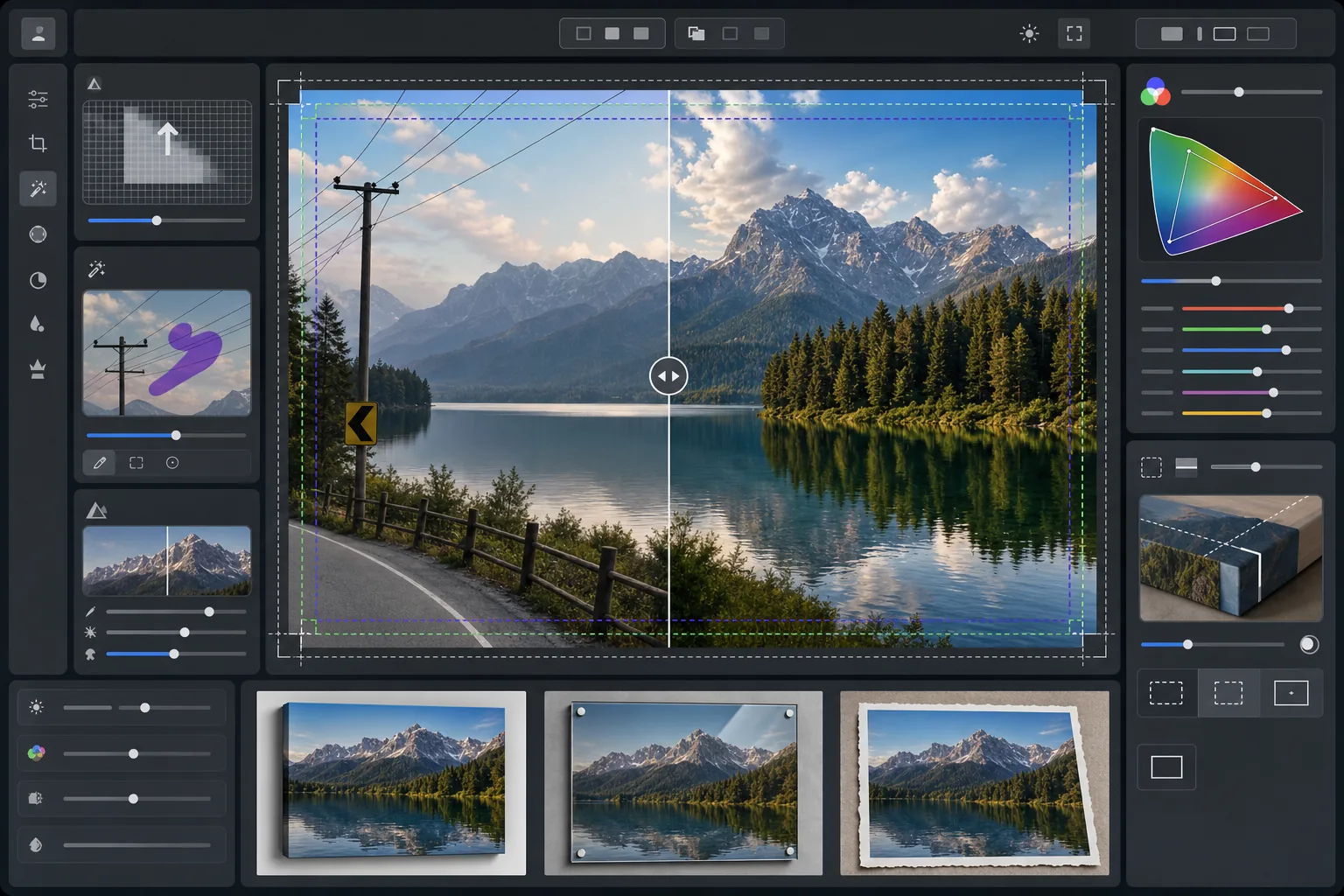
O que este modelo faz
Prepara fotografias de paisagem para impressão profissional em grande formato, ampliando a resolução para atender aos requisitos de 300 DPI a 16x20 polegadas e além. O AI Enhance aumenta a contagem de pixels sem introduzir artefatos, preservando os detalhes finos da folhagem, das texturas da água e das formações de nuvens. O Magic Eraser remove linhas de energia, postes, placas de trânsito, cercas e outras distrações artificiais que interrompem a composição natural. A cor é ajustada para a gama mais ampla e as diferentes propriedades reflexivas de telas esticadas, impressões em metal de alumínio e papel de algodão para belas-artes.
Configurações do modelo
| Meta de ampliação | 6000×4000px no mínimo (300 DPI a 20×13 polegadas) |
| Nitidez | Máscara de nitidez otimizada para impressão (raio 1,2, quantidade 80%) |
| Perfil de cor | ProPhoto RGB (gama máxima para impressão de belas-artes) |
| Faixa dinâmica | Sombras +0,8 EV, recuperação de altas luzes -0,3 EV |
| Redução de ruído | Sensível à luminância (preserva a granulação nos céus, suaviza a folhagem) |
| Formato de saída | TIFF de 16 bits com perfil ICC incorporado |
Como usar este modelo
Envie sua foto de paisagem
Envie uma imagem de paisagem de qualquer câmera ou smartphone. A IA analisa a resolução de origem e calcula o fator de ampliação necessário para atingir 300 DPI no tamanho de impressão desejado. Até mesmo fotos de smartphone de 12 megapixels podem ser ampliadas de forma limpa para impressões de 16x20.
Remova as distrações visuais
O Magic Eraser identifica e remove linhas de energia, postes, placas de trânsito, cercas, lixo e outros elementos artificiais que desviam a atenção da cena natural. A IA reconstrói os gradientes do céu, as bordas da linha de árvores e as texturas do terreno por trás dos objetos removidos.
Aprimore para a saída de impressão
O AI Enhance amplia a imagem para a resolução desejada enquanto a torna nítida para a distância de visualização da impressão. A cor é convertida para a gama ProPhoto RGB para preservar toda a variedade de verdes, azuis e tons de pôr do sol que o sRGB de consumo corta.
Exporte para o seu substrato de impressão
Baixe um TIFF de 16 bits com o perfil ICC incorporado correspondente à sua saída — tela esticada, impressão em metal ou papel para belas-artes. O arquivo inclui a margem de sangria e as marcas de corte exigidas pela maioria dos laboratórios de impressão profissionais.
Dicas profissionais para os melhores resultados
- ✓Para telas esticadas, adicione 1,5 polegada de sangria em cada lado para que a imagem envolva as barras do chassi sem cortar a composição principal. O modelo inclui na saída um guia de área segura para tela de galeria.
- ✓As impressões em metal refletem a luz e amplificam o contraste, portanto, reduza o controle deslizante de contraste em 10 a 15% em relação ao que parece bom na tela. Sombras que parecem detalhadas no seu monitor podem ficar totalmente empastadas em substratos de alumínio.
- ✓Ao remover longas linhas de energia que atravessam todo o quadro, a IA as processa em segmentos. Para o resultado mais limpo, use uma foto de origem em que o céu atrás das linhas tenha um gradiente suave em vez de padrões de nuvens complexos.
- ✓Processe no maior tamanho que você poderá imprimir, mesmo que seu pedido atual seja menor. Reduzir um arquivo 24x36 para 16x20 é sem perdas, mas você não poderá ampliar depois um arquivo 16x20 para 24x36 sem perda de qualidade.
Ferramentas
Perguntas frequentes
De que tamanho posso imprimir a partir de uma foto de smartphone?
+
Uma foto de smartphone de 12 megapixels (4032x3024) pode ser ampliada de forma limpa para 8000x6000 pixels, o que permite a impressão a 300 DPI no tamanho de 26x20 polegadas. Nas distâncias de visualização padrão para impressões grandes (1 a 1,2 metro), até mesmo impressões de 24x36 polegadas parecem nítidas a partir de originais de smartphone ampliados por IA.
A remoção de linhas de energia deixa vestígios visíveis?
+
A IA reconstrói o gradiente do céu, as bordas das nuvens e a linha de árvores atrás das linhas de energia removidas usando os dados dos pixels ao redor. Em condições de céu uniforme, a remoção é praticamente indetectável. Céus complexos com nuvens dramáticas podem mostrar uma mesclagem sutil em uma inspeção muito próxima, mas nas distâncias normais de visualização de impressão o resultado é limpo.
Qual formato de arquivo devo enviar para um laboratório de impressão?
+
A maioria dos laboratórios profissionais aceita arquivos TIFF de 16 bits com perfis ICC incorporados, que é a saída padrão deste modelo. Se o seu laboratório solicitar JPEG, exporte na qualidade 100 no espaço de cor Adobe RGB. Evite o sRGB para impressões em grande formato, pois ele corta os verdes vivos e os azuis profundos comuns na fotografia de paisagem.
Imprima suas paisagens em qualquer tamanho com confiança
Envie uma foto de paisagem e obtenha um arquivo pronto para impressão com as linhas de energia removidas, a resolução ampliada e a cor otimizada para tela, metal ou papel para belas-artes.
Experimente gratuitamente