
Foto de lookbook de moda
Produza imagens de lookbook com qualidade editorial para coleções sazonais, apresentações de atacado e campanhas de e-commerce. Este modelo remove os fundos do local e os substitui por cenários de estúdio limpos ou ambientes editoriais selecionados, aplica gradação de cor de nível de moda que faz os tecidos saltarem aos olhos e realça a pele com retoque natural que mantém o foco nas roupas.
Experimente este modelo gratuitamenteFashion template preview
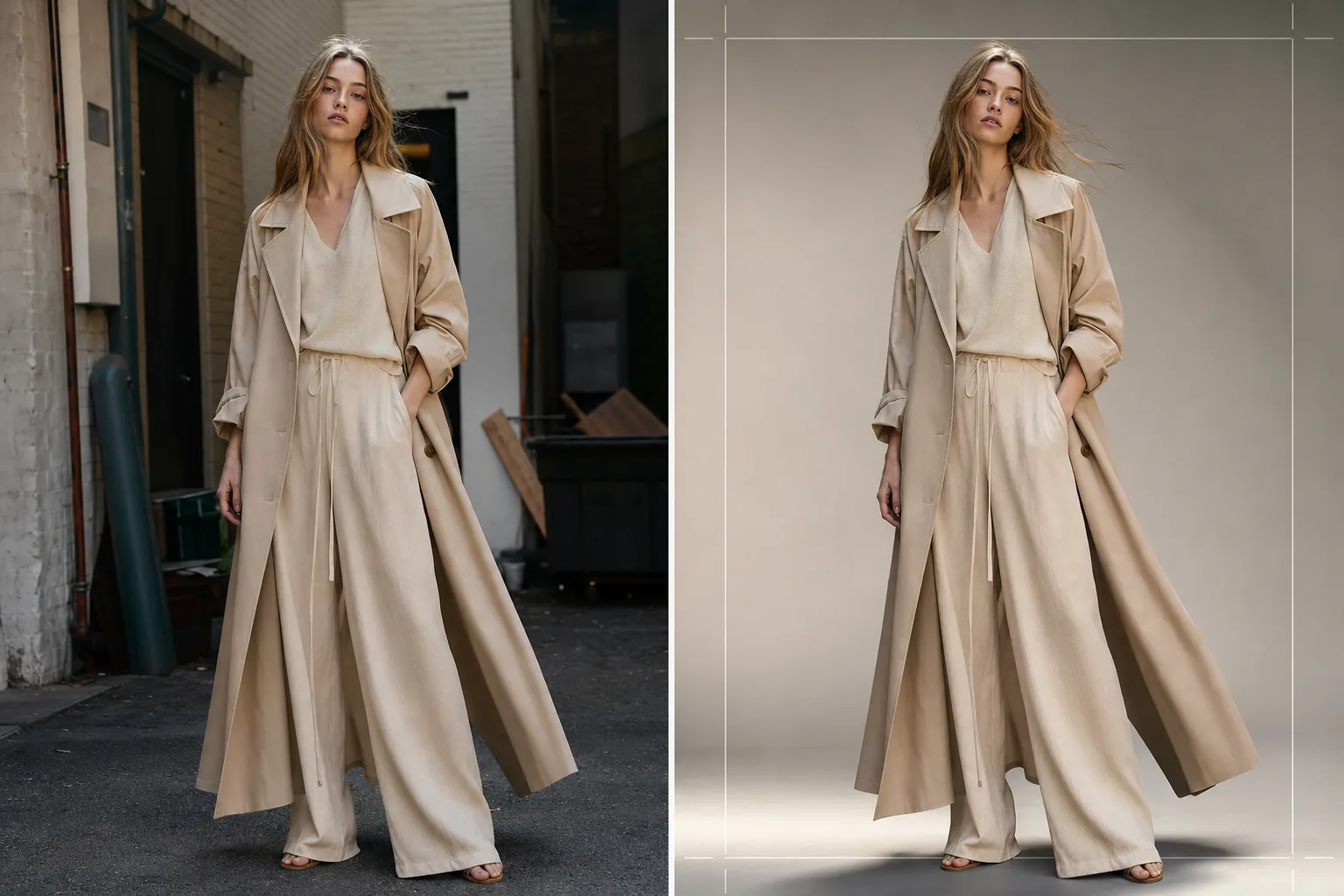
O que este modelo faz
Simplifica todo o fluxo de pós-produção do lookbook, da captação bruta no local ou em estúdio até imagens sofisticadas e consistentes com a marca. O Background Eraser isola a modelo e a peça de qualquer ambiente e oferece substituição por cores sólidas de estúdio, varreduras em degradê ou fundos editoriais selecionados, como paredes de concreto, vegetação natural ou cenas de ruas urbanas. O AI Enhance aplica gradação de cor adaptada aos tipos de tecido — tons quentes para linho e lã em cores terrosas, tons mais frios para jeans e tecidos técnicos — para que a textura e o caimento da peça sejam o destaque visual. O retoque de pele é leve e editorial, uniformizando imperfeições temporárias sem remover sardas, pintas ou características naturais que mantêm a modelo autêntica.
Configurações do modelo
| Estilo de fundo | Branco de estúdio, cinza uniforme, varredura em degradê ou ambiente editorial |
| Gradação de cor | Editorial de moda (adaptável ao tecido: quente para naturais, frio para técnicos) |
| Retoque de pele | Editorial leve (remoção de imperfeições, uniformização do tom, características naturais preservadas) |
| Realce do tecido | Nitidez da textura e ênfase no caimento para visibilidade dos detalhes da peça |
| Recorte e enquadramento | Corpo inteiro, três quartos ou close com margem de segurança para sobreposição de texto |
| Resolução de saída | 4000×6000px (orientação retrato, pronta para impressão a 300 DPI) |
Como usar este modelo
Envie sua foto de lookbook
Envie uma foto da modelo de corpo inteiro ou em três quartos vestindo a peça em destaque. Fotos de sessões em estúdio, locais externos e showrooms funcionam todas. O modelo lida com conversões RAW, JPEGs e TIFFs de alta resolução.
Substitua ou refine o fundo
O Background Eraser isola a modelo com detecção de bordas precisa o suficiente para preservar bordas soltas de tecido, cabelos esvoaçantes e materiais translúcidos como chiffon. Substitua o fundo por uma cor de estúdio que corresponda às diretrizes da sua marca ou selecione um ambiente editorial que complemente o clima da coleção.
Aplique gradação de cor e realce
O AI Enhance aplica uma gradação de cor que enfatiza a textura do tecido e a cor real da peça. O retoque de pele é aplicado em intensidade editorial — uniformizando vermelhidão e imperfeições temporárias sem achatar a pele ou remover características naturais. A nitidez do tecido destaca padrões de trama, costuras e linhas de caimento.
Exporte para lookbook e e-commerce
Baixe em 4000×6000px para lookbooks impressos e PDFs de fichas de produto, ou em tamanhos otimizados para web para Shopify, portais de atacado e redes sociais. O modelo pode gerar recortes consistentes em toda uma coleção para um layout de lookbook unificado.
Dicas profissionais para melhores resultados
- ✓Fotografe as peças em uma modelo em vez de um manequim sempre que possível. A remoção de fundo e o retoque de pele da IA produzem os resultados mais naturais com formas humanas reais, e os compradores respondem de forma mais positiva a imagens que mostram como o tecido cai sobre um corpo.
- ✓Use um elástico ou presilha para manter os cabelos longos longe do decote de blusas e jaquetas durante a sessão. A remoção de fundo lida bem com cabelos soltos, mas cabelos que cobrem detalhes da gola e a construção do decote ocultam justamente as características que os compradores estão avaliando.
- ✓Mantenha uma direção de iluminação consistente em todas as fotos de uma coleção. Quando a IA aplica a mesma gradação de cor e a direção da luz é consistente, o lookbook se lê como uma história editorial coesa, em vez de uma colcha de retalhos de sessões diferentes.
Ferramentas
Perguntas frequentes
Posso usar isto para fotos de peças em flat lay?
+
Este modelo é otimizado para fotografia na modelo. Para fotos de peças em flat lay sobre mesas ou arranjos pendurados, o modelo Clothing Flat Lay Cleanup lida com essas composições de forma mais eficaz porque entende a geometria do tecido posto plano em vez de drapeado sobre um corpo.
Tecidos translúcidos como chiffon serão preservados?
+
Sim. A detecção de bordas no Background Eraser preserva as bordas de tecido semitransparentes. O fundo de substituição fica visível através do material fino, assim como o ambiente original ficaria, mantendo a silhueta e o efeito de camadas pretendidos da peça.
Posso combinar o fundo com a cor hexadecimal exata da minha marca?
+
Sim. Você pode especificar um código hexadecimal exato para a cor de fundo sólida, e a IA gera um cenário uniforme nessa cor com uma queda de sombra apropriada sob os pés da modelo para um visual firme e realista.
Produza um lookbook sofisticado a partir de qualquer local de captação
Envie fotos de modelos e obtenha imagens de lookbook consistentes com a marca, de qualidade editorial, prontas para impressão, web e apresentações de atacado.
Experimente gratuitamente