
Aprimoramento de sorriso dentário
Crie imagens de marketing odontológico de antes e depois profissionais que mostram o trabalho do seu consultório. Este modelo aplica um clareamento dental de aparência natural, remove a desordem clínica do fundo, padroniza os fundos dos retratos dos pacientes e equilibra a iluminação superior intensa comum nas fotos de consultório.
Experimente este modelo gratuitamenteProfessional template preview
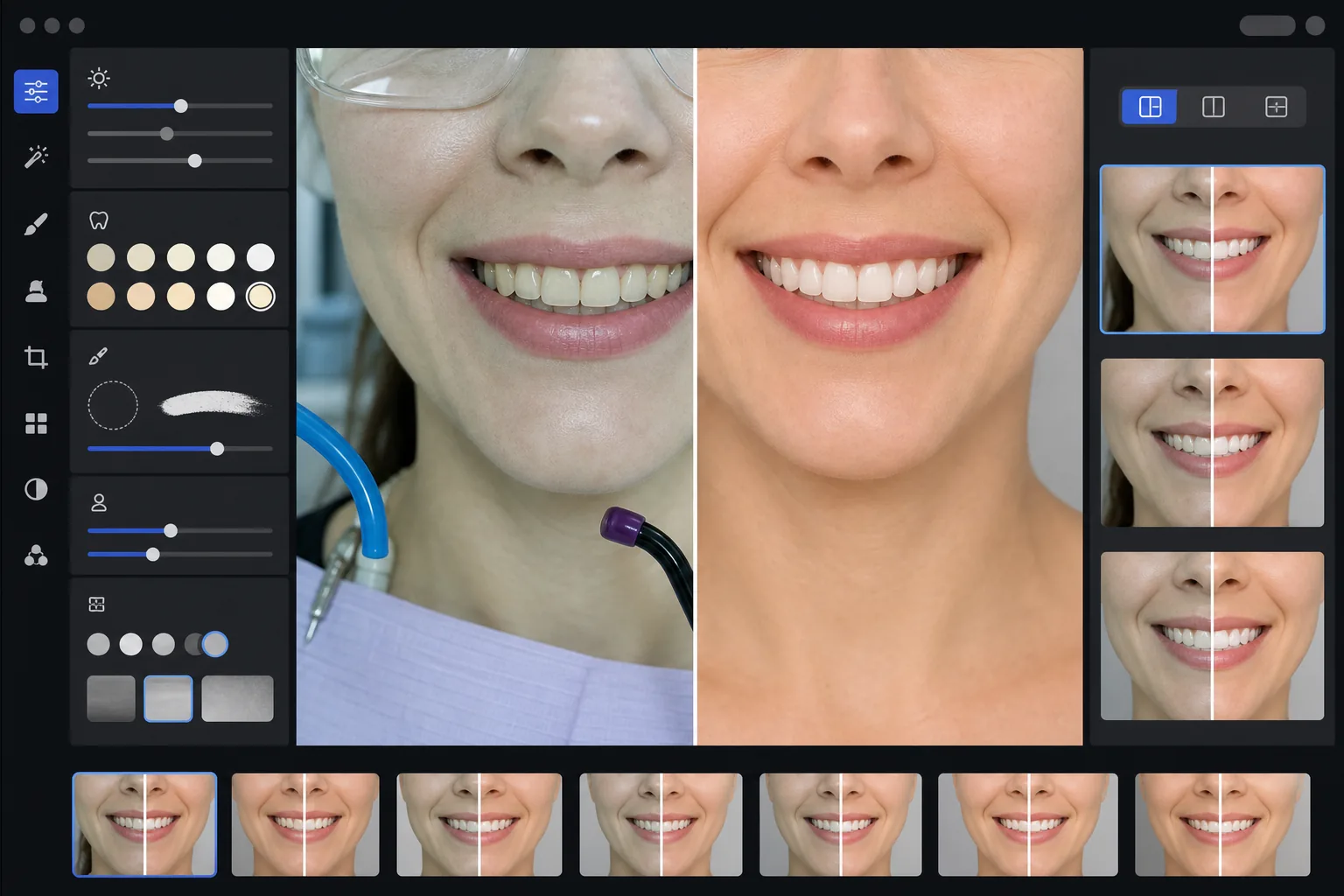
O que este modelo faz
Transforma fotos odontológicas clínicas em imagens de marketing refinadas para sites de consultórios, redes sociais e materiais de educação do paciente. O AI Enhance corrige o pouco lisonjeiro tom verde-branco da iluminação do consultório odontológico e aplica um clareamento dental sutil de aparência natural — clareando os dentes em 2 a 3 tons sem deixá-los artificiais. O Magic Eraser remove elementos clínicos do fundo, como mangueiras de sucção, fotopolimerizadores, marcas de papel de articulação nos lábios e óculos de proteção. Os fundos dos retratos dos pacientes são padronizados para um fundo limpo e consistente em toda a sua galeria de casos.
Configurações do modelo
| Clareamento dental | Clareamento natural de +2 a +3 tons (preserva a translucidez e a textura do esmalte) |
| Correção de iluminação | Equilíbrio de luz do dia de consultório odontológico (remove o tom clínico verde-branco) |
| Fundo | Fundo cinza ou branco neutro e consistente com vinheta suave |
| Tom de pele | Correção de calor perioral (reduz a palidez causada pela iluminação odontológica) |
| Cor dos lábios | Recuperação natural da saturação (compensa a iluminação clínica desbotada) |
Como usar este modelo
Carregue fotos clínicas
Carregue closes do sorriso, fotos de antes e depois em estilo retrato ou imagens intraorais feitas no seu consultório. O modelo funciona com fotos de câmeras específicas para odontologia, DSLRs com flash anelar e fotos de smartphone tiradas sob as luzes do consultório.
Corrija a iluminação clínica
O AI Enhance neutraliza o tom verde-branco das lâmpadas superiores do equipo odontológico, aquece os tons de pele ao redor da boca e recupera a cor natural dos lábios. A cor dos dentes é clareada sutilmente para mostrar o resultado da melhor forma, mantendo-se realista e honesta.
Limpe fundos e distrações
O Magic Eraser remove mangueiras visíveis, pontas de fotopolimerizadores, presilhas de babador, manchas de papel de articulação nos lábios e equipamentos clínicos ao fundo. O fundo é substituído por um fundo neutro consistente que combina em todos os seus pares de antes e depois.
Exporte para uso em marketing
Baixe imagens aprimoradas individuais ou composições de antes e depois lado a lado. A saída é dimensionada para galerias de sites, publicações do Instagram, Google Business Profile e folhetos impressos para pacientes, com resolução adequada para impressões de 8x10 polegadas.
Dicas profissionais para os melhores resultados
- ✓Para os pares de antes e depois, fotografe tanto a imagem pré-tratamento quanto a pós-tratamento do mesmo ângulo, distância e posição de iluminação. O modelo pode corrigir as diferenças de exposição entre as duas, mas manter o ângulo de câmera original produz a comparação mais convincente.
- ✓O clareamento dental é intencionalmente conservador — ele clareia de 2 a 3 tons vita em vez de deixar os dentes brancos como papel. Isso parece mais natural e confiável para os pacientes em potencial. Se o seu resultado clínico real for dramático, a foto honesta com leve aprimoramento é mais persuasiva do que uma imagem superprocessada.
- ✓Use um afastador de bochechas para as tomadas intraorais do sorriso a fim de obter a visão mais completa do trabalho odontológico. O modelo lida com a aparência ligeiramente clínica das fotos assistidas por afastador aquecendo os tons de pele e recortando para focar na zona do sorriso.
- ✓Processe toda a sua galeria de casos em um único lote para garantir cor de fundo, brilho e calor consistentes em todos os pares de antes e depois. Uma iluminação inconsistente entre os casos no seu site prejudica a impressão profissional.
Ferramentas
Perguntas frequentes
Isso é considerado publicidade odontológica enganosa?
+
O aprimoramento do clareamento é limitado a 2-3 tons vita e preserva a translucidez natural e a textura superficial do esmalte. Isso está bem dentro do que a iluminação fotográfica profissional e o balanço de branco afetam naturalmente. O modelo não altera o formato dos dentes, o alinhamento ou o contorno gengival — ele apenas corrige os efeitos de cor pouco lisonjeiros da iluminação clínica que fazem os resultados parecerem piores nas fotos do que pessoalmente.
Isso pode criar composições de antes e depois lado a lado?
+
Sim. O modelo pode produzir imagens aprimoradas individuais ou gerar uma composição lado a lado com um divisor central, fundo consistente e rótulos de antes/depois. Ambas as imagens do par recebem o mesmo tratamento de fundo, de modo que a comparação fica visualmente limpa e profissional.
Isso funciona com fotos de câmera intraoral?
+
Sim. As imagens de câmera intraoral normalmente têm uma iluminação muito intensa e direta que desbota a textura da superfície. O modelo recupera o detalhe do esmalte, corrige o tom branco extremo e ajusta o contraste para mostrar a anatomia dental de forma natural. O resultado é mais detalhado e de aparência mais natural do que a captura intraoral bruta.
Mostre seu trabalho odontológico com fotos de marketing profissionais
Carregue fotos clínicas e obtenha imagens de antes e depois aprimoradas de forma natural e com estilo consistente, prontas para o seu site, redes sociais e folhetos para pacientes.
Experimente gratuitamenteRelated templates
More professional templates for your workflow.
Modelo profissional de headshot do LinkedIn. Fundo limpo, aprimoramento natural da pele e aparência polida que obtém 14x mais visualizações de perfil.
Crie fotos de passaporte e visto compatíveis em casa. Fundo branco, proporção correta do tamanho da cabeça, padrão dos EUA de 2 x 2 polegadas e saída de 600 DPI que atende aos requisitos do Departamento de Estado.
Modelo profissional de headshot para atores e modelos. Atenda aos padrões dos diretores de elenco com saída pronta para impressão 8×10, retoque natural e planos de fundo limpos para envios para agências.