
Controle Deslizante Antes e Depois
Mostre o impacto do seu trabalho com imagens de comparação antes e depois perfeitamente alinhadas. Este modelo cria pares prontos para demonstração que mantêm enquadramento, equilíbrio de iluminação e dimensões consistentes — ideal para portfólios, estudos de caso, prova social e marketing de produto, onde a transformação visual conta a história.
Experimente este modelo gratuitamenteMarketing template preview
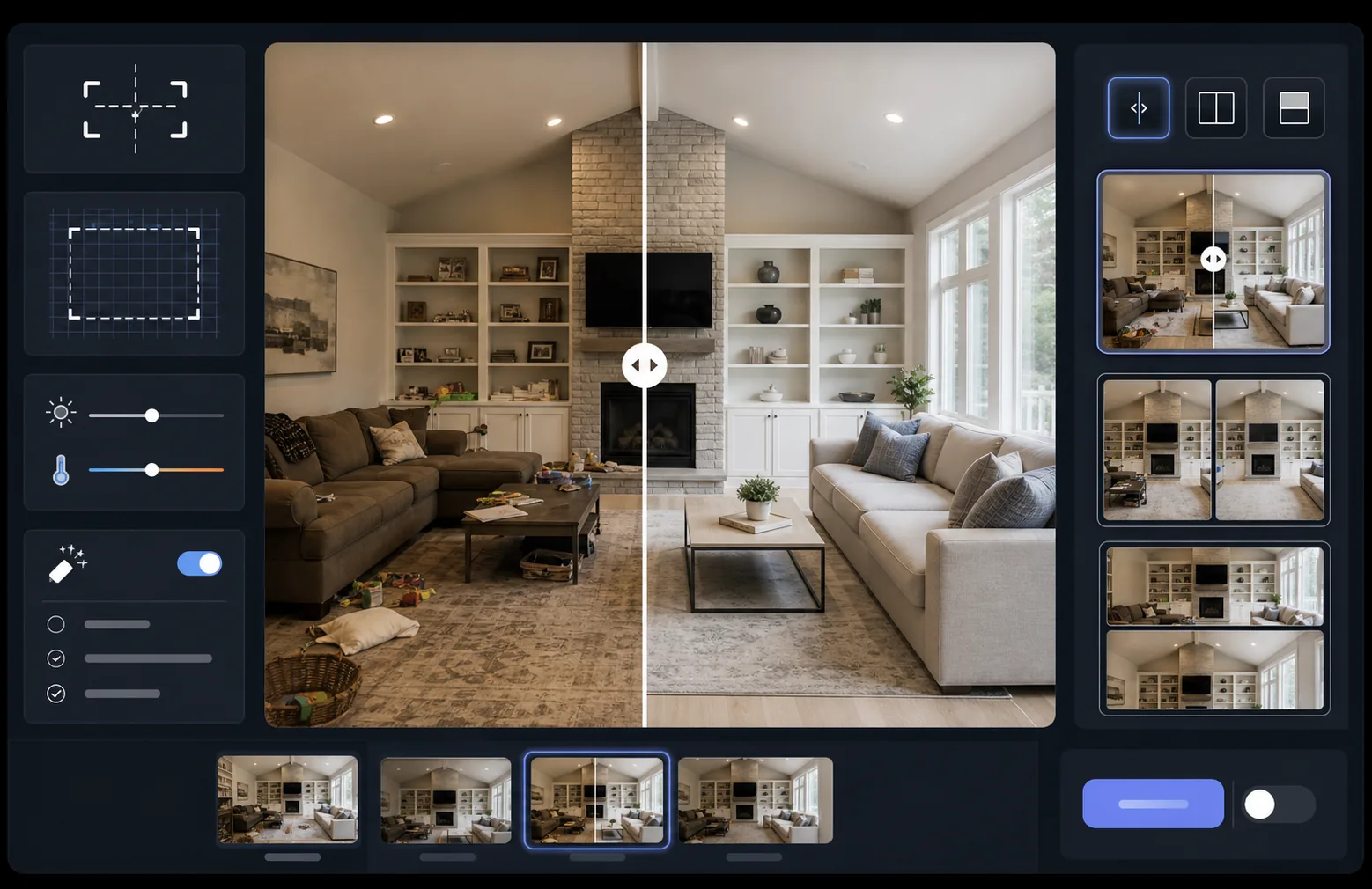
O que este modelo faz
Processa duas imagens — um antes e um depois — em um par de comparação perfeitamente alinhado, pronto para widgets de controle deslizante, layouts lado a lado ou revelações animadas. O AI Enhance normaliza a exposição e o balanço de branco entre os dois quadros para que a transformação fique claramente visível, sem que as diferenças de iluminação confundam a comparação. O Magic Eraser pode limpar distrações incidentais em qualquer um dos quadros que não fazem parte da transformação pretendida.
Configurações do modelo
| Layout | Par pronto para controle deslizante, lado a lado ou empilhado na vertical (selecionável) |
| Tamanho de saída | 1600×1200px por quadro (dimensões iguais) |
| Alinhamento | Registro automático — faz a perspectiva e o enquadramento coincidirem entre as fotos |
| Normalização da iluminação | Equilibra a exposição e o balanço de branco em todo o par |
| Sobreposição de rótulos | Rótulos 'Before' / 'After' opcionais com posição personalizável |
| Borda | Divisor cinza neutro de 1px ou borda sem emendas (selecionável) |
Como usar este modelo
Envie sua imagem de antes
Envie a foto original, não modificada, que mostra o estado inicial. Pode ser um cômodo antes da reforma, um produto antes do aprimoramento, uma pele antes do tratamento ou qualquer transformação visual que você queira demonstrar.
Envie sua imagem de depois
Envie a foto do resultado mostrando a transformação concluída. Tente fotografar do mesmo ângulo e distância da foto de antes. O modelo alinhará automaticamente pequenas diferenças de enquadramento e perspectiva.
Normalize e alinhe
O modelo registra automaticamente as duas imagens para que os elementos correspondentes se alinhem pixel a pixel. A exposição e o balanço de branco são normalizados para que as diferenças de iluminação entre as sessões de fotografia não desviem a atenção da transformação real.
Exporte a comparação
Escolha o formato de saída — par combinado para um widget de controle deslizante, composição lado a lado para redes sociais ou empilhamento vertical para marketing por e-mail. Adicione rótulos Before/After opcionais e exporte em resolução otimizada para web ou em qualidade de impressão.
Dicas profissionais para os melhores resultados
- ✓Fotografe o antes e o depois exatamente da mesma posição, se possível — marque o local do seu tripé ou fique no mesmo ponto. Quanto menos a IA precisar corrigir o alinhamento, mais nítida será a comparação.
- ✓Use a mesma distância focal para ambas as fotos para evitar diferenças de distorção de perspectiva que fazem as comparações alinhadas parecerem sutilmente desencontradas.
- ✓Remova as alterações não relacionadas entre o antes e o depois usando o Magic Eraser — se uma planta se moveu ou um novo objeto apareceu, apague-o para que os espectadores se concentrem na transformação pretendida.
- ✓Para incorporações de controle deslizante na web, exporte ambas as imagens com dimensões idênticas e use PNG sem perdas para evitar artefatos de compressão ao longo da linha divisória do controle deslizante.
Ferramentas
Perguntas frequentes
E se as fotos de antes e depois forem tiradas de ângulos ligeiramente diferentes?
+
O sistema de registro automático lida com diferenças moderadas de ângulo de câmera, distância e enquadramento. Ele identifica pontos de referência correspondentes em ambas as imagens e os transforma para coincidirem. Para os melhores resultados, a diferença de ângulo deve ser inferior a 15 graus.
Posso usar isso para miniaturas de vídeo mostrando transformações?
+
Sim. A saída de composição lado a lado é ideal para miniaturas de vídeo do YouTube e das redes sociais. O layout de tela dividida com rótulos comunica imediatamente uma história de transformação que gera cliques.
A normalização da iluminação altera os resultados reais mostrados?
+
Não. A normalização da iluminação apenas ajusta a exposição geral e o balanço de branco para que ambos os quadros pareçam ter sido fotografados nas mesmas condições. A transformação real — as mudanças no objeto — é preservada exatamente como foi fotografada.
Mostre seus resultados, lado a lado
Envie suas fotos de antes e depois e obtenha em segundos uma imagem de comparação perfeitamente alinhada e apresentada de forma profissional. Deixe a transformação falar por si mesma.
Experimente gratuitamente