
Como remover grãos de uma foto
ISO alto, pouca luz ou um sensor de câmera antigo – granulação e ruído podem arruinar uma ótima foto. A remoção de ruído por IA do Magic Eraser remove a granulação enquanto preserva a nitidez e os detalhes que a redução de ruído tradicional destrói.
Last updated
Remova os grãos agora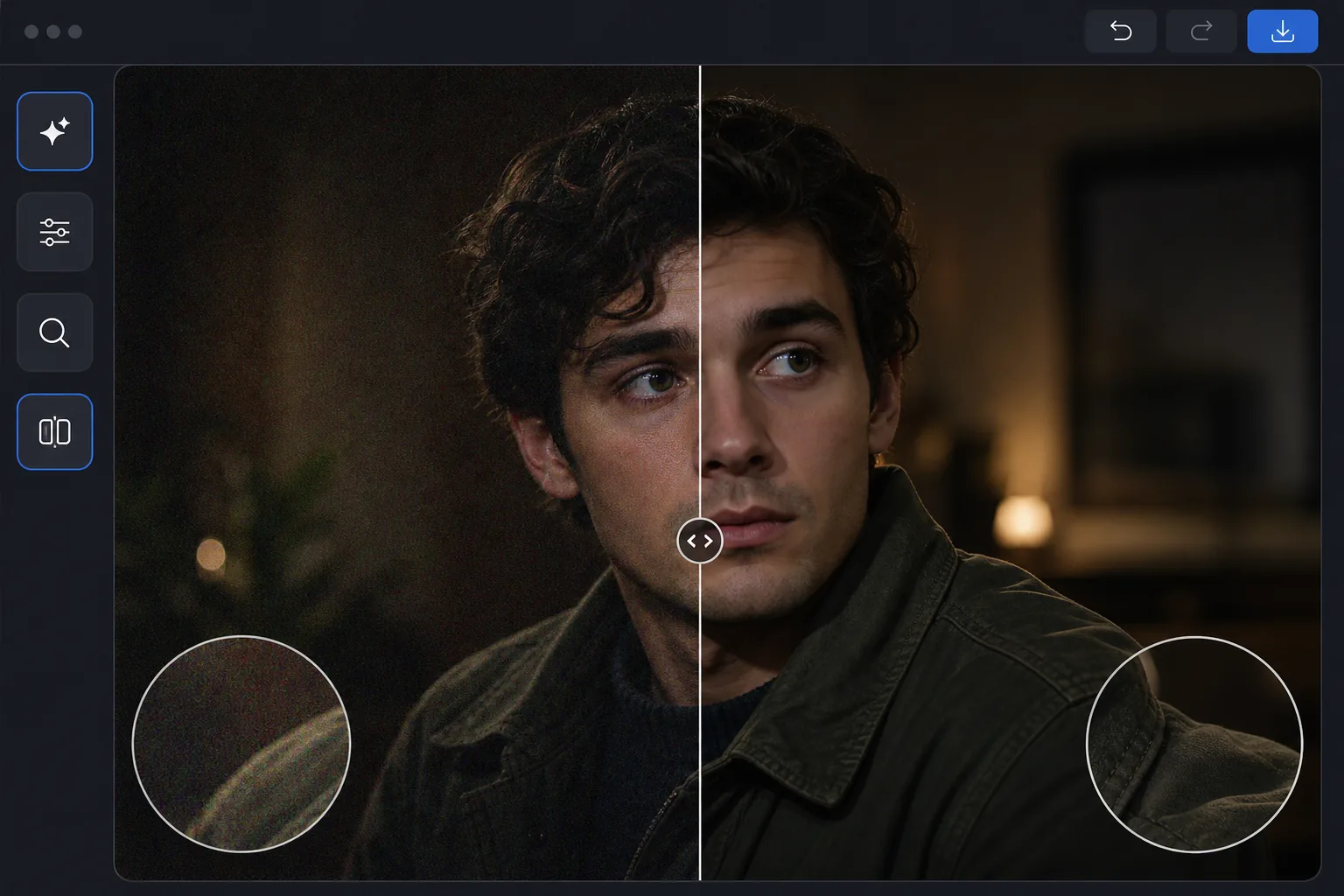
Por que a remoção de ruído por IA é melhor do que a redução de ruído tradicional
Para remover o ruído (grão) de uma foto, abra o Magic Eraser na web, no iOS ou no Android, selecione AI Enhance, envie a imagem com ruído e deixe a IA tratar o ruído — ela distingue o grão do detalhe real, então suprime os pontinhos enquanto mantém bordas, textos e texturas nítidos, em vez de borrá-los. É grátis e sem cadastro. Funciona tanto com o ruído de luminância granulado quanto com os pontos coloridos de croma, comuns em fotos com ISO alto e em pouca luz. Compare o antes e o depois com zoom total e, se a foto também tiver baixa resolução, remova o ruído primeiro e depois aumente a resolução. O ruído digital (grão) aparece quando as câmeras amplificam o sinal do sensor com pouca luz ou com configurações ISO altas. A remoção de ruído tradicional desfoca a imagem para suavizar o ruído, destruindo pequenos detalhes no processo – o texto torna-se ilegível, a pele perde poros e os tecidos perdem textura. A remoção de ruído por IA funciona de maneira diferente: redes neurais treinadas em milhões de pares de imagens limpas/ruidosas aprendem a distinguir ruído de detalhes. Eles podem suprimir o ruído e, ao mesmo tempo, aprimorar detalhes genuínos. O resultado é uma foto que parece ter sido tirada com um ISO mais baixo e melhor iluminação – não apenas uma versão desfocada do original barulhento.
Before you start
Remova grãos em três etapas
Start with carregue a foto barulhenta. The result preview above and tips below use this guide's existing content; no separate before-and-after proof is assumed.
- 1
Carregue a foto barulhenta
Abra Magic Eraser na web, iOS ou Android e selecione AI Enhance. Carregue a foto granulada. A IA detecta automaticamente o nível e o tipo de ruído – ruído de luminância (textura granulada), ruído cromático (manchas coloridas) ou ambos.
- 2
Aplicar remoção de ruído de IA
A IA processa a imagem, removendo granulação enquanto preserva bordas, texturas e detalhes finos. Ele trata diferentes regiões da imagem de maneira adequada: áreas suaves como o céu recebem uma remoção de ruído agressiva, enquanto áreas texturizadas como cabelo e tecido recebem tratamento cuidadoso para preservar os detalhes.
- 3
Compare e exporte
Use o controle deslizante antes/depois para comparar. Amplie áreas detalhadas (texto, olhos, padrões de tecido) para verificar a preservação dos detalhes. Exporte na resolução que você precisa. Para fotos com ruído e de baixa resolução, combine a eliminação de ruído com o aumento de escala de IA para obter recuperação de qualidade máxima.
Melhor para
- Fotografia noturna e astrofotografia tiradas com configurações ISO altas
- Fotos de eventos internos tiradas sem flash em locais escuros
- Fotos da câmera do telefone em situações de pouca luz onde o ruído é proeminente
- Imagens de câmeras de segurança que precisam ser limpas para maior clareza
- Fotos de filmes digitalizados com granulação visível que precisa de suavização
Dicas para melhores resultados
A IA funciona melhor quando o ruído é o problema principal – se a foto também estiver muito desfocada ou extremamente subexposta, resolva esses problemas separadamente. Para fotos com luminância e ruído cromático, a IA lida com ambos simultaneamente. Evite aplicar a redução de ruído tradicional antes da remoção de ruído da IA, pois o pré-processamento pode remover os detalhes que a IA precisa. Para fotos RAW, exporte com redução mínima de ruído na câmera aplicada e, em seguida, use a eliminação de ruído de IA para obter melhores resultados do que o processamento integrado da câmera. As fotos do céu noturno retêm melhor os detalhes das estrelas com a remoção de ruído de IA do que com qualquer método tradicional.
Perguntas frequentes
- A remoção de ruído reduz a nitidez da imagem?
- Ao contrário dos métodos tradicionais baseados em desfoque, a remoção de ruído por IA realmente preserva e pode melhorar a nitidez. A rede neural distingue entre ruído e detalhes, removendo apenas o ruído e mantendo as bordas nítidas.
- Ele pode corrigir ruído cromático (manchas coloridas)?
- Sim. A IA lida com o ruído de luminância (textura granulada) e o ruído cromático (pontos coloridos aleatórios) simultaneamente. O ruído cromático é particularmente fácil de ser identificado e removido pela IA porque possui padrões distintos.
- A remoção de ruído de fotos é gratuita?
- Sim. AI Enhance incluindo remoção de ruído está disponível no nível gratuito com limites de uso diários. Premium remove limites e adiciona processamento em lote para grandes conjuntos de fotos.
- Como removo o ruído de uma foto no Android ou no iPhone?
- Abra o Magic Eraser em qualquer navegador do celular ou no app para iOS ou Android, carregue a foto com ruído da sua galeria e selecione AI Enhance. A IA detecta o ruído e o remove direto no seu celular — sem precisar de computador — e salva a versão mais limpa de volta na galeria. Funciona igual à versão para desktop, sem precisar instalar nenhum app se você usar o navegador, o que é prático para limpar fotos de pouca luz logo depois de tirá-las.
- Funciona com o grão de filme de fotos digitalizadas?
- Sim. A IA suaviza o grão de filme de negativos e impressões digitalizados de forma parecida com a que trata o ruído de sensor digital, mantendo o detalhe real em rostos, textos e texturas. Se você quiser justamente preservar o visual de filme, remova o ruído de leve ou pule essa etapa — o grão faz parte dessa estética. Para digitalizações antigas ou danificadas, a remoção de ruído combina bem com o aumento de resolução: limpe o grão primeiro e depois amplie para um resultado mais nítido e útil.