
Como fazer uma foto para passaporte em casa
Os serviços de fotos para passaporte cobram de US$ 10 a 15 por algo que você pode fazer em casa em 2 minutos. Magic Eraser remove o fundo, substitui-o pelo branco necessário e ajuda a cortar nas dimensões corretas - EUA, Reino Unido, UE ou especificações de qualquer país.
Last updated
Faça foto para passaporte agora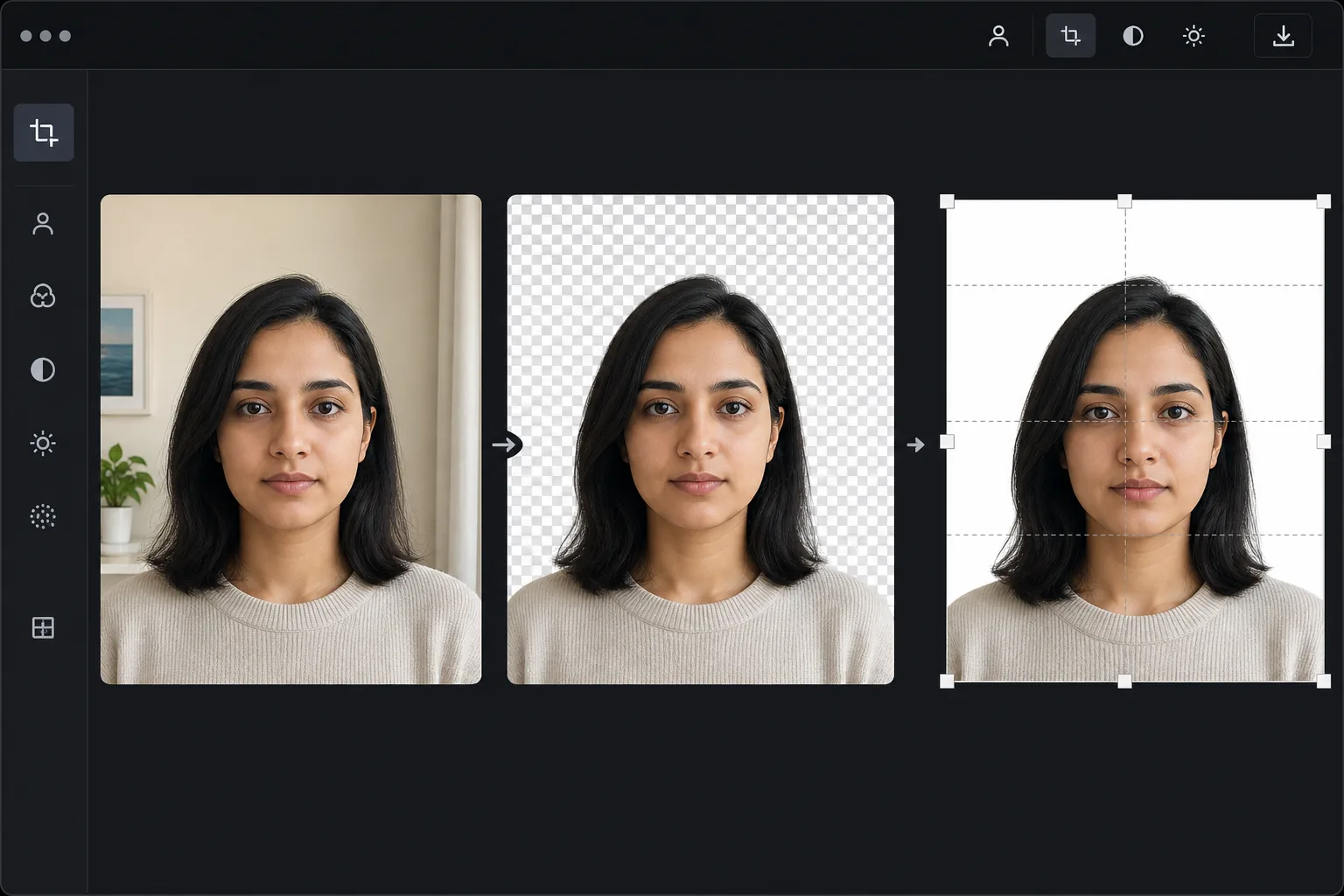
Os requisitos de foto para passaporte são mais rígidos do que você pensa
Para recortar uma foto para passaporte, abra o Magic Eraser na web, no iOS ou no Android, envie uma foto de frente com expressão neutra, troque o fundo pela cor lisa exigida (branco para os EUA) e recorte no tamanho e na proporção de altura da cabeça exatos do seu país — 2x2 polegadas com a cabeça ocupando 50-69% para os EUA, 35x45mm para o Reino Unido e a maior parte da UE. É grátis e sem cadastro. A ferramenta cuida do fundo e do recorte; ainda assim você precisa partir de uma foto dentro das normas (iluminação uniforme, sem reflexo nos óculos, pose neutra), já que o recorte não corrige uma cabeça inclinada nem sombras fortes. Sempre confira a especificação atual do seu governo antes de enviar. Os escritórios governamentais de passaportes rejeitam uma porcentagem significativa de fotos enviadas por questões evitáveis: cor de fundo errada, dimensões incorretas, proporção inadequada do tamanho da cabeça, sombras no rosto ou no fundo e reflexos nos óculos. As fotos para passaporte dos EUA exigem um fundo branco, dimensões de 2 x 2 polegadas, e a cabeça deve ocupar 50-69% da altura da imagem. As fotos para passaporte do Reino Unido exigem um fundo cinza claro ou creme de 35x45mm. Cada país tem requisitos específicos. Os serviços profissionais de fotos para passaporte em farmácias e correios cobram de US$ 10 a 15 por conjunto e às vezes ainda produzem resultados rejeitáveis. Magic Eraser cuida da correção principal: substituindo qualquer fundo pelo branco necessário e garantindo uma iluminação limpa e uniforme.
Before you start
Faça uma foto para passaporte em três etapas
Start with tire a foto. The result preview above and tips below use this guide's existing content; no separate before-and-after proof is assumed.
- 1
Tire a foto
Fique contra qualquer parede ou fundo simples (a IA irá substituí-lo). Use a luz natural de uma janela à sua frente – sem flash. Segure o telefone na altura dos olhos, a 1,2 a 1,5 metros de distância. Olhe diretamente para a câmera com uma expressão neutra e boca fechada. Remova os óculos, se possível (muitos países agora exigem fotos sem óculos).
- 2
Remova e substitua o fundo
Carregar para Magic Eraser. Use a remoção de fundo para remover o fundo existente e, em seguida, substitua por branco puro (para EUA, Schengen, a maioria dos países) ou cinza claro (Reino Unido, alguns outros países). Verifique se não há sombras no fundo original e se as bordas do cabelo estão limpas contra o branco.
- 3
Cortar e exportar
Corte nas dimensões exigidas pelo seu país – 2 x 2 polegadas (EUA), 35 x 45 mm (Reino Unido/UE) ou no tamanho específico do seu destino. Centralize o rosto com a cabeça ocupando a proporção correta da moldura. Exporte com no mínimo 300 DPI para impressão. Imprima em um laboratório fotográfico ou em papel fotográfico brilhante em casa.
Melhor para
- Fotos de passaporte e visto dos EUA que exigem fundo branco e formato 2x2 polegadas
- Fotos de passaporte do Reino Unido que exigem fundo cinza claro e formato 35x45mm
- Fotos do visto Schengen da UE com requisitos específicos do país
- Fotos de identificação para carteiras de motorista, carteiras de estudante e crachás de funcionários
- Fotos de passaporte de bebês e crianças onde a experiência de estúdio é difícil
Dicas para melhores resultados
A iluminação é o fator mais importante – fique de frente para uma grande janela com luz natural iluminando seu rosto de maneira uniforme. Evite iluminação suspensa que crie sombras sob os olhos e nariz. O fundo não importa (a IA irá substituí-lo), mas até a iluminação facial importa. Para bebês e crianças pequenas, coloque-os em um lençol branco e fotografe diretamente de cima - esta é a técnica aceita e a IA cuida da conversão da folha em fundo branco. Tire várias fotos e escolha aquela com a expressão mais natural e neutra. A maioria das rejeições é por problemas de expressão (sorrir, apertar os olhos) e sombras, não por problemas de fundo – a IA lida com o fundo perfeitamente, mas não consegue corrigir uma expressão ruim.
Perguntas frequentes
- O escritório de passaportes aceitará uma foto editada por IA?
- Sim. Os escritórios de passaportes avaliam a foto final de acordo com seus requisitos – cor de fundo, dimensões, tamanho da cabeça, expressão. A forma como o fundo foi produzido (estúdio vs. remoção de IA) não é avaliada. O resultado deve simplesmente atender às especificações técnicas.
- Qual cor de fundo os EUA exigem?
- Branco ou esbranquiçado. A opção de fundo branco do Magic Eraser produz branco puro (RGB 255.255.255), que atende aos requisitos do Departamento de Estado dos EUA.
- Posso usar um telefone para tirar a foto?
- Sim. As câmeras dos telefones modernos excedem o requisito mínimo de resolução. Use a câmera traseira (não a câmera selfie) para obter melhor qualidade, segurada com o braço estendido ou por outra pessoa. A luz natural da janela produz os melhores resultados.
- A criação de fotos para passaporte é gratuita?
- Sim. A remoção do fundo e a substituição do fundo branco estão disponíveis no nível gratuito. Isso por si só economiza os US$ 10-15 cobrados pelos serviços de fotos para passaporte.
- Em que tamanho e proporção de cabeça devo recortar, e isso muda de país para país?
- Sim, varia conforme o país. Os EUA usam 2x2 polegadas (51x51mm) com a cabeça medindo de 1 a 1-3/8 polegadas de altura — cerca de 50-69% do quadro. O Reino Unido e a maioria dos países da UE usam 35x45mm com a cabeça entre 29 e 34mm de altura. A Índia usa 2x2 polegadas; o Canadá usa 50x70mm. Recorte na especificação exata do país de destino, mantenha a cabeça centralizada e os olhos na altura exigida, e confirme os números na página oficial do governo, já que as exigências mudam e uma proporção errada é um dos motivos mais comuns de rejeição.