


"I run a food blog and AI Filter turns my phone photos into something that looks like it came from a professional shoot. The warm film look is my favorite."
FoodieFrames_Lily
March 28, 2026 • 82 helpful
Use Magic Eraser's AI Filter tool to transform photos with one-tap styles for portraits, social media content, thumbnails, lifestyle images, and creative marketing assets. Try anime, cinematic, retro, and mood-based photo filters without a complex editing workflow.
Magic Eraser AI Filter applies one-tap creative styles to photos using AI. It transforms portraits, lifestyle images, and social content with cinematic, anime, retro, and mood-based looks — commonly used by content creators, social media managers, and marketers who need distinctive visual styling without manual editing.
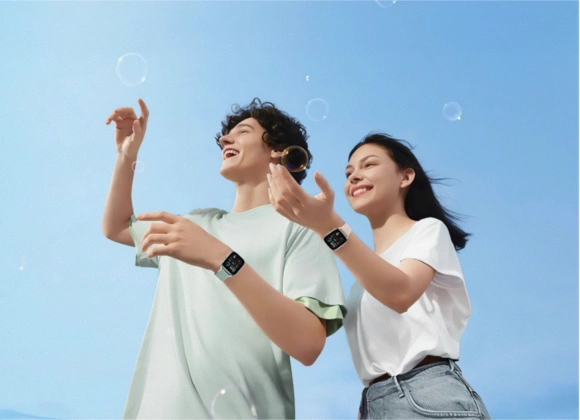
AI Filter helps you explore different looks from a single photo without rebuilding the edit each time. Try mood shifts, portrait styles, and more expressive color treatments for faster content iteration.
Open AI Filter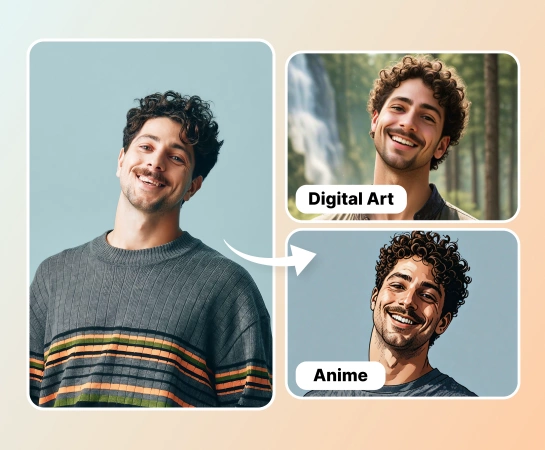
Instead of adjusting tones, contrast, and mood by hand for every asset, choose a filter and preview the transformation immediately. This is useful for teams producing social graphics, creator content, and rapid campaign variations.
Open AI Filter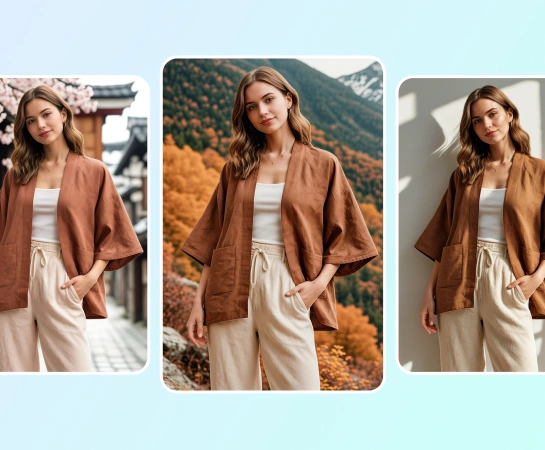
From lifestyle photography and portraits to thumbnails and ecommerce content, AI Filter makes it easier to match a specific vibe. It works well when you need a cinematic, polished, playful, or trend-driven look.
Open AI Filter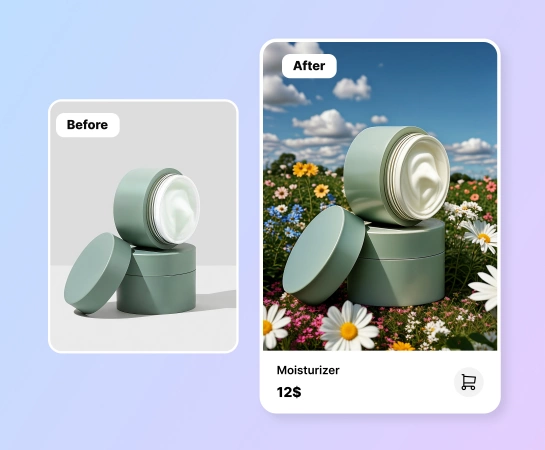
Once the style is in place, continue with other Magic Eraser workflows such as Remove Background, AI Enhance, Design, or AI Create. This makes AI Filter a practical first step in a larger content production flow.
Open AI Filter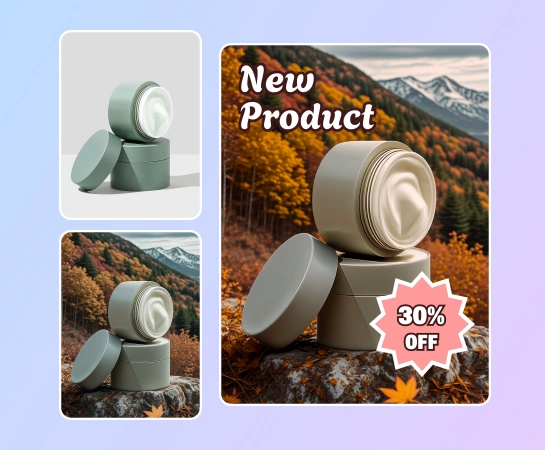
Start with a portrait, product image, lifestyle shot, or any photo you want to restyle with AI.
Browse available looks such as anime, cinematic, retro, portrait, or other mood-based AI styles.
Let Magic Eraser apply the selected AI filter so you can compare the original image against the stylized version.
Export the filtered image or move into other tools like AI Enhance, Remove Background, or Design.
Explore the main editing capabilities currently available in Magic Eraser Web, from cleanup and enhancement to generation and design.
Apply creative AI-powered looks to everyday images with a faster one-tap styling workflow.
Give portraits a more cinematic, polished, playful, or trend-driven look without manual grading.
Switch the visual tone of an image quickly when you need a different campaign feel or platform aesthetic.
Choose a filter and see the result update fast so you can iterate through multiple looks more easily.
Clean up sharpness, color, and clarity after filtering when the image needs a more polished finish.
Take the filtered image into a cutout workflow when you need cleaner product compositions or transparent exports.
Place your filtered image into simple design layouts for ads, posts, thumbnails, and social content.
Pair generated visuals with filter styling to explore more creative directions inside one editing stack.
These examples show how creators, marketers, and sellers use AI Filter to turn ordinary photos into stronger, more stylized visuals with less manual editing.
"I run a food blog and AI Filter turns my phone photos into something that looks like it came from a professional shoot. The warm film look is my favorite."
"Applied the anime-style filter to my portrait and it went viral on TikTok. The style options are creative and the results are surprisingly consistent."
"Our brand needs consistent visual style across all social channels. AI Filter lets us apply the same mood to different source images in seconds."
"Turned basic product photos into holiday-themed visuals for our seasonal sale without rebooking a photographer. Quick and effective."
Upload a photo, choose the filter you want, and let Magic Eraser apply the selected style automatically. You can then compare before and after, download the result, or continue editing it.
AI Filter is designed for creative styles such as portrait looks, cinematic moods, retro aesthetics, anime-inspired treatments, and other visual transformations depending on the templates available in the app.
AI Filter works well for portraits, lifestyle photos, social content, product visuals, thumbnails, and creator assets that need a stronger look or more distinctive visual identity.
Yes. After applying a filter, you can continue into other Magic Eraser Web tools such as AI Enhance, Remove Background, Design, or other workflows depending on what you need next.
The usual flow is simple: upload an image, choose a filter, preview the result, compare the new look with the original image, and export or continue editing.
See how Magic Eraser compares to other photo editing tools.
Fotor offers a broad online photo editor with templates and beauty tools. Magic Eraser focuses on practical AI cleanup, background removal, enhancement, and generative editing for faster daily workflows.
Luminar Neo is powerful for desktop photographers who want deep enhancement and creative controls. Magic Eraser is built for faster cleanup, lighter workflows, and flexible editing across web and mobile.
RetouchMe uses human retouchers for portrait and body edits with results delivered in minutes. Magic Eraser uses AI for instant results across object removal, background editing, enhancement, and generative tools — giving you more control and faster turnaround.
AirBrush is a selfie and beauty editor focused on portrait retouching and filters. Magic Eraser is a versatile AI photo editor built for object removal, background removal, enhancement, and generative editing across all photo types.
We tested the top photo editing apps for iPhone to find which ones deliver the best results for AI editing, object removal, enhancement, and creative effects. Here are our picks for the best iPhone photo editors this year.
We tested the top photo editing apps available on Android to compare AI editing, object removal, enhancement, and creative tools. Here are the best Android photo editors this year and how they compare.
See how professionals use these tools in real-world workflows.
Photobombers ruining your travel pics? Messy backgrounds killing your selfie game? Stop wasting hours in Photoshop. Magic Eraser removes distractions, cleans up cluttered shots, and expands your photos to fit any platform format — all in one tap.
Tired of the same stock photos your competitors use? Stop paying designers hundreds per post. AI Create generates original illustrations, artwork, and visuals from simple text prompts — then AI Filter and AI Enhance polish them to perfection. Unique, on-brand content for every platform, every day.
YouTube thumbnails decide 50-70% of the click decision in the first 1-2 seconds of feed exposure. Magic Eraser handles the workflow that lets creators ship higher-CTR thumbnails in 25-40 minutes per video: subject isolation via Background Eraser, dark-mode-feed color contrast via AI Filter, clean text-overlay surfaces via AI Fill, and 2-3 distinct variants ready for YouTube's native Test & Compare in under 30 minutes.
Pinterest is a visual search engine, not a social feed — pins keep earning impressions for 6-18 months on evergreens and 2-5 years on seasonal evergreens like holiday recipes and gift guides. That long-tail traffic only compounds if every pin is built for the 2:3 vertical canvas at 1000×1500 displayed at ~320px on mobile (85%+ of Pinterest traffic). Magic Eraser's AI tools turn a landscape source photo library into pin-ready vertical compositions in 2-3 minutes per pin instead of 20-40 minutes in Photoshop.
Online course businesses live or die by their visual production quality. The sales-page hero photo, the instructor headshot in the bio section, the in-lesson screenshots, the social-promo carousels driving traffic to the sales page, and the email-newsletter inline imagery in the launch sequence — every one of those surfaces directly affects conversion, completion, and refund rates. Magic Eraser handles the full course-creator image workflow without a designer on staff, on the same laptop or phone you record courses with.
Podcasting is a uniquely visual-poor medium that lives or dies by its visual surfaces. The cover art is the most-viewed surface of every podcast brand, displayed at 56-100px in feed where new listeners decide whether to tap in under a second. The supporting graphic set per episode (Instagram squares, Stories, TikTok, YouTube audiogram covers, email-newsletter inline imagery) is where the show's growth happens between episodes. Magic Eraser handles the full podcaster visual stack — 3000×3000 cover art, host-portrait libraries, per-episode guest graphics, per-season AI refreshes, supporting graphic sets — without a designer on staff, on the laptop or phone you record episodes with.
Indie authors compete with traditional publishing on Amazon's discovery surface where the same algorithms, the same readers, and the same 100-150px mobile-thumbnail decision window apply equally to both. The difference is the production budget — traditional publishers have in-house art departments and marketing teams; indie authors have to handle covers, author headshots, BookTok and Instagram promo, A+ Content modules, and series-consistent visual identity themselves. Magic Eraser preps the full self-published author visual stack — book covers that survive the thumbnail render, author headshots for back covers and bios, social-promo across BookTok / Instagram / Pinterest, Amazon A+ Content modules, and series-consistent presets across 3-12 books — in minutes per asset instead of $400-1500 of designer time per book.
Newsletter writing in 2026 is platform-fragmented across Substack (35M+ subscribers), beehiiv, ConvertKit, Ghost, and Beehiiv-adjacent indie tools — and the visual surfaces have multiplied with each platform's discovery features (Substack Notes, beehiiv Boost, Ghost's recommendation network). Newsletter writers need post hero images that survive every platform's render pipeline, author photos that work across bylines and email signatures, microblog imagery for the discovery-driving feed surfaces, and email-newsletter inline graphics that render across Gmail / Apple Mail / Outlook. Magic Eraser preps the full newsletter visual stack — phone-to-publish in minutes per asset — without a designer on staff.
Fashion influencers operate in a visual-first economy where feed consistency, photo quality, and content volume directly determine brand-partnership rates, follower growth, and affiliate revenue. The production reality is that most outfit shoots happen in bedrooms, parking lots, coffee shops, and hotel lobbies — not studios — and the gap between where the photo was taken and where it needs to look like it was taken is the core editing challenge. Background Eraser, AI Filter, and AI Enhance transform location-constrained outfit photos into feed-consistent, brand-ready content at the volume Instagram's algorithm and brand partners demand.
Musicians and bands need a constant supply of visual assets — electronic press kit photos for venue and festival submissions, social media content to maintain audience engagement between releases, gig posters and flyers for upcoming shows, and merchandise designs for an increasingly important revenue stream. Professional photo shoots cost $300-$1,500 per session, and the results age quickly as lineups change, looks evolve, and the visual identity needs refreshing for each release cycle. Background Eraser isolates band and artist photos from venue and rehearsal-space clutter. AI Filter applies stylized treatments that establish visual identity. AI Enhance recovers detail from low-light live performance captures. Together, they maintain a professional visual presence on the budget reality of working musicians.
Explore more guides and editorial content related to this workflow.
Learn how AI filters transform photos with style transfer and intelligent adjustments. Step-by-step guide for Instagram, LinkedIn, ecommerce, and more.
Learn how to make your Instagram photos stand out with AI editing tools, consistent feed aesthetics, and smart design techniques for stories and reels.
Halloween content gets two weeks of social-feed attention and burns out by November 1. AI photo edits — color grading, atmosphere, vintage time-travel, prop compositing — that ship in under 10 minutes per post and don't look like an Instagram filter everyone already used.